38
Armstrong International
Parc Industriel Des Hants-Sarts, 2ème Avenue No. 4, Haerstal, B-4040, Belgium
armstronginternational.com/brain
Options
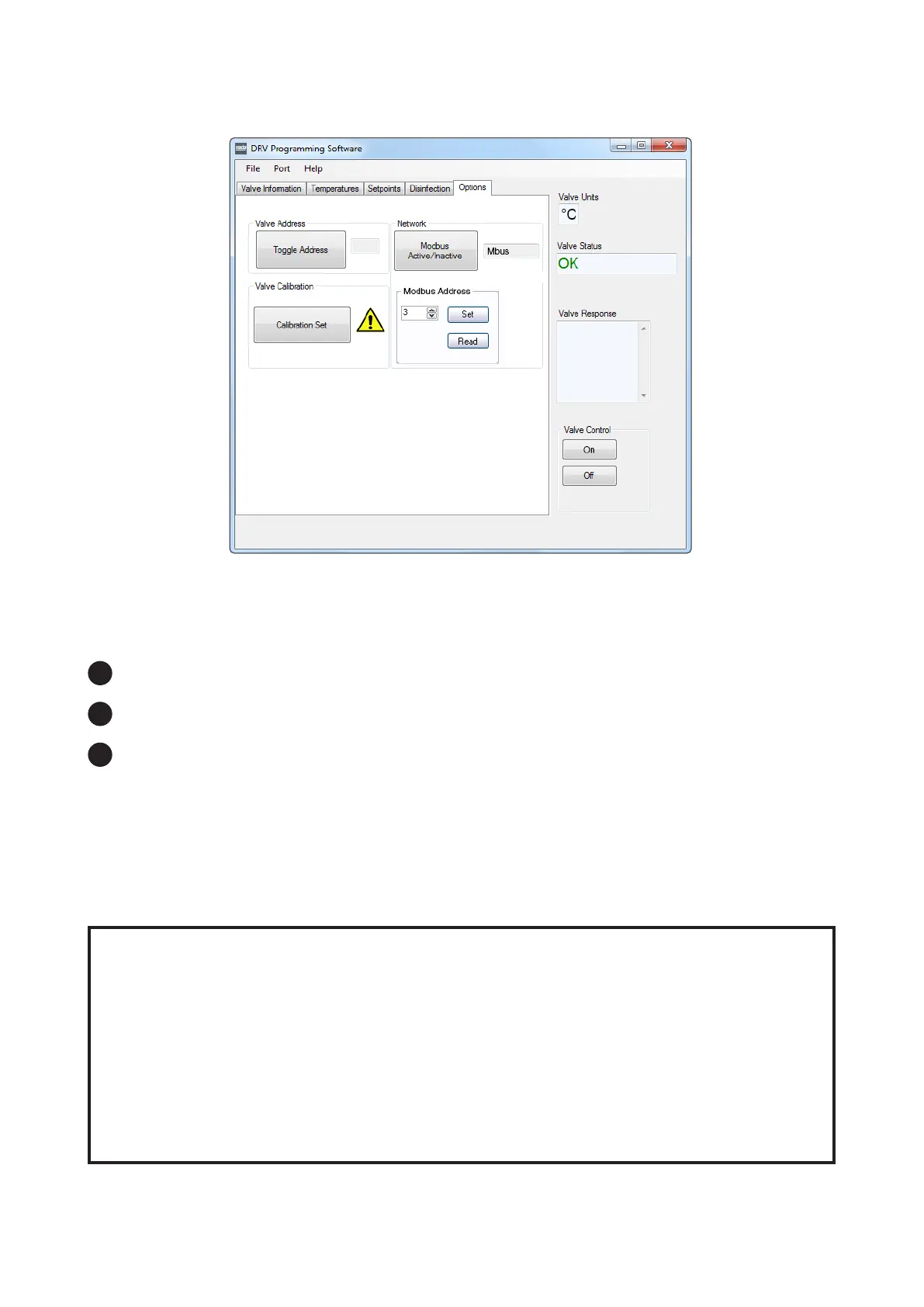
Valve Address
The Address of the DRV80 as used by BrainScan® can be set to Standard (Std) or Alternate (Alt). This
allows the use of two DRV80s on one serial line.
Set the rst DRV80 to Std and the second DRV80 to Alt.
Network
Click the button to toggle to Bscan if the DRV80 is connected to BrainScan®.
Click the button to toggle to Mbus if the DRV80 is connected to a Modbus network. The Modbus Address
number is determined by the conguration of the network. The number is between 3 and 32.
(If you are in any doubt contact the system administrator before adjusting this setting.)
1
2
3
Switch Valve Control to OFF.
Click Toggle Address .
Switch Valve Control back ON.
Valve Calibration
Must be used when replacing the following parts:
• Proportioning Assembly
• PCB
• Drive Housing
• Gear Drive Assembly
(see Preventative Maintenance and Fitting Spare Parts for further details)
Do not use Calibration Set for any other reason. If in doubt contact Armstrong for further advice.


 To Next Page