Need more help?
No TV or Internet service:
Check your connections:
Cables usually make an
audible click when secure.
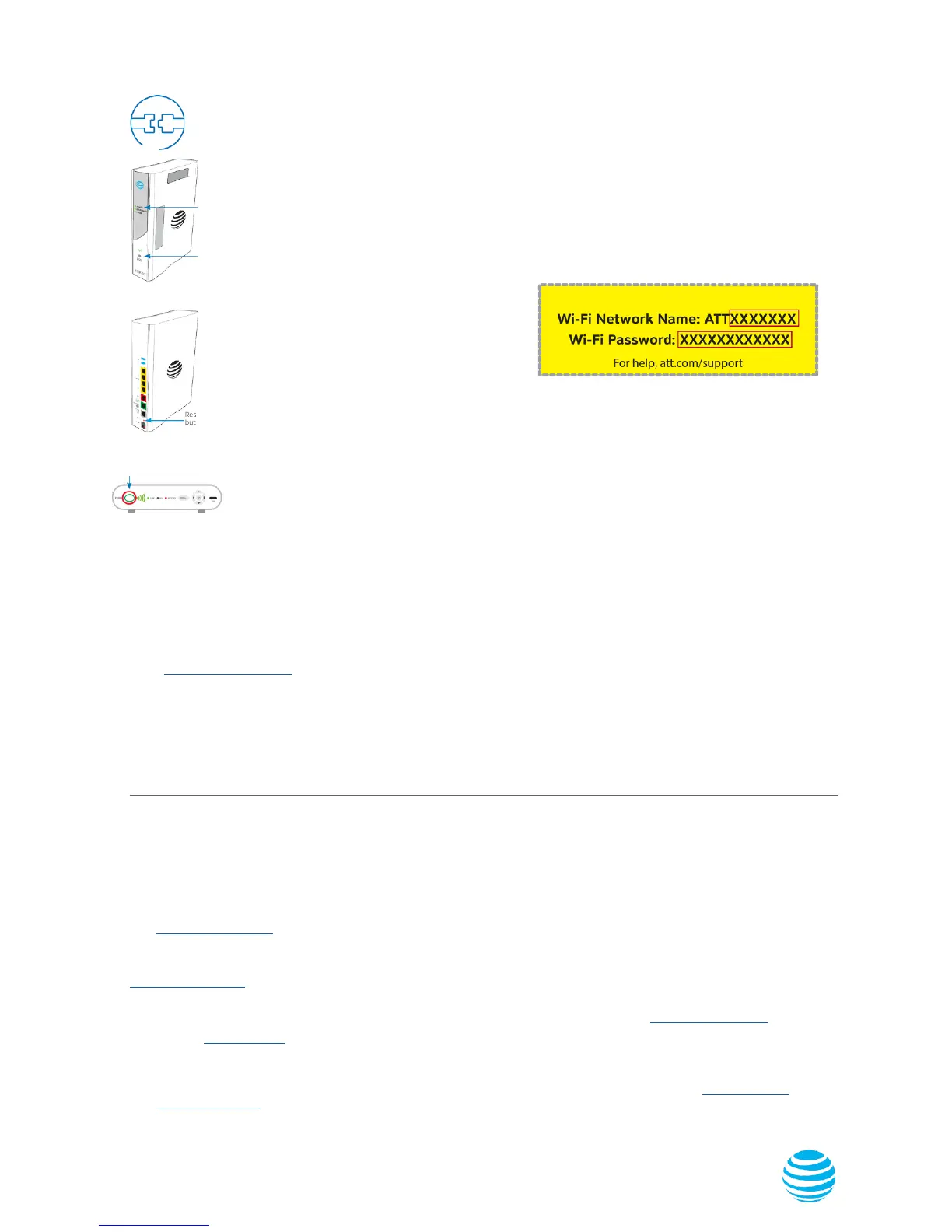
Green
Light
Service
Light
Front View
Check Power: Power light
on the Wi-Fi Gateway should
be green; if not, try another
electrical outlet.
Check Service light on front
of the Wi-Fi Gateway: If aer
5 minutes, the light is red or o,
power down the Wi-Fi Gateway
by holding down red Reset
button for 10 seconds.
Back View
Reset
button
Power
button
TV Receivers not responding:
Conrm Service light is solid green
on the Wi-Fi Gateway. If so, hold the
TV receiver’s Power button down for
10 seconds and release, then wait
ve minutes.
If your existing Wi-Fi settings did not transfer,
you will need to set up a new Wi-Fi Network Name
and Password.
·
Use settings from new Wi-Fi Gateway
yellow sticker
·
Open your device’s Wi-Fi connection settings,
select your Wi-Fi Network Name and enter
Wi-Fi Password to connect
·
Record and keep your Wi-Fi settings for future
reference when connecting all your
Wi-Fi devices
Wi-Fi Gateway Power light is amber: Don’t worry. This is a normal part of the power-up sequence.
No dial tone: Make sure your phone cable is plugged into the Phone Line port on the Wi-Fi Gateway.
Power Supply: If the power supply or cord becomes damaged or needs to be replaced, please contact AT&T customer service
to obtain an authorized replacement.
Get the most from AT&T Fiber
SM
and nd out what it can do for you.
Go to att.com/bersupport to nd answers to frequently asked questions.
• Internet Speed: How do I improve my speed?
• U-verse TV: How does AT&T Fiber make your U-verse TV experience better?
• Phone: Will AT&T Fiber change my current Digital Phone service?
• More Support: Having trouble with your AT&T Fiber connection?
Additional information
Test your Internet connection speed
Our speed test takes less than a minute to perform
two key measurements (Download and Upload) to help
you determine if you should take steps to improve the
performance of your online experience.
Visit att.com/speedtest.
Manage your account:
Available 24/7, download the myAT&T app at
att.com/myattapp from your mobile device.
IPv6
AT&T supports IPv6 across our network, equipment and
devices. Visit att.com/ipv6 for more information.
Accessibility Support:
• Alternate formats now available in Large Print or Braille.
Call 800.288.2020 and request your guide number
(
ATT162550933
).
• Telephone equipment for visual and/or hearing impaired:
- Phone: 877.902.6350
- TTY: 800.772.2889
• Repair Center:
- Phone: 800.246.8464
- TTY: 800.397.3172
• Accessible Tagged PDF: Visit att.com/userguides.
•
Compatible with any TTY/TDD devices with standard phone
line.
¿Hablas español?
Para ver a esta guia en español, visita att.com/guias y haz clic
en la pestaña Internet. Desplázate hacia abajo a donde dice
“Guías de Reemplazo” y elije (ATT162550933).
Need more help?
Visit att.com/support
Call us at 800.288.2020 and ask for
“technical support.”
©2017 AT&T Intellectual Property. All rights reserved. AT&T and Globe logo are registered trademarks of AT&T Intellectual Property.
All other marks are the property of their respective owners.


 To Next Page
 Loading...