To Next Page
B
Bruce JalaSep 28, 2025
How do I set up a VPN on this router

How do I set up a VPN on this router
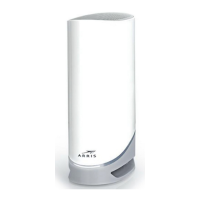
Details on DOCSIS 3.0 Dual Band 802.11-AC WiFi Modem with 24x8 channel bonding for managing WiFi.
Specifies the highest service level supported, noting DOCSIS 3.1 modem requirement for Gigablast/Ultimate speeds.
Describes the Power, US/DS, and Online indicators illuminating to show the cable modem is online.
Details the ports available on the back of the modem, including Reset, Ethernet, Cable, and Power connections.
Explains MAC addresses as unique 12-digit identifiers, noting the first six characters are manufacturer-specific.
Introduces the modem lights that indicate WiFi cable modem status for troubleshooting connection problems.
Provides a table detailing the status and problems for Power, US/DS, Online, 2.4 GHz, 5 GHz, and WPS lights.
Details the lights related to the Ethernet connection status, including problems and solutions for wired connections.
Lists resources from Arris for more detailed technical information on the DG2460, including user guides and specifications.
 General
| Device Type | Gateway |
|---|---|
| Wi-Fi Standard | 802.11ac |
| Ethernet Ports | 4 |
| DOCSIS Version | 3.0 |
| Downstream Channels | 24 |
| Upstream Channels | 8 |
| Wi-Fi | Yes |
| Telephony Ports | 2 |
| Wi-Fi Frequency | 2.4 GHz and 5 GHz |
| USB Ports | 1 |