8
Reset
Ethernet
10/100/1000
Cable
2
1
4
3
Configuring Your Wireless Connection
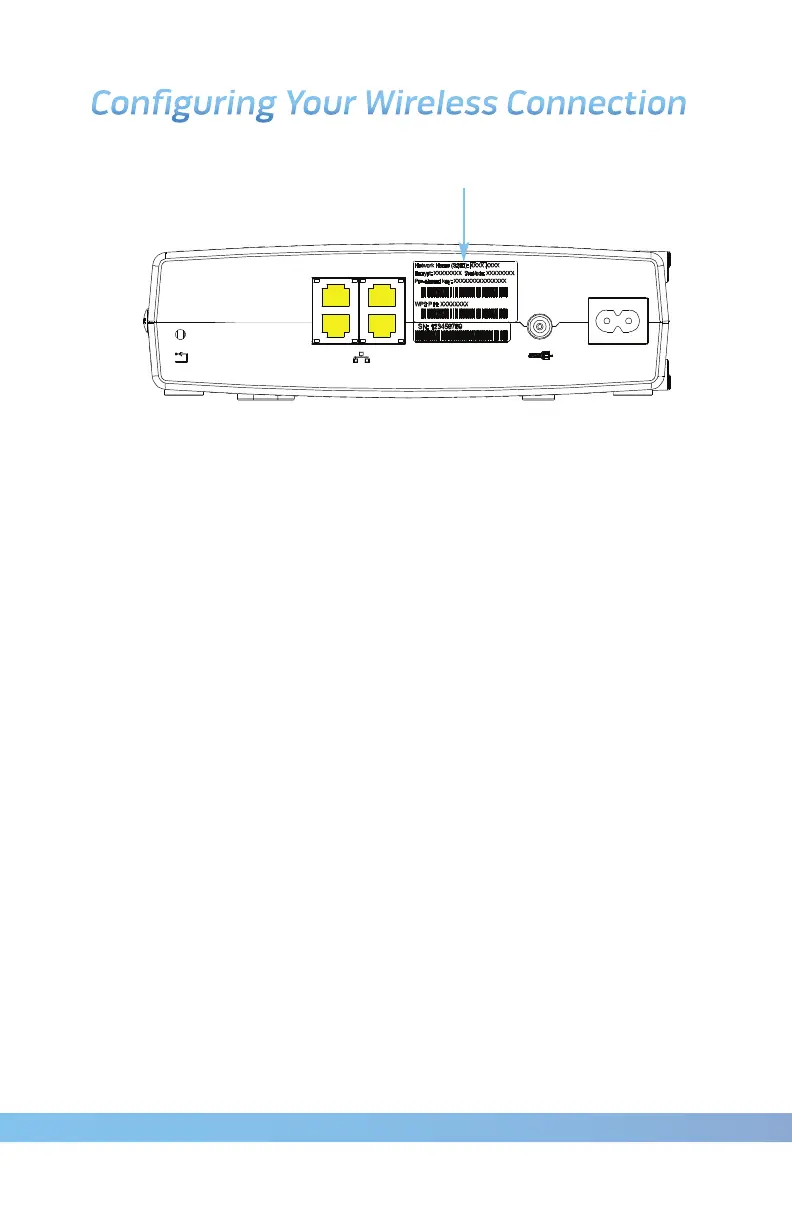
Security Label
The modem ships with wireless LAN security set by default. See the
security label on your product (shown on image at top) for the factory
security settings: network name (SSID), encryption method, network
key and WPS PIN.
Note: You must set up our computer and other client devices to
work with the security settings on the modem. Refer to the
documentation for your client device for instructions on
setting security. On most computer systems, you only need
to select the network name (SSID) and enter the encryption
key. If your computer or client device supports WiFi Alliance
WPS activate WPS on your computer or client device and
the modem simultaneously to easily set up your
system security.
If you need to modify the modem’s default wireless security
settings, or if you want to configure any other wireless LAN settings,
refer to the instructions on Page 9.









 To Next Page