Chapter 6: Using the Telephony Gateway
Release 24 STANDARD 1.2 April 2016 Touchstone TG2492 Telephony Gateway User Guide
© ARRIS Enterprises, LLC, 2015-2016. All Rights Reserved. 32
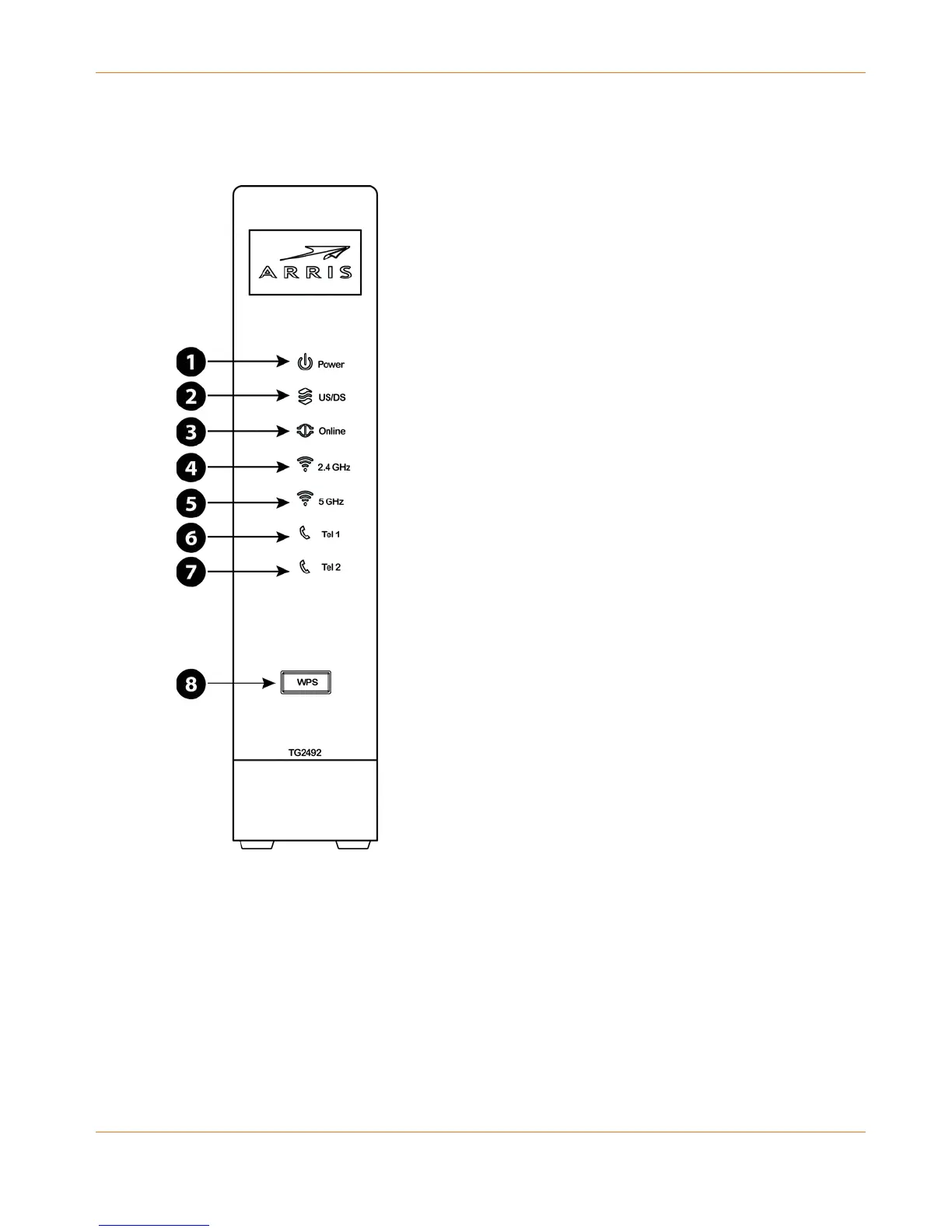
Indicator Lights for the TG2492
The Telephony Gateway has LED indicator lights to assist in troubleshooting.
1. Power
2. US/DS
3. Online
4. 2.4 GHz Wi-Fi
5. 5 GHz Wi-Fi
6. Tel 1
7. Tel 2
8. WPS Button/LED
Wiring Problems
If the Telephony Gateway begins flashing all its lights for more than 10 seconds, this indicates
a problem with the telephone wiring — the red and green wires may be shorted (touching), or
there may be undesired voltage on the lines. If this pattern persists for more than 10 seconds,
disconnect the telephone lines from the Telephony Gateway, then call a wiring technician for
assistance.











 To Next Page