Chapter 3: Install and connect your Telephony Gateway
Rear panel
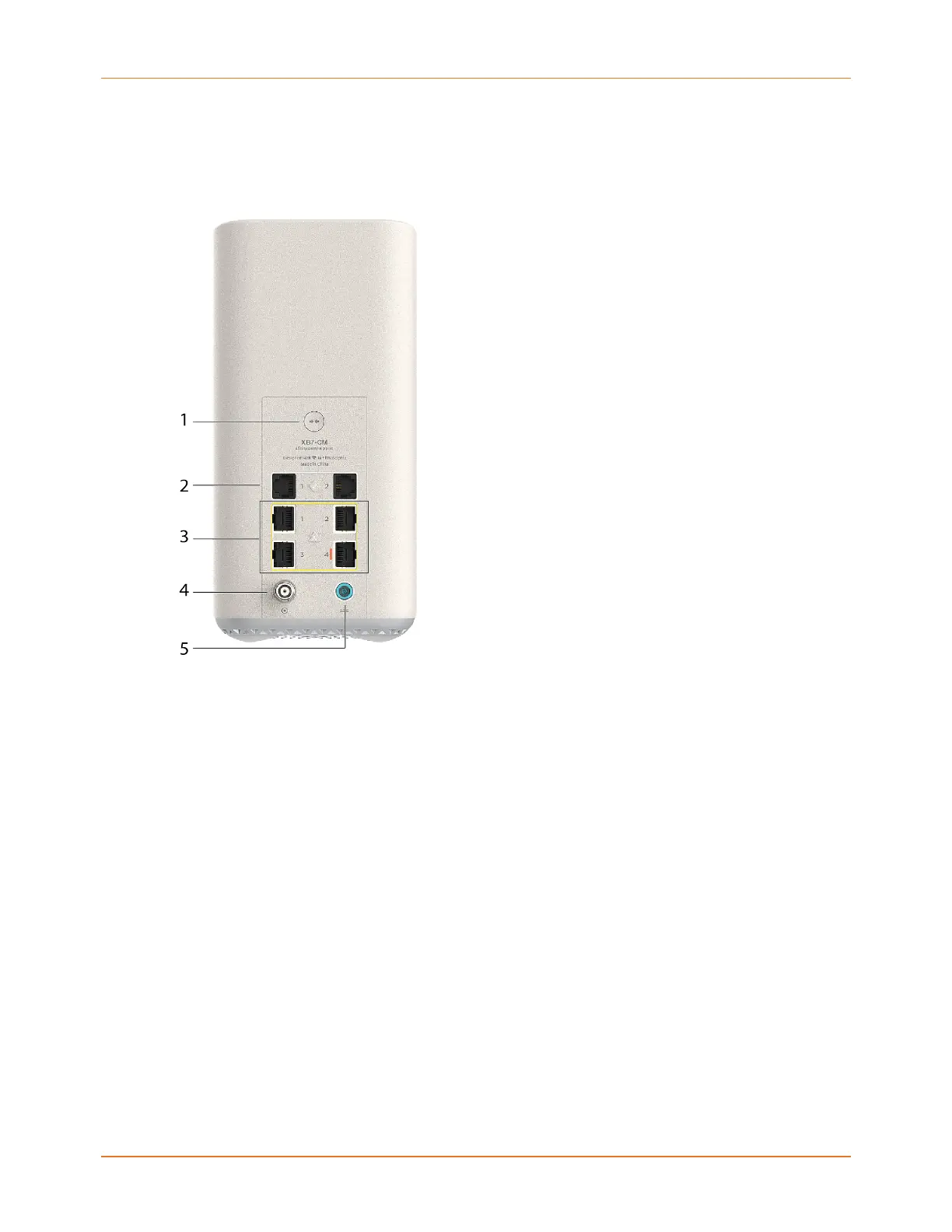
The rear of the TG4492 has the following connectors and controls.
1. WPS button: Begins associating the Telephony Gateway with a wireless device.
2. Tel (1 - 2): Connector for the first phone line (or both lines of a 2-line phone).
3. Ethernet (1 - 4): Connectors for use with a computer LAN port.
4. Cable: Connector for the coaxial cable.
5. Power: Connector for the power cord.
Choose an installation location
There are a number of factors to consider when choosing a location to install your Telephony
Gateway:
■
Is an AC outlet available nearby? For best results, the outlet should not be switched and
should be close enough to the Telephony Gateway that extension cords are not required.
■
Is a cable jack available? For best performance, keep the number of splitters between
the jack and cable drop to a minimum. Each splitter attenuates (reduces) the signal
available to the Telephony Gateway. A large number of splitters can slow down the
Internet connection and even affect your telephone service.
■
Can you easily run cables between the Telephony Gateway’s location and the phones?
Touchstone TG4482 Telephony Gateway User Guide DRAFT Revision 1.3 17











 To Next Page