Chapter 5: Installing and Connecting your Telephony Modem
Release 8 STANDARD 1.1 August 2016 Touchstone TM804G Telephony Modem User Guide
© 2011-2016 ARRIS Enterprises LLC. All Rights Reserved. 25
6. Link: indicates Ethernet connectivity between the Telephony Modem and computer. it
may be yellow or green to indicate the connection speed.
7. Online: indicates internet data transmission status.
8. US: indicates upstream connectivity. It may be yellow or green to indicate the connection
speed.
9. DS: indicates downstream connectivity. It may be yellow or green to indicate the
connection speed.
10. Power: indicates whether AC power is available to the unit.
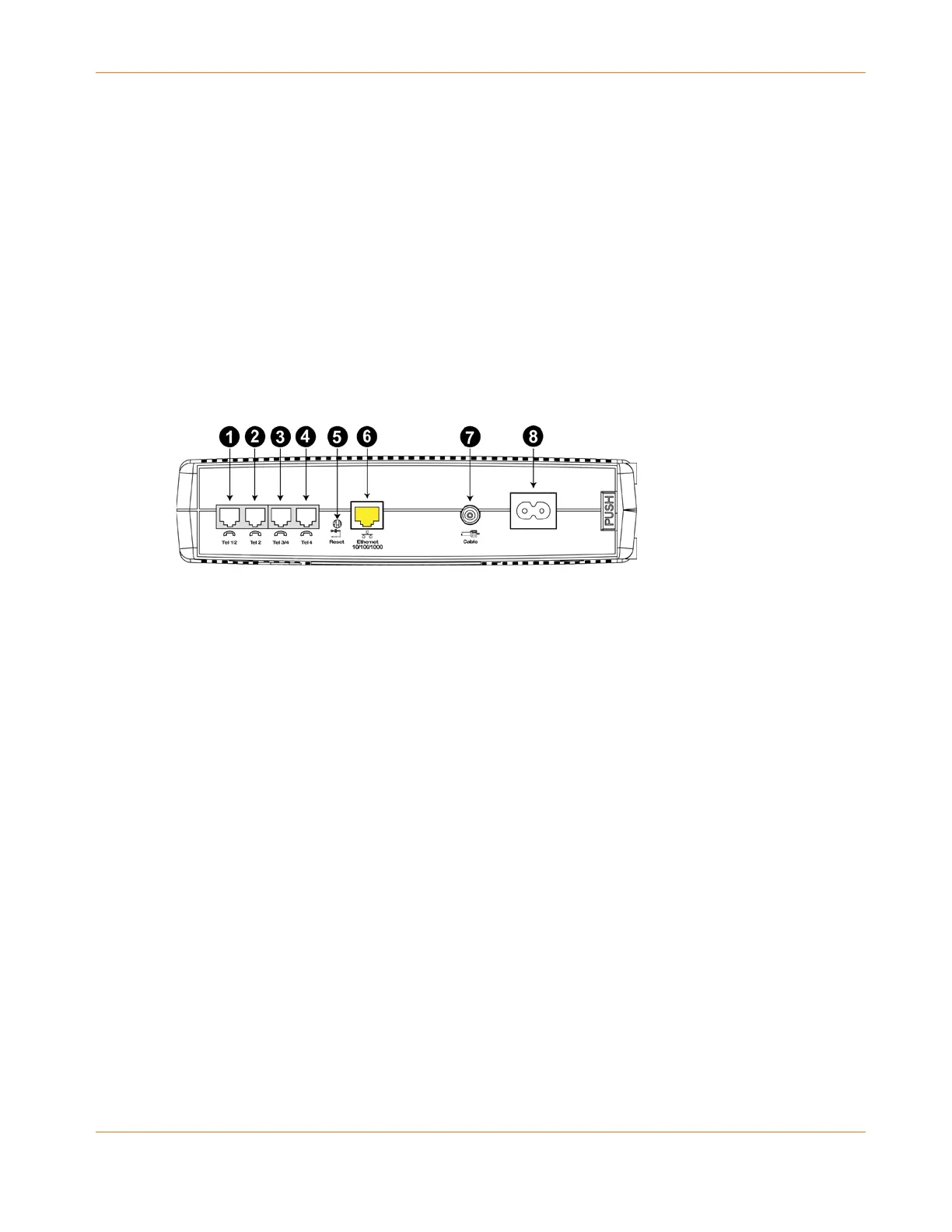
Rear Panel
The rear of the Telephony Modem has the following connectors and controls.
1. Tel 1/2: connector for the first phone line (or both lines of a 2-line phone).
2. Tel 2: connector for the second phone line.
3. Tel 3/4: connector for the third phone line (or both lines of a 2-line phone).
4. Tel 4: connector for the fourth phone line.
5. Reset button: resets the Telephony Modem as if you power cycled the unit. Use a pointed
non-metallic object to press this button.
6. Ethernet: connector for use with a computer LAN port.
7. Cable: connector for the coaxial cable.
8. Power: connector for the power cord.
Selecting an Installation Location
There are a number of factors to consider when choosing a location to install your Telephony
Modem:
Is an AC outlet available nearby? For best results, the outlet should not be switched and
should be close enough to the Telephony Modem that extension cords are not required.
Is a cable jack available? For best performance, keep the number of splitters between the
jack and cable drop to a minimum. Each splitter attenuates (reduces) the signal available
to the Telephony Modem. A large number of splitters can slow down the Internet
connection and even affect your telephone service.
Can you easily run cables between the Telephony Modem’s location and the phones?















 To Next Page