VIP5602WT Wireless IPTV Receiver Installation Guide 3
Rear Panel
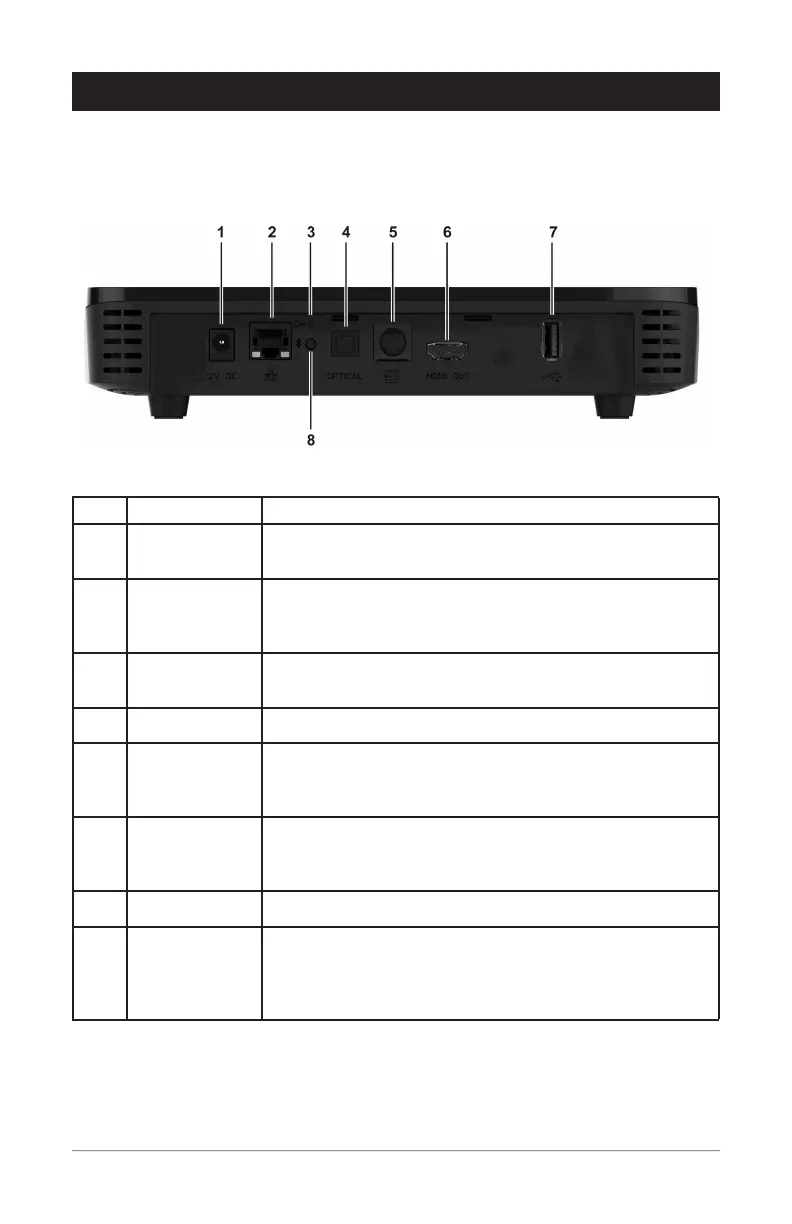
The illustration below and the table following list the rear-panel features, controls, and
connectors of the VIP5602WT.
Key Item Function
1 POWER
+12 VDC
Connector for the DC power adapter. Use only the adapter
specified for this VIP5602WT.
2 NETWORK Ethernet 10/100/1000Base-T RJ-45 port.
Link LED: Lights green when ethernet connection detected
Activity LED: Flashes amber with data traffic
3 RESET
BUTTON
Press and release to trigger the System Recovery Process.
4 OPTICAL TOSLink (S/PDIF) digital audio output.
5 BREAKOUT
CABLE
CONNECTION
Alternative method for video/audio connections. Offers
analog component, composite, and stereo audio outputs.
6 HDMI™ OUT Connects to a High Definition TV or home theater receiver
with an HDMI input (for a DVI input, use an HDMI-to-DVI
adapter).
7 USB 3.0 Allows connectivity with USB 3.0 devices.
8 BLUETOOTH
PAIRING
Press and release to initiate Bluetooth remote control
unit pairing with wireless receiver. Hold the button for 10
seconds to unpair the Bluetooth remote control unit and the
wireless receiver.
Overview


 To Next Page