6. SYNCHRONIZATION
KeyStep 37 can be the master clock for a wide range of musical devices, or it can serve as
a slave to any one of several sources. See section 1.1 [p.8] for connection diagrams.
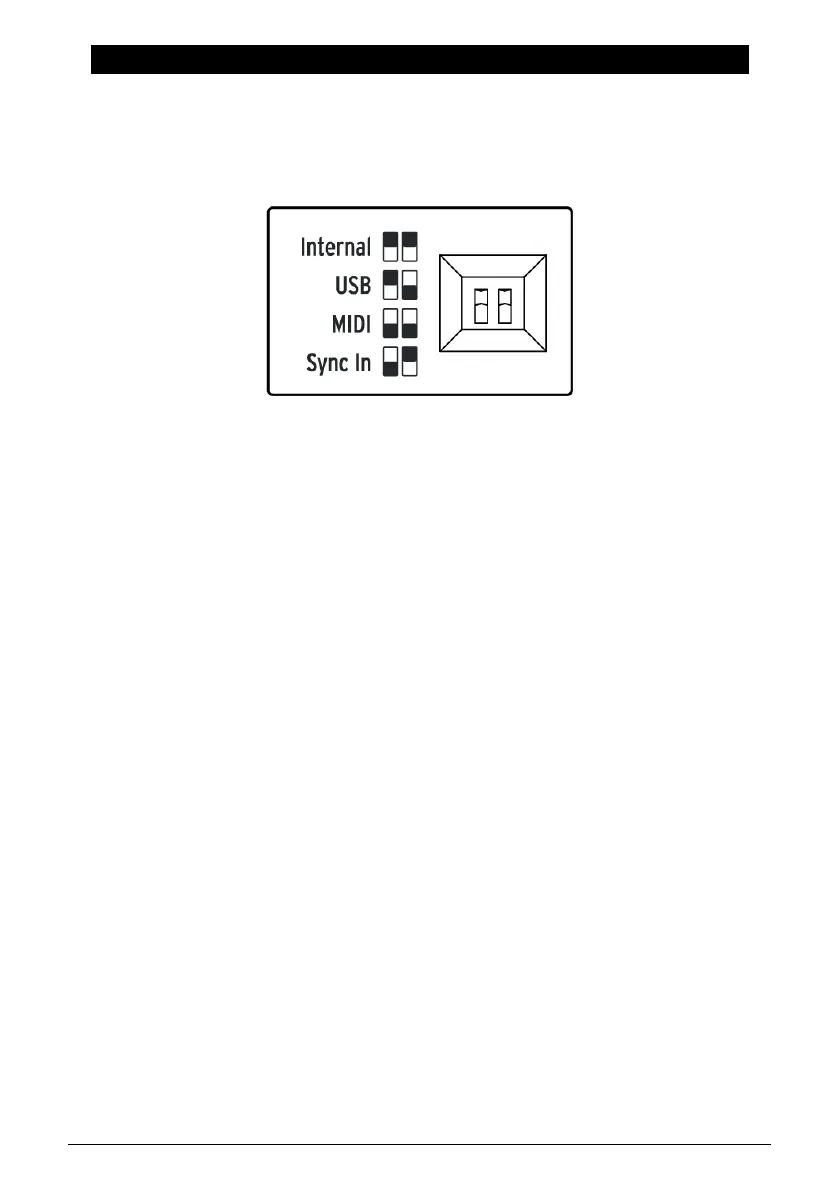
The Sync options are selected using different combinations of the rear panel switches.
For example; in the illustration below the MIDI sync option has been selected.
It's important to remember that the physical switch caps correspond to the white boxes in
the graphics to the left. Match the physical switches to the graphics and you'll get it right
every time.
The switches are recessed so they won't be changed accidentally. Use the tip of a pen or a
small screwdriver when you need to change their position.
6.1. As Master
KeyStep 37 is the master clock when the Internal option is selected on the rear panel.
When this is the case:
• The transport section will control the internal sequencer and arpeggiator
• MIDI clock messages are sent to the MIDI output and to USB MIDI
• Clock signals are sent to the Sync output. You can specify the clock output type
with the MIDI Control Center (see Chapter 9 [p.74])
• The tempo can be set using the Rate knob and the Tap button.
61 Arturia - User Manual KeyStep 37 - Synchronization













 To Next Page