AP Deployment
Chapter 2
12 Aruba AP-60/61 0510160-03
Installation Guide April 2008
Using the Built-In Mounting Slots
The keyhole-shaped slots on the back of the Aruba AP-60/61 can be used to
attach the device upright to an indoor wall or shelf.
To hang the Aruba AP-60/61 upright using the mounting slots, perform the
following steps.
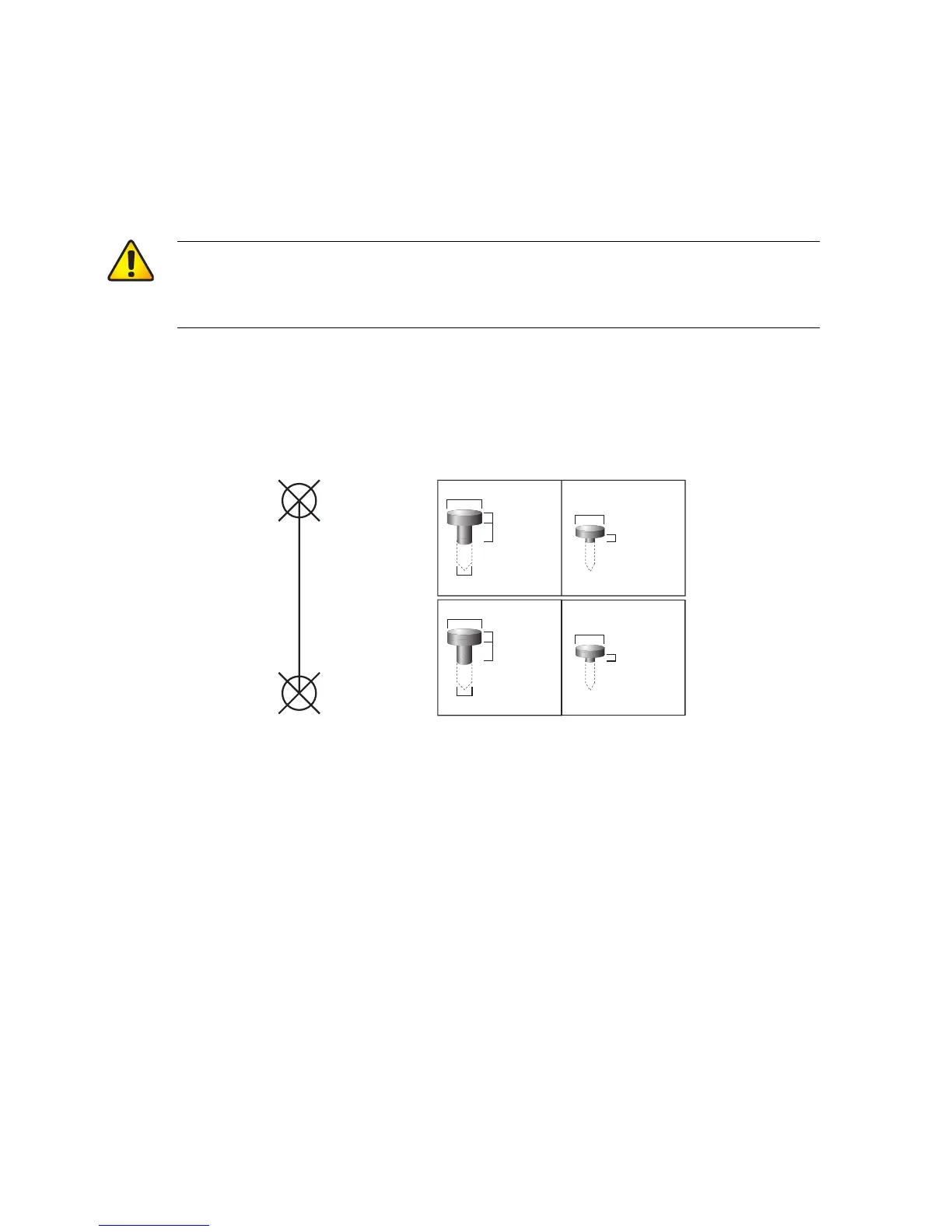
1. Install two screws in the wall or shelf as shown in Figure 2-3:
FIGURE 2-3 Mounting Screw Specifications
If attaching the device to drywall, we recommend using appropriate wall
anchors (not included) as shown in Figure 2-4 on page 13.
CAUTION: Do not use the mounting slots to hang the Aruba
AP-60/61 from the ceiling, sideways, or in any place
where it could fall on people or equipment. For more
secure installation, use one of the optional mounting kits.
Screw/Nail Positions
(fastened to wall or shelf)
12.7 cm
(5.00")
0.12"
0.27"
0.23"
0.05"
clearance
from surface
3.0 mm
5.8 mm
0.08"
0.15"
clearance
from surface
2.0 mm
3.8 mm
clearance
from surface
1.3 mm
clearnace
from surface
7.0 mm
Maximum Minimum
Screw/Nail Dimensions



 To Next Page