Aruba AP-60/61 13
Installation Guide
AP Deployment
Chapter 2
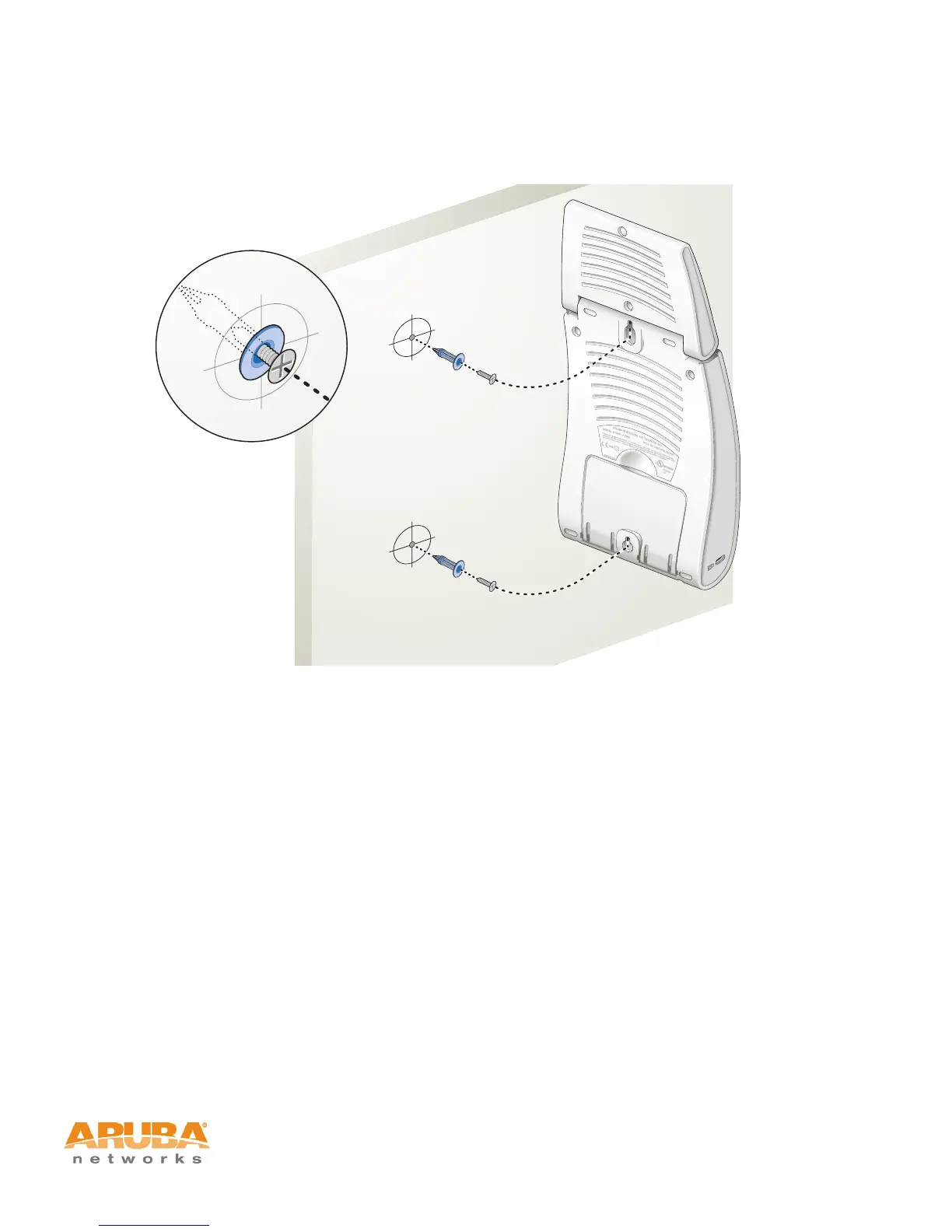
2. Align the Aruba AP-60/61 mounting slots to capture the surface screws.
FIGURE 2-4 Hanging the Aruba AP-60/61 on Screws
3. Secure the Aruba AP-60/61, if desired.
To prevent the unauthorized removal of the Aruba AP-60/61 from its installed
location, use a Kensington MicroSaver Security Cable (not included). Wrap
the security cable around an immovable object, insert the cable’s lock into the
Kensington Security Slot on the back of the Aruba AP-60/61, and turn the
key.
4. Orient the antennas.
For best performance, swivel the individual antennas (Aruba AP-60) or antenna
array (Aruba AP-61) so that they are oriented vertically (see Figure 2-1 on page 8).
Once mounting is complete, connect the required cables (see instructions on
page 14).
Using the Optional Mounting Kits
Use the optional mounting kit to attach the Aruba AP-60/61 to a wall, shelf, or
ceiling. For installation, see the Aruba AP-60/61 Mounting Kit Installation Notes
(P/N 0500037-01) provided with each kit.



 To Next Page