30 | AP-85 Series Installation Aruba AP-85 Outdoor Access Point Series | Installation Guide
DC and AC Power Cables
To connect the power cables (wiring harnesses):
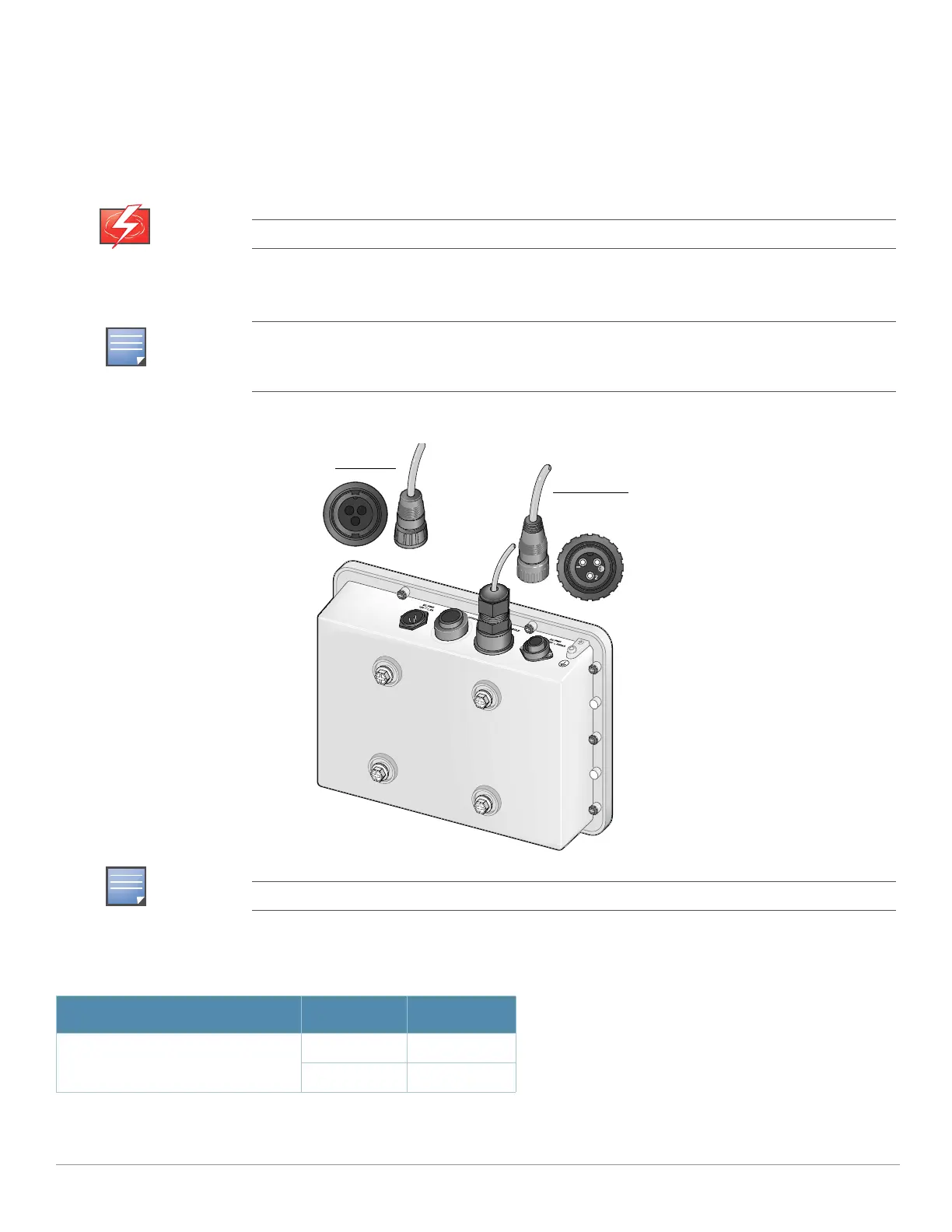
1. Screw the two-wire, 8-foot long DC power cable (wiring harness) to the DC interface on the AP-85TX, AP-85FX, or AP-
85LX model.
2. Screw the three-wire, 8-foot long AC power cable (wiring harness) to the AC interface on the AP-85FX or AP-85LX
models only.
Figure 21 Connecting Power
Disconnect the AC mains before handling the AC power cable and connecting it to the AP-85.
All connections made to the unit should conform to all local and national electrical codes. Power
cords with lengths longer than 15 ft and cords without plugs should only be installed in appropriate
areas. Check the codes for your area to ensure proper use.
Always shut power off to the unit to de-energize it before disconnecting any cables.
Table 5 AC and DC Power Cable Descriptions
Cable Type Wire Color Assignment
DC Power Cable Red +12V
Black Ground
DC Power Cable
AC Power Cable



 To Next Page