Aruba AP-85 Outdoor Access Point Series | Installation Guide AP-85 Series Installation | 23
Mounting the AP-85
Preparing the AP-85 for Installation
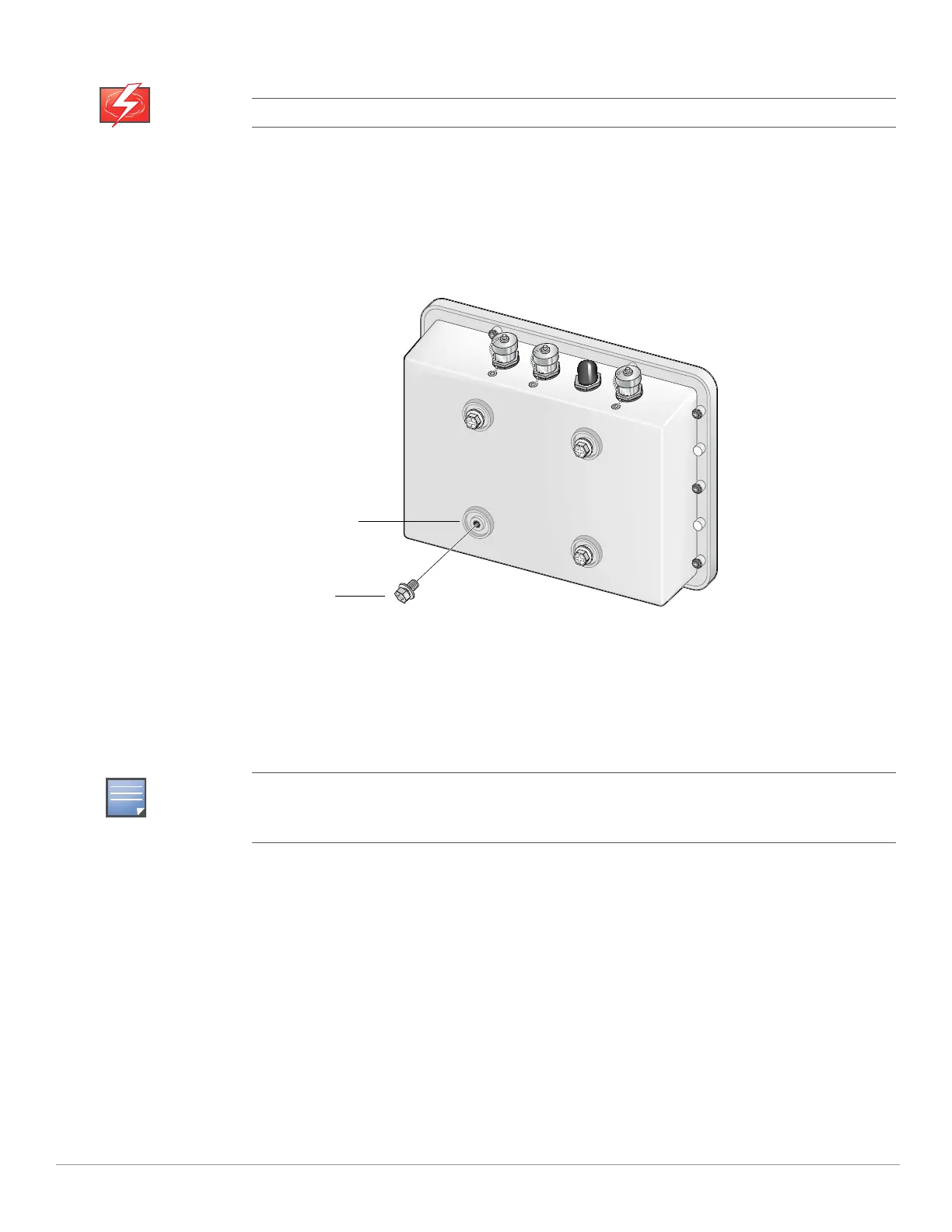
1. Install the provided mounting bolts (M8 bolts with captive flat washer) into the four mounting holes on the rear of the
AP-85 (see Figure 10). Leave approximately two to three threads showing on each mounting bolt.
Figure 10 Installing the Mounting Bolts
Wall Mounting the AP-85
To wall mount an AP-85:
1. Secure the mounting plate to a flat wall using the appropriate screws and anchors for your mounting application (see
Figure 11).
Do not work on an AP and do not connect or disconnect cables during periods of lightning activity.
Wall mount hardware is not included with the mounting plate and must be purchased separately for
your mounting application. The mounting plate accepts the following screw or bolt sizes: M4, M5,
SAE #8, and SAE #10.
Mounting Holes
Mounting Bolts
(M8 bolts, 4x)



 To Next Page