- Page 11 -
STYLE CONTROL: CHORDS
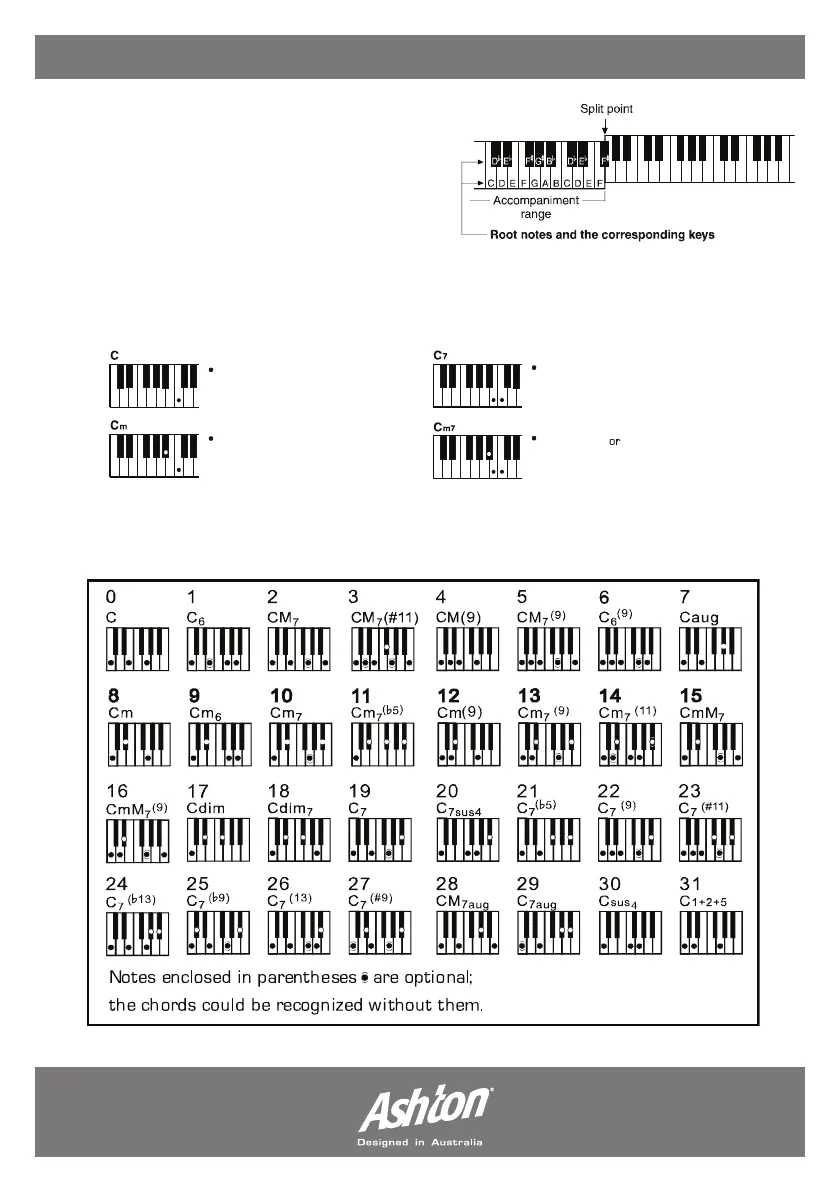
CHORD RECOGNITION:
When the A.B.C. mode is enabled, and a style is
selected, you can navigate the accompaniment
range to create chords while the accompaniment
is playing. There are two methods of creating
chords; single & multi finger chords.
SINGLE FINGER CHORDS:
This method allows you to play chords easily within the accompaniment range using one, two or
three fingers. (Example chords are: C, Cm, C7 and Cm7, shown below.)
MULTI FINGER CHORDS:
This method allows you to play chords with normal fingering within the accompaniment
range of the keyboard.
To play a major chord,
press the root note of the chord
To play a minor chord, press the root
note together with the nearest black
key to the left of it.
To play a seventh chord, press the
root note together with the nearest
white key to the left of it.
To play a mintor seventh chord,
press the root notes together with the
nearest white and black keys to the
left of it.
.


 To Next Page