SONG:
There are 100 songs on the AK110 keyboard (see appendix). Each song can be practised in
the MELODY OFF mode.
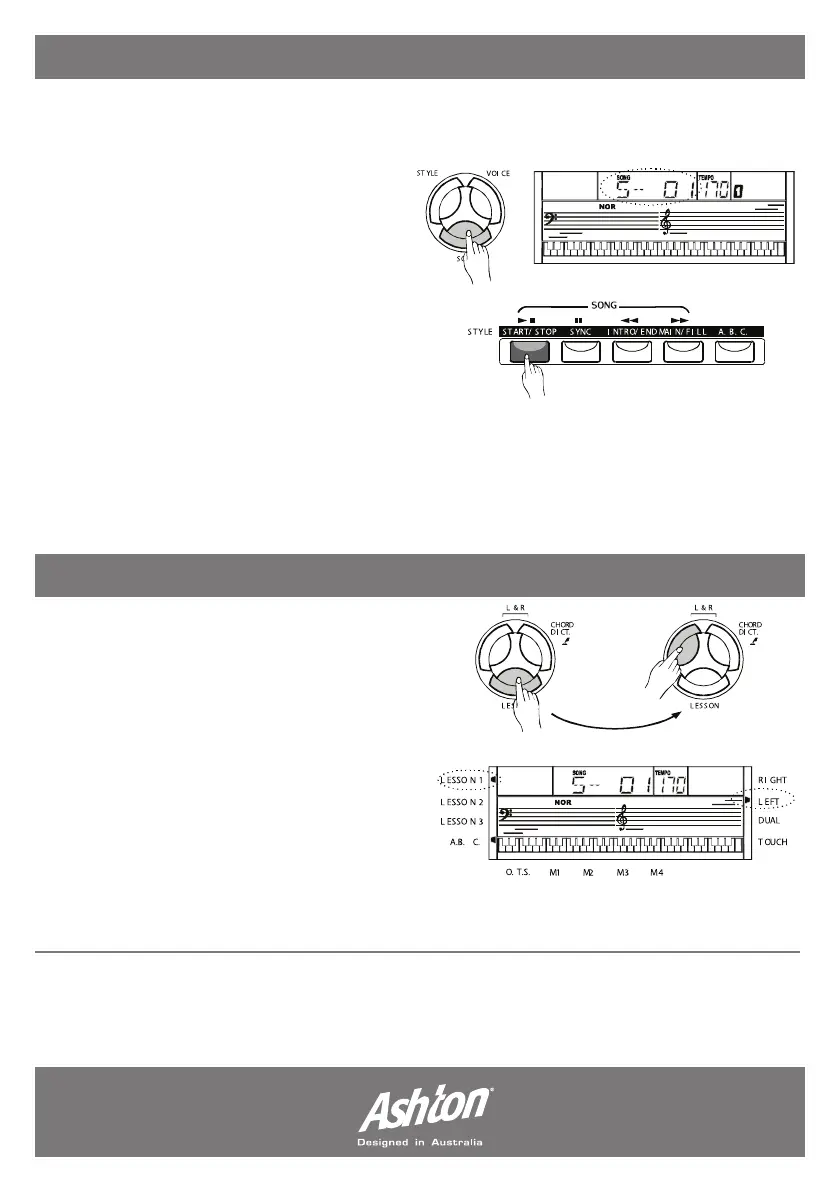
1. START/STOP the song: Press the
(SONG) button to enter the “song mode”,
the song flag will light on the LCD- all songs
are looped. Press (START/STOP) button to
stop the song.
2. LOOP: The second time you start playing
the song, press the (START/STOP) button,
it will play the current song repeatedly.
3. SELECT the song: Use the (+/YES), (-/NO) buttons or the numeric keypad to select a song.
4. REW/FF/PAUSE: When a song is playing press (REW) to rewind, (FF) to fast forward or
(PAUSE) to pause the song. When the song is stopped press (STYLE), (VOICE) or (DUAL) to exit
the song mode.
LESSON MODE:
The lesson mode allows you to learn a song
via timing and accuracy. To enter lesson
mode, select song mode (press [SONG]
button), then press the (LESSON) button.
There are 3 levels to score the performance
of your playing. You can use the (R) or (L)
buttons to select which hand you want to
practice with. (R) hand is default. You can also
select both hands for the lesson.
Note: The hand choice varies on different
songs. If a chord song is chosen the left hand provides the chord and the right hand for the
melody. The LCD will indicate the melody position .
- Page 17 -


 To Next Page