SETTING UP: POWER SUPPLY
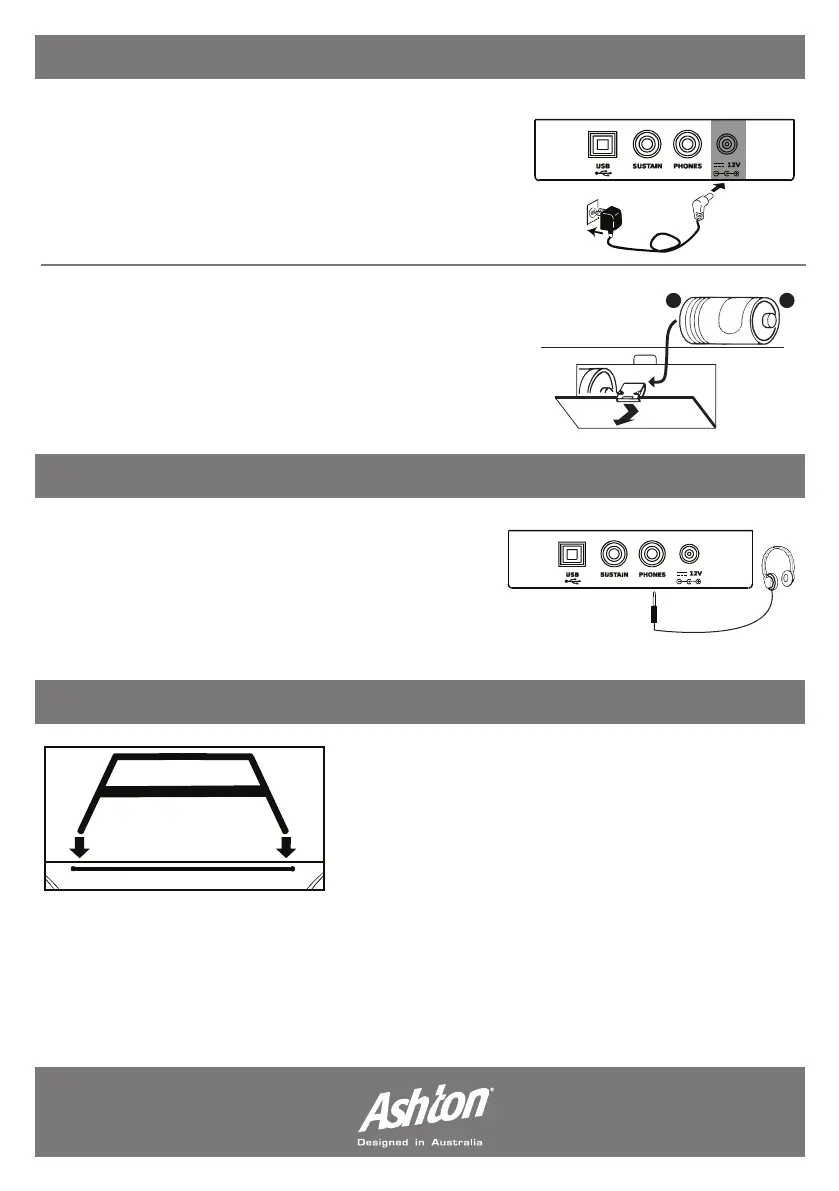
USING AN ADAPTOR:
Connect the adaptor to the DC IN jack located on the
rear panel of the unit and plug into power outlet. Do not
use adaptors other than what is specified. The technical
specifications for the power adaptor on the Ashton
AK110 is DC12V1A+.
USING BATTERIES:
1. Open the battery compartment cover on the underside
of the unit.
2. Insert 8 x alkaline “D” sized, R 20, SUM-1 or equivalent
batteries. Read the polarity instructions (negative and
positive guide). Close the battery compartment.
- Page 2 -
SETTING UP: USING HEADPHONES
Alternative to using the internal speakers or an
amplifier, you may choose to play using headphones.
To do this, simply connect a pair of headphones to
the ¼” stereo phones jack located on the back panel
of the unit.
SETTING UP: INSERTING MUSIC STAND
To set up the music stand, locate the tabs on the
bottom of the music stand and slot them into the slots
located at the top end of the AK110 keyboard.


 To Next Page