LESSON MODE:
LESSON 1: PRACTICE TIMING:
When you have entered the lesson mode by pressing the (LESSON) button. It will default to
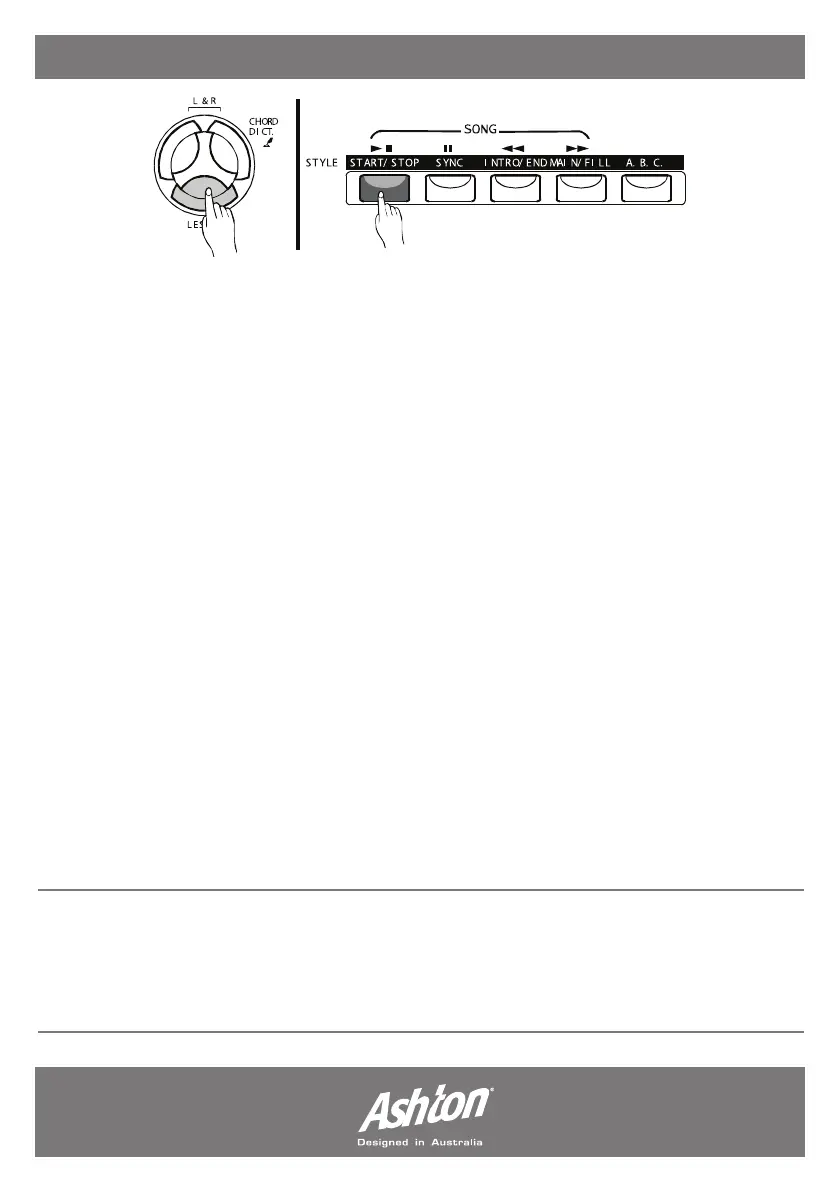
“LESSON 1”. Lesson 1 will test your accuracy of keeping in time. Press the (START/STOP)
button to begin.
Select either (L), (R) or (L) & (R). Whatever you have chosen, you will need to follow the melody
of that hand/hands, Once the lesson is completed - your evaluation will be announced.
LESSON 2: PRACTICE NOTE ACCURACY:
When you have entered the lesson mode by pressing the (LESSON) button. It will default to
“LESSON 1”. Press (LESSON) again to start Lesson 2. Lesson 2 will test your accuracy of notes.
Press the (START/STOP) button to begin.
Select either (L), (R) or (L) & (R). Whatever you have chosen, you will need to follow the melody
of that hand/hands, Once the lesson is completed - your evaluation will be announced.
LESSON 3: MELODY OFF
When you have entered the lesson mode by pressing the (LESSON) button. It will default to
“LESSON 1”. Press (LESSON) twice to start Lesson 3. Lesson 3 will test your accuracy of timing
and notes. Press the (START/STOP) button to begin.
Select either (L), (R) or (L) & (R). Whatever you have chosen, you will need to follow the melody
of that hand/hands, you must play the song melody correctly and in time. Once the lesson is
completed - your evaluation will be announced.
GRADE FUNCTION:
Lesson 1/Lesson 2/Lesson 3 all have the grading function. There are four levels; OK, GOOD,
VERY GOOD and EXCELLENT. After a grade is given , the song will be played again and retain
the lesson mode selected.
- Page 18 -


 To Next Page