MIDI FUNCTION:
WHAT IS MIDI:
MIDI stands for “Musical Instrument Digital Interface”, that is the standard interface between
a computer and another electronic instrument. USB connections can be used for MIDI data
transfer with a computer or other devices that support USB inputs. Use the keyboard as a tone
generator, the data (MIDI) recorded on the computer can be played on the keyboard.
NOTE: while recorded data and a style is being played, you cannot use the MIDI IN function, or
the song you are playing will have an error in the same channel.
USB CONNECTION
System Requirements:
- CPU: >300MHz, >Pentium 2
- Memory: >64MB
- Driver: CDROM 24X
- OS: Windows 2000/XP
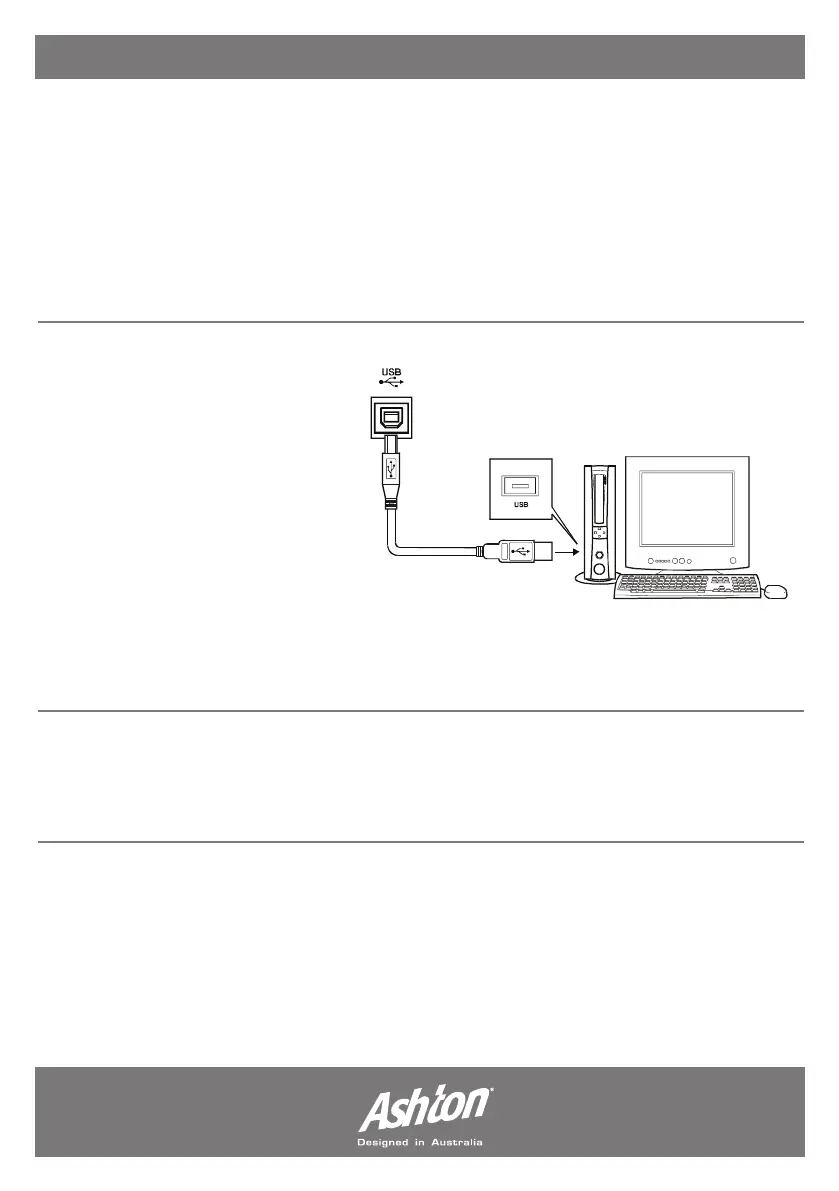
Connect a standard USB cable from
the USB connection on both keyboard
and computer. You can purchase an
Ashton USB cable from your nearest
dealer. Connect the USB before turning the instrument power on, connect the USB to the
computer when it is “live” and not in standby or off - this will ensure the keyboard or the computer
will not freeze.
MIDI APPLICATION:
PC Recorded Data (MIDI) can be played on the keyboard. In order to transfer songs between
your computer and the keyboard you will need to install other applications.
- Page 20 -


 To Next Page