RECORD:
START RECORDING:
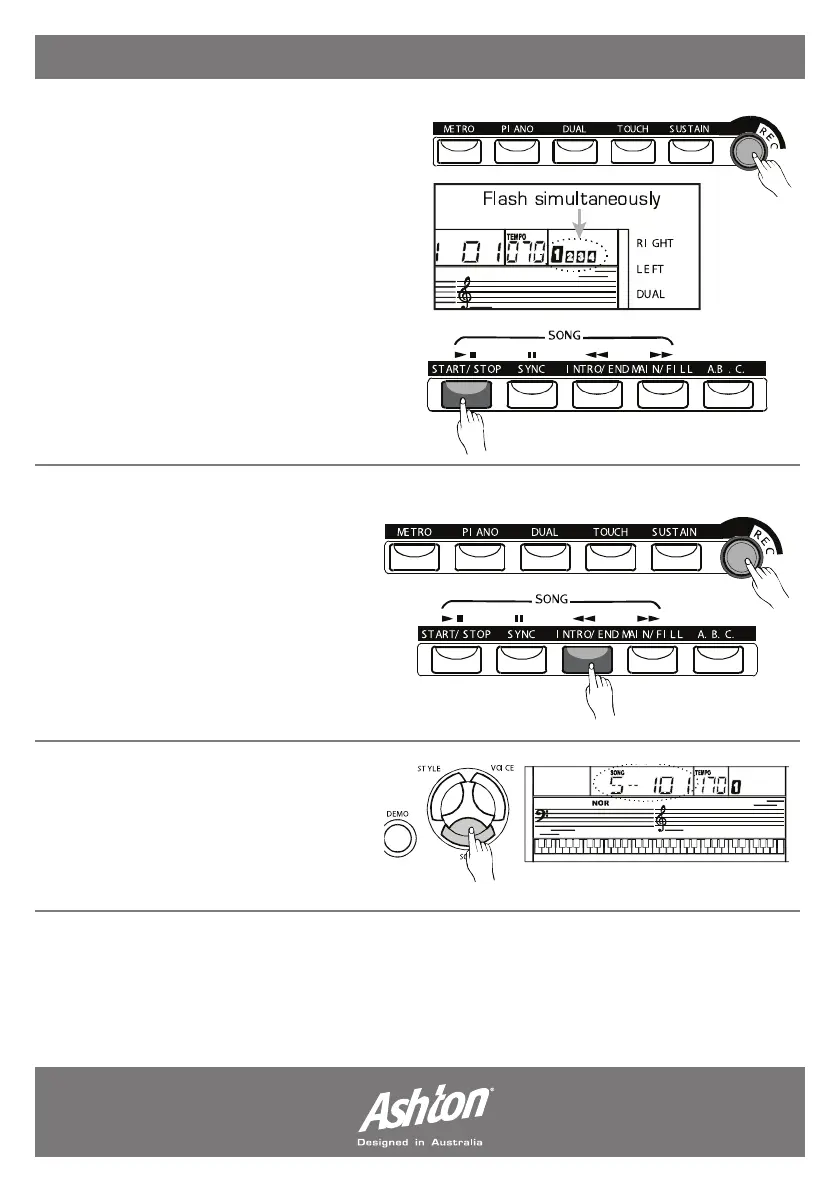
Press the (RECORD) button, the four-beat
LCD will flash simultaneously, indicating the
“record waiting status”. A voice, style and
memory can be selected in this status. The
ACCOMP track and MELODY track can be
recorded together. After all the settings in the
“record waiting status” have been selected,
play the keyboard (or chord area when using
ACCOMP) or press the (START/STOP)
button; it will start recording and the beat will
be displayed according to the current tempo.
When new recording has started, original
data will be lost.
STOP RECORDING:
1. While recording, if the memory is full,
the recording will stop automatically.
“FULL” will be displayed on the LCD
screen.
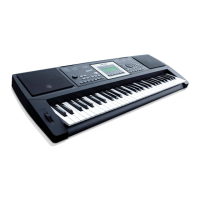
2. Press the (RECORD) button again to
stop the recording or press the (INTRO/
END) button to allow the recording to
end with an ending sequence.
PLAYBACK THE RECORDING:
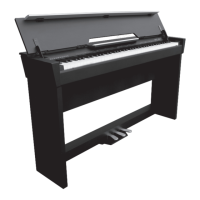
Press the (SONG) button, use the
numeric keypads (+/YES)/(-/NO) to
select from song 101 or 102. The
recorded data will be played.
- Page 14 -


 To Next Page