PAGE 4
MODULE: FRONT PANEL DESCRIPTION
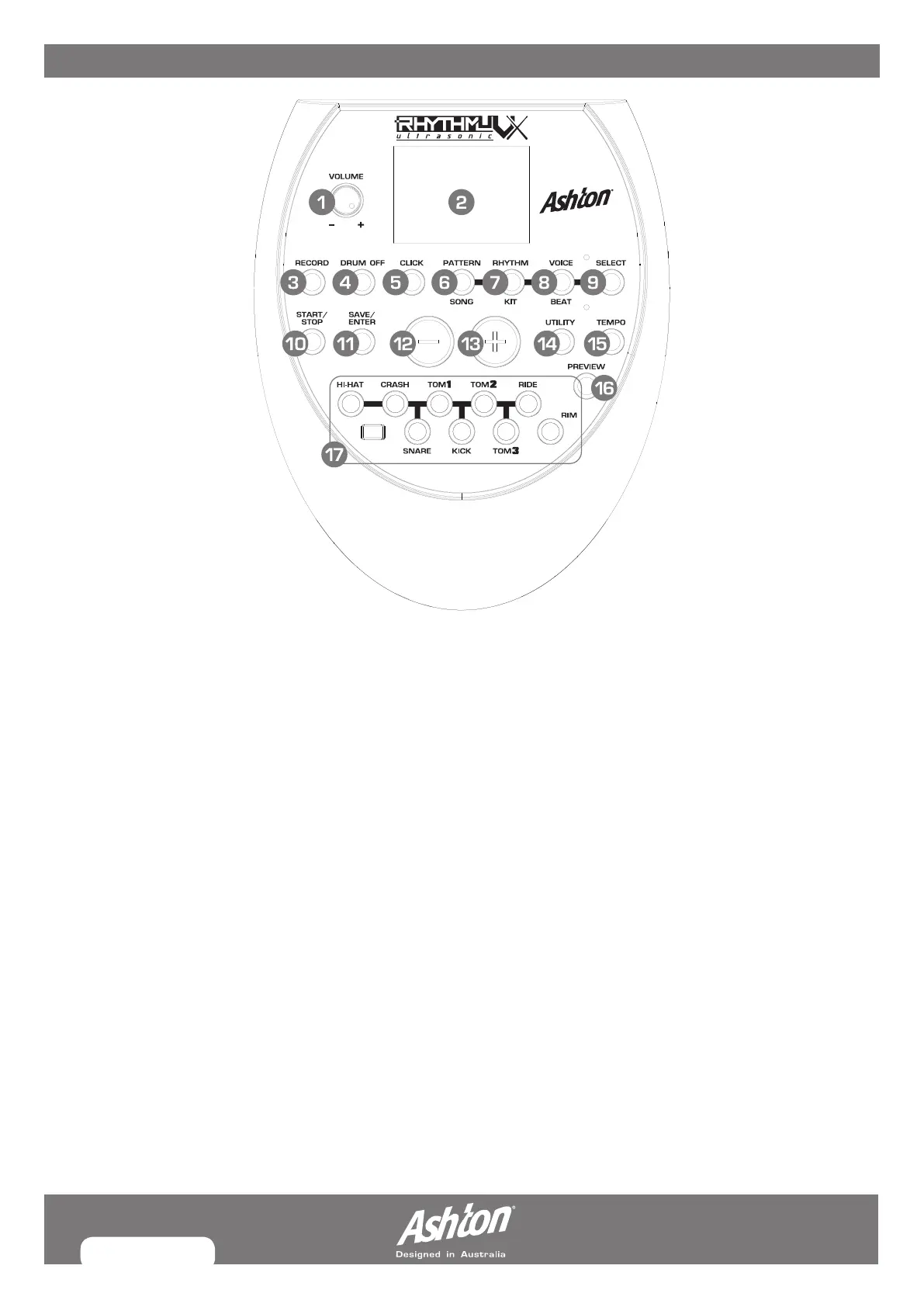
1. VOLUME: Controls master volume. Turn to adjust.
2. LCD DISPLAY: Displays current parameters.
3. RECORD BUTTON: Enter the Record menu in NORMAL mode.
4. DRUM OFF BUTTON: Mutes pattern drum kit.
5. CLICK BUTTON: Turns the metronome on or off and enters
the Click menu in NORMAL mode.
6. SONG/PATTERN BUTTON: Enter the Song menu in
NORMAL mode or enter the Pattern Practice menu in
LEARNING mode.
7. KIT/RHYTHM BUTTON: Enters the Kit menu in NORMAL
mode or enter the Rhythm Practice menu in LEARNING mode.
8. BEAT/VOICE BUTTON: Enter the Voice menu in NORMAL
mode or enter the Beat Practice menu in LEARNING mode.
9. PAGE/SELECT BUTTON: Scroll through the menu pages.
Press and hold it for 1 second to switch modes between
NORMAL and LEARNING.
10. START/STOP BUTTON: Starts/stops a song from playing.
11. SAVE/ENTER BUTTON: This button is used to save the
current kit settings in a user kit and save the trigger
settings under the Utility menu pages.
12 /13. (–) & (+) BUTTONS: Adjusts menu parameter (kit,
voice, pattern, click value, tempo etc...)
14. UTILITY BUTTON: Enters the Utility menu in NORMAL mode.
15. TEMPO BUTTON: Enters tempo adjustment mode.
16. PREVIEW BUTTON: Play back your recording in NORMAL
mode. Start practicing following sample practice patterns
in LEARNING mode. Press and hold it for 1 second to play
back your practice in LEARNING mode.
17. PAD SELECT BUTTONS: Shows triggered pad (LED) allows
for manual function select on desired pad.


 To Next Page