English
19
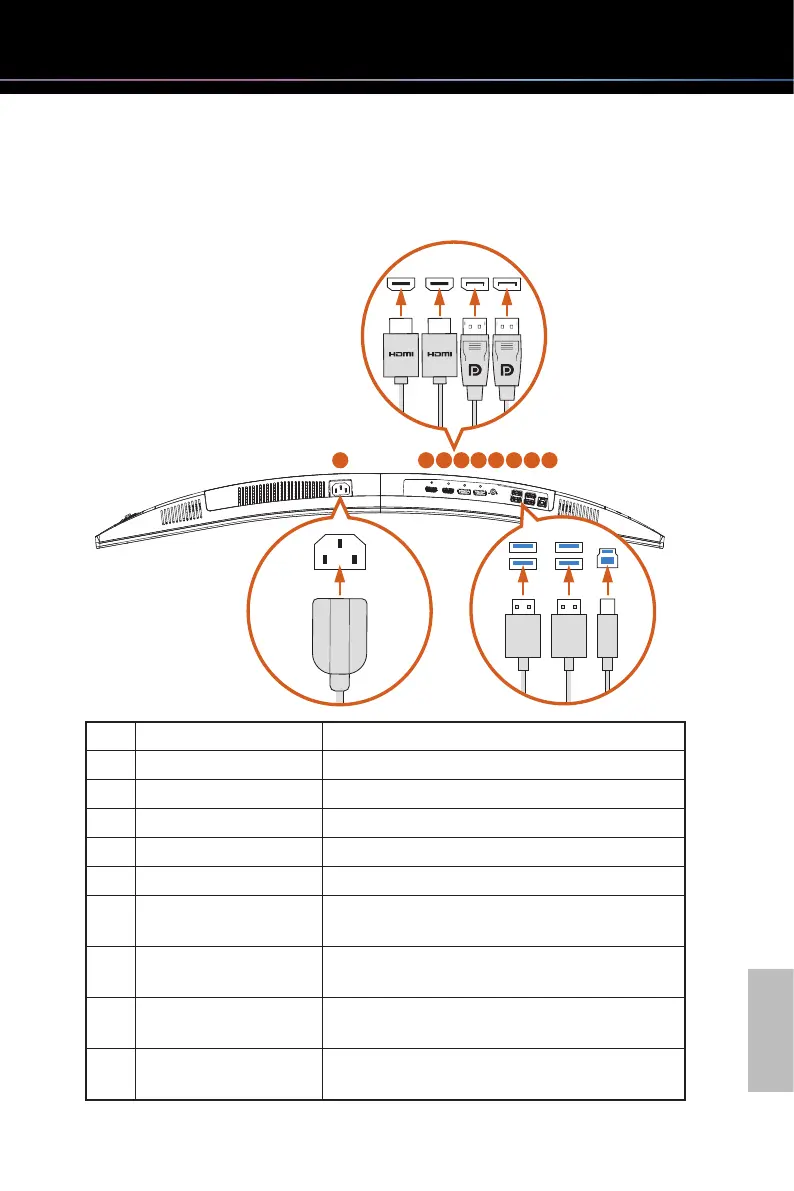
3.3 Boom View
1 2 3 4 5 7 8 96
No. Item Description
1 AC-IN port Connect the power cord.
2 HDMI-2 port Connect your computer with the HDMI cable.
3 HDMI-1 port Connect your computer with the HDMI cable.
4 DisplayPort-2 Connect your computer with the DisplayPort cable.
5 DisplayPort-1 Connect your computer with the DisplayPort cable.
6 Audio output
Connect your headphones with the audio cable.
(Purchase separately)
7
USB 3.2 Gen1 Type-A
ports (downstream)
Connect your computer with the USB Type-A
cables. (Purchase separately)
8
USB 3.2 Gen1 Type-A
ports (downstream)
Connect your computer with the USB Type-A
cables. (Purchase separately)
9
USB 3.2 Gen1 Type-B
port (upstream)
Connect your computer with the USB 3.0 Type-A to
Type-B cable.



 To Next Page