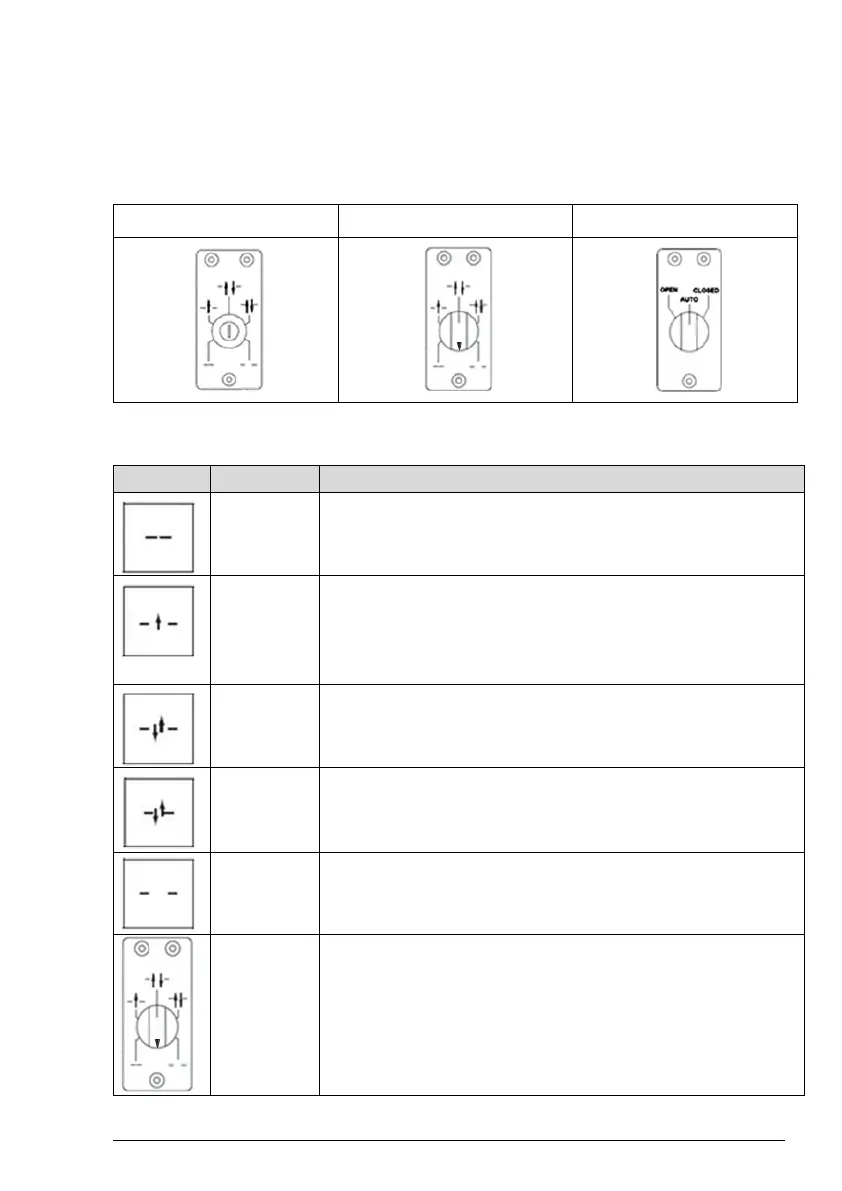
Program selectors and functions
The functions of the door are selected with mechanical or key Program Selectors:
5 Position with Key uses 1/2" spacer or can be surface mounted
5 Position Mechanical Switch, flush or surface mounted.
3 Position Mechanical Switch, flush or surface mounted.
Program selector functions
The inner and outer activation units are disconnected. The door is locked if an
electro-mechanical locking device has been installed. The door can be opened
with an emergency push-button/key switch (if installed).
Two-way traffic, AUTO PARTIAL is obtained. The door can be opened
partially with the inner and outer activation units and with a key switch (if
fitted). With an emergency push-button the door opens fully
Passage through
doorway from one side only. The door is locked if an electro-mechanical
locking device has been attached. The door can be opened with an activation to
INNER IMPULSE 2 or KEY IMPULSE 6.
Two-way traffic, normal operation of the door. The door can be opened with the
inner and outer activation units and with an emergency push- button/key switch
(if installed).
Two-way traffic. The door can be opened partially with the inner and outer
activation units and with an emergency push-button/key switch (if installed).
The door is permanently held open.
Momentarily (5 seconds), set the Program Selector as shown and then place at
"AUTO" or "OFF" position.
Keep the area clear while the door completes a
system test and resets. After closing, the operator is reset and ready for normal
operation again
*3 pos switch is selectable between AUTO and EXIT functionality at the AUTO position by
removing the jumper on the back side of the switch.





 To Next Page