K00E
73
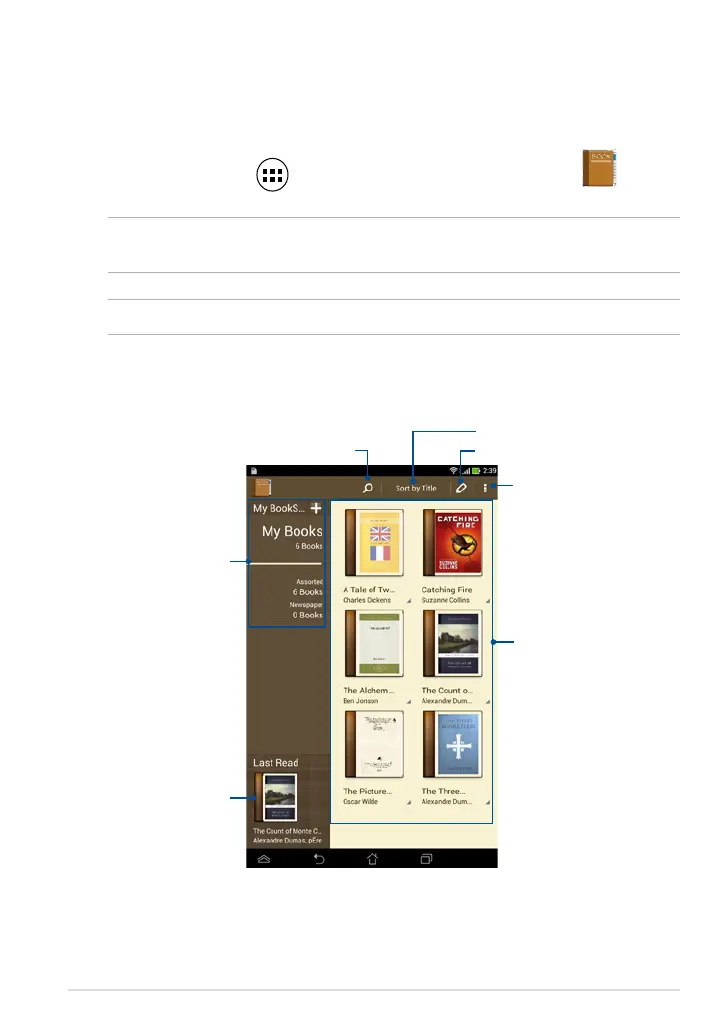
MyLibrary main screen
Search an e-book
Tap to select and move or delete e-books
More settings
Your books on the
selected bookshelf
Last read e-book
MyLibrary
MyLibrary, an integrated interface for your book collections, allows you to place
your purchased or downloaded e-books into bookshelves and sort them by
author, title or date.
To launch MyLibrary, tap to display the All apps screen then tap
.
IMPORTANT! You may need to install Adobe® Flash® Player to open some e-books.
Download Adobe® Flash® Player before using MyLibrary.
NOTE: MyLibrary supports e-books in ePub, PDF and TXT formats.
Your bookshelves
Sort by title, author, date, and my array



 To Next Page