26 ASUS P3C-E User’s Manual
System Memory
3. H/W SETUP
3. HARDWARE SETUP
General DIMM Notes
• PC100-compliant modules must be used on the riser because of the strict timing
issues involved under this speed.
• This motherboard supports SPD (Serial Presence Detect) memory modules. This
is the memory of choice for best performance vs. stability.
• BIOS shows your memory type on bootup screen.
• Single-sided memory modules come in 16, 32, 64, 128, 256MB; double-sided
come in 32, 64, 128, 256, 512MB.
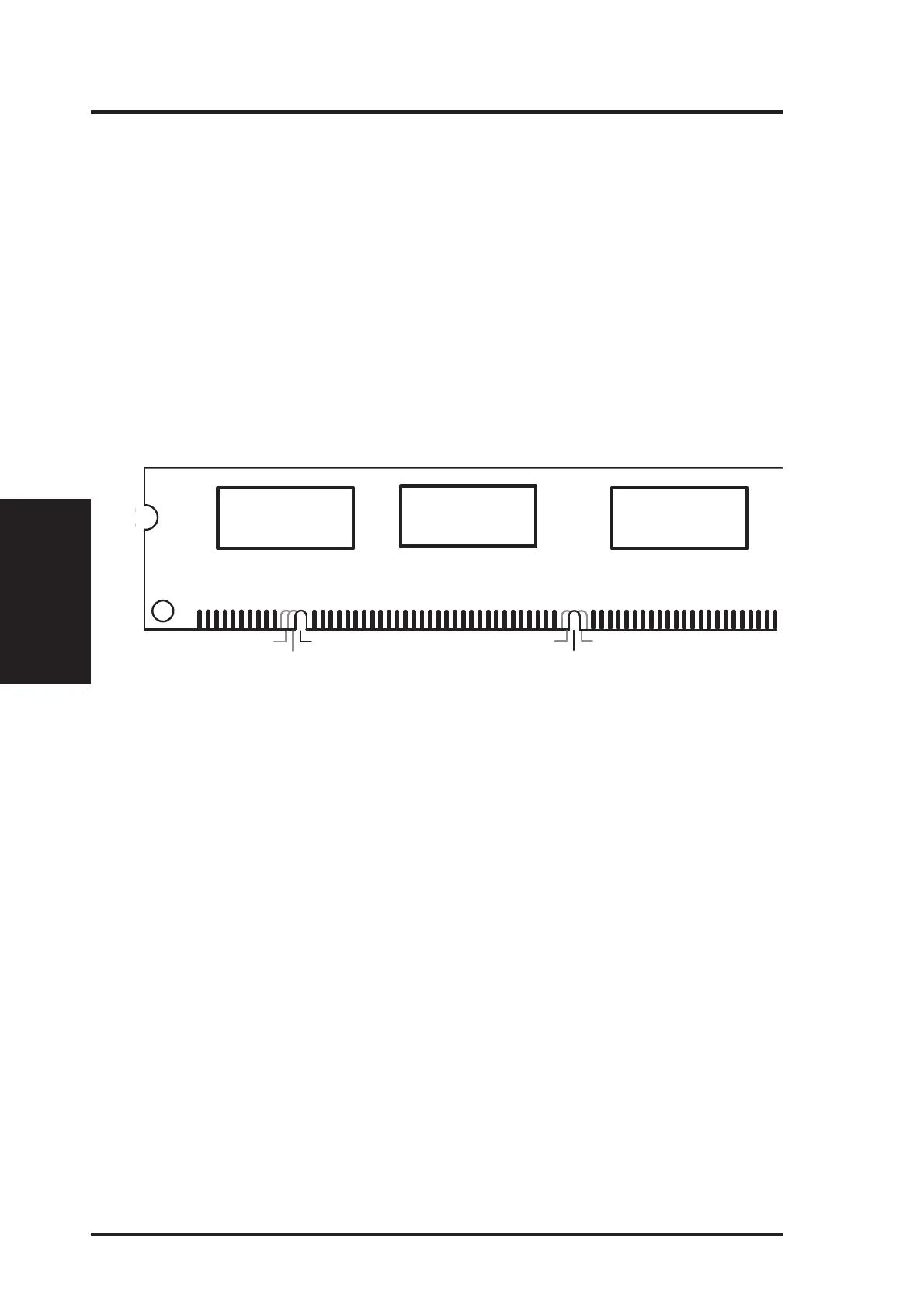
• The DIMMs must be 3.3V Unbuffered for this motherboard. To determine the
DIMM type, check the notches on the DIMMs (see figure below).
168-Pin DIMM Notch Key Definitions (3.3V)
DRAM Key Position
Voltage Key Position
Unbuffered
RFU
Buffered
Reserved
3.3V
5.0V
The notches on the DIMM module will shift between left, center, or right to identify
the type and also to prevent the wrong type from being inserted into the DIMM
socket on the riser. You must ask your retailer the correct DIMM type before pur-
chasing. The riser supports four clock signals.







 To Next Page