32
ASUS Xonar Phoebus
6.2.7 7.1 Virtual Speaker Shifter
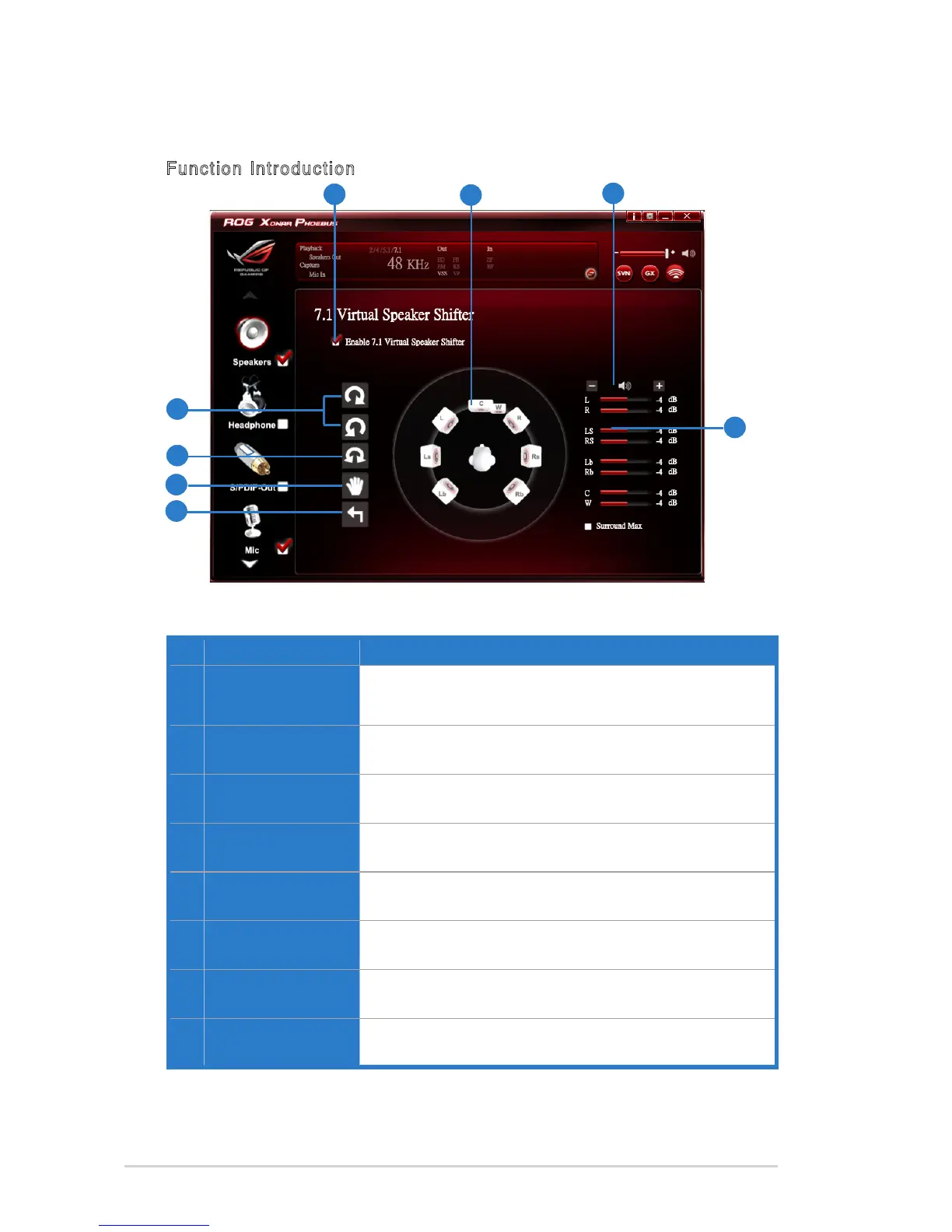
Function Introduction
No Item Description
1 7.1 Virtual speaker
shifter enable/disable
switch
Click on the check box to enable / disable 7.1 Virtual
Speaker to simulate the speaker direction and distance.
2 Virtual Speaker (L/R/
Ls/Rs/Lb/Rb/C/W)
Each virtual speaker virtualizes one channel of the 7.1
channel speakers in the real world.
3 Volume Control
Each virtual speaker virtualizes one channel of the 7.1
channel speakers in the real world.
4 Volume indicator
Indicate the volume of each channel.
5 Reset
Reset the location of virtual speakers / virtual listener to
default.
6 Manual Shifting (Free
Moving Mode)
Use the pointer to click and drag to move the location of
individual virtual speakers.
7 Manually Rotation
Mode
Use mouse to rotate the virtual speakers on the screen
manually.
8 Auto Rotation Mode
The virtual speakers rotate clockwise or counterclockwise
slowly.
1
4
2
3
8
7
6
5



 To Next Page