RX3141 User’s Manual Chapter 9. Configuring Firewall/NAT Settings
57
9.4.4 Display Inbound ACL Rules
To see existing inbound ACL rules, just open the Inbound ACL Rule configuration page by double clicking the
Router Setup Î Inbound ACL menu. The existing inbound ACL rules are displayed at the bottom of the
configuration page.
9.5 Configuring Outbound ACL Rules
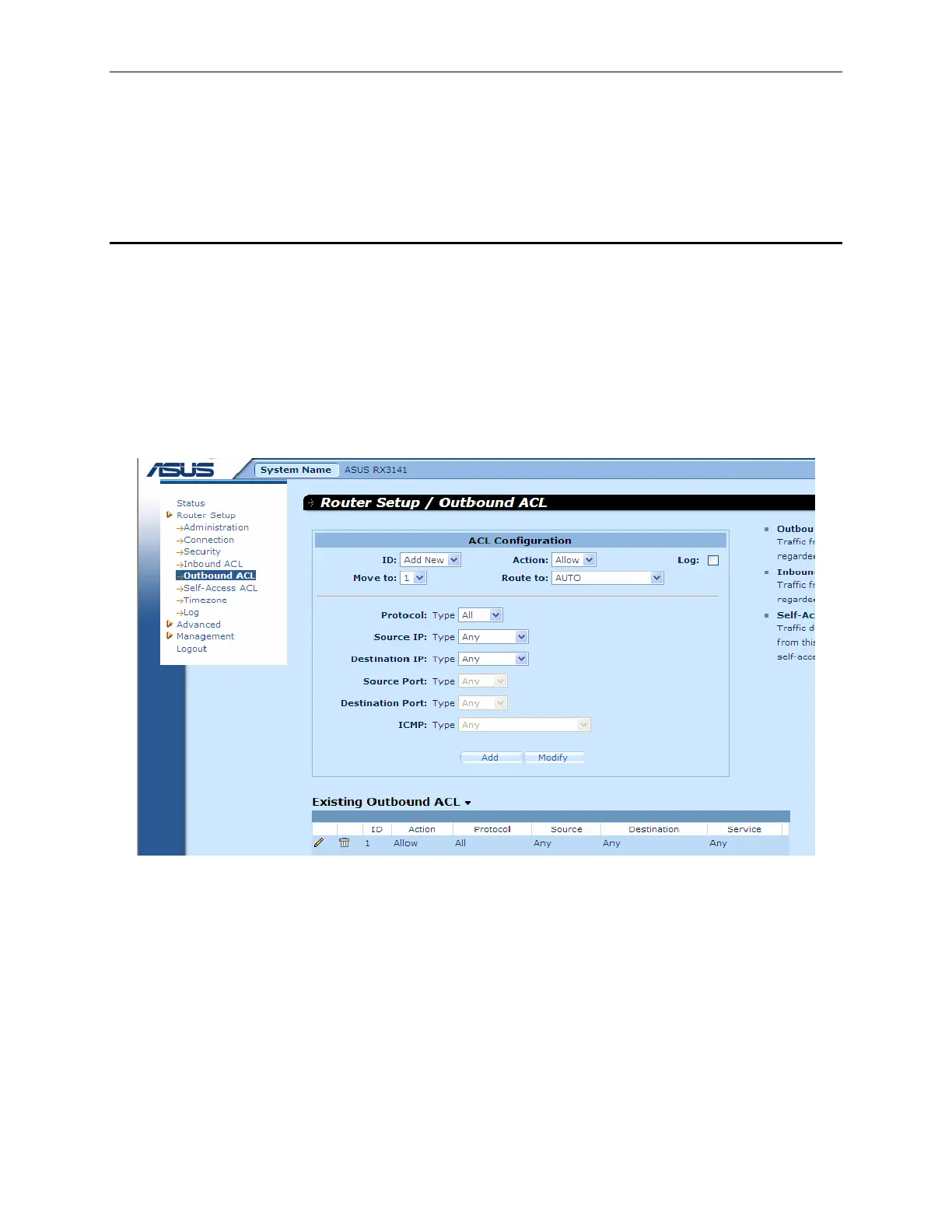
By creating ACL rules in outbound ACL configuration page as shown in Figure 9.5, you can control (allow or
deny) Internet or external network access for computers on your LAN.
Options in this configuration page allow you to:
f Add a rule, and set parameters for it
f Modify an existing rule
f Delete an existing rule
f View configured outbound ACL rules
Figure 9.5. Outbound ACL Configuration Page
9.5.1 Add an Outbound ACL Rule
To add an outbound ACL rule, follow the instructions below:
1. Open the Outbound ACL Rule configuration page, as shown in Figure 9.5, by double clicking the
Router Setup Î Outbound ACL menu.
2. Select “
Add New” from the “ID” drop-down list.
3. Set desired action (Allow or Deny) from the “
Action” drop-down list.


 To Next Page