Taskbar icon - Left-click menu
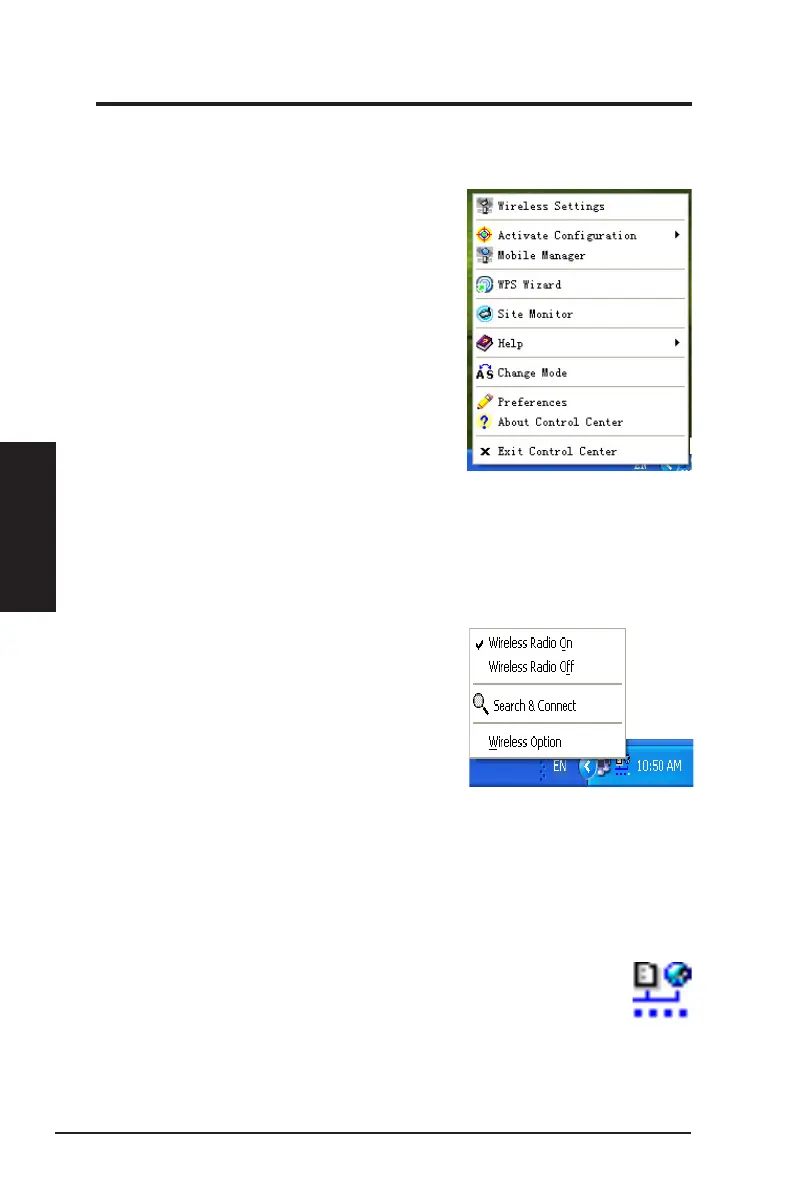
Left-click the taskbar icon to show the following
menu items:
•
Wireless Radio On
:
Click to turn the wireless
radio ON.
•
Wireless Radio Off
:
Click to turn the wireless
radio OFF.
•
Search & Connect
: Click to view the
properties of available access points.
•
Wireless Option
(Windows
®
XP only): Click to choose Windows
®
Wireless Zero
Conguration (WZC) service or ASUS utilities to congure your Network adapter.
Taskbar Icon - Launch Wireless Settings
Double-click the taskbar icon to launch the Wireless Settings utility. to launch the Wireless Settings utility.
Taskbar icon - Right-click menu
Right-click the taskbar icon to show the following menu items:
•
Wireless Settings
: Click to launch Wireless
Settings application.
•
Activate Configuration
:
Click to choose a
preset prole.
•
Mobile Manager
:
Click to launch Mobile
Manager application.
•
WPS
Wiza r d
: Cl ick to la unch Wir eles s
Protected Setup Wizard.
•
Site Monitor
:
Click to launch Site Monitor
application.
•
Preferences
:
Click to customize the Control
Center program. You can create a Control
Center shortcut on the desktop and decide
whether to start Control Center when the system boots up.
•
About Control Center
: Shows the version of Control Center.
•
Help
:
Click to launch the help le.
•
Exit Control Center
:
Click to close the Control Center program.
Taskbar Left-Click Menu
28 ASUS Network adapter
Chapter 3 - Software Reference
Chapter 3
Software Reference


 To Next Page