Creating a new conguration
To create a new conguration:
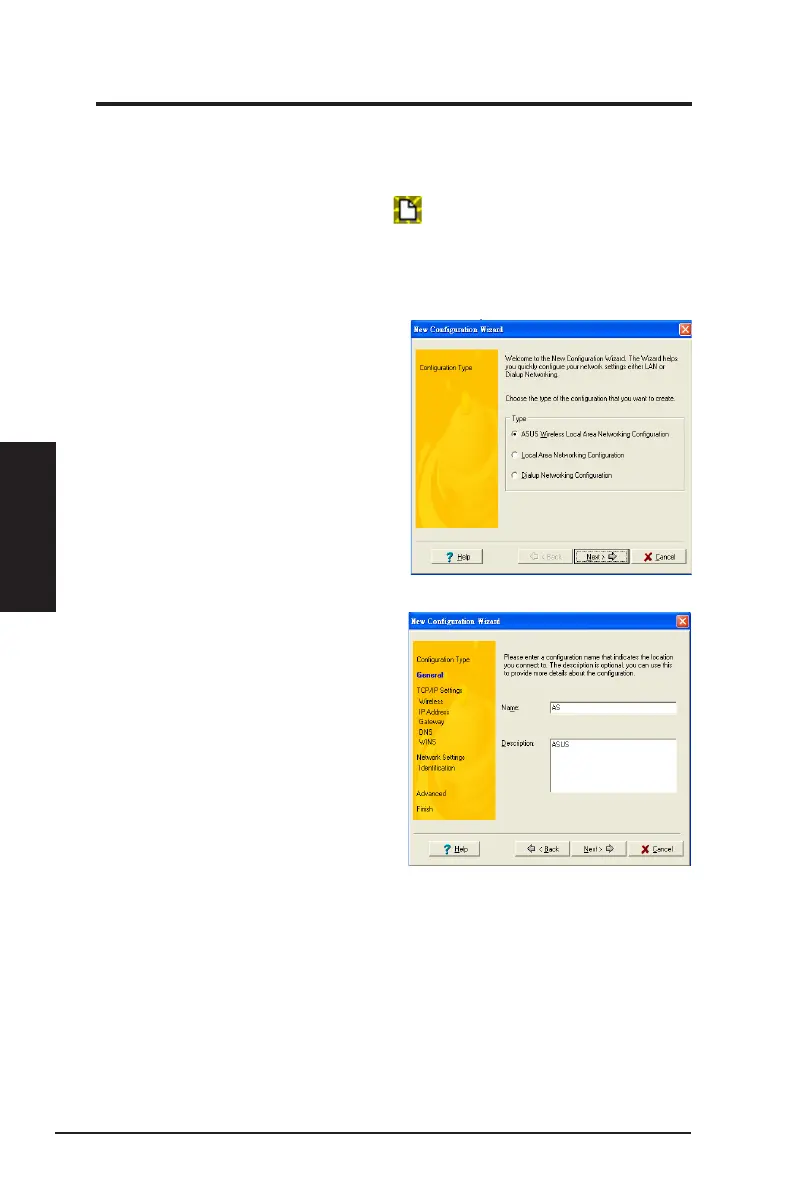
1. To launch the New Conguration Wizard, click
File
>
New Conguration
or
double-click the
New Conguration
icon on the Mobile Manager toolbar.
The New Conguration Wizard dialog box appears.
2. Select any of the conguration types below. Click
Next
when done.
•
ASUS Wireless Local Area Network Conguration.
Select this option if you
have an installed ASUS USB Wireless LAN Adapter in your computer.
•
W i r e d L o c a l A r e a N e t w o r k
Configuration.
Select this if your
computer has an installed network
interface card other than ASUS USB
Wireless LAN Adapter.
•
Dialup Networking Configuration.
Select this option if your computer
has an installed modem.
3. Key in the name and description
of the conguration you wish to
create, then click Next.
46 ASUS Network adapter
Chapter 3 - Software Reference
Chapter 3
Software Reference


 To Next Page