Survey - Site Survey
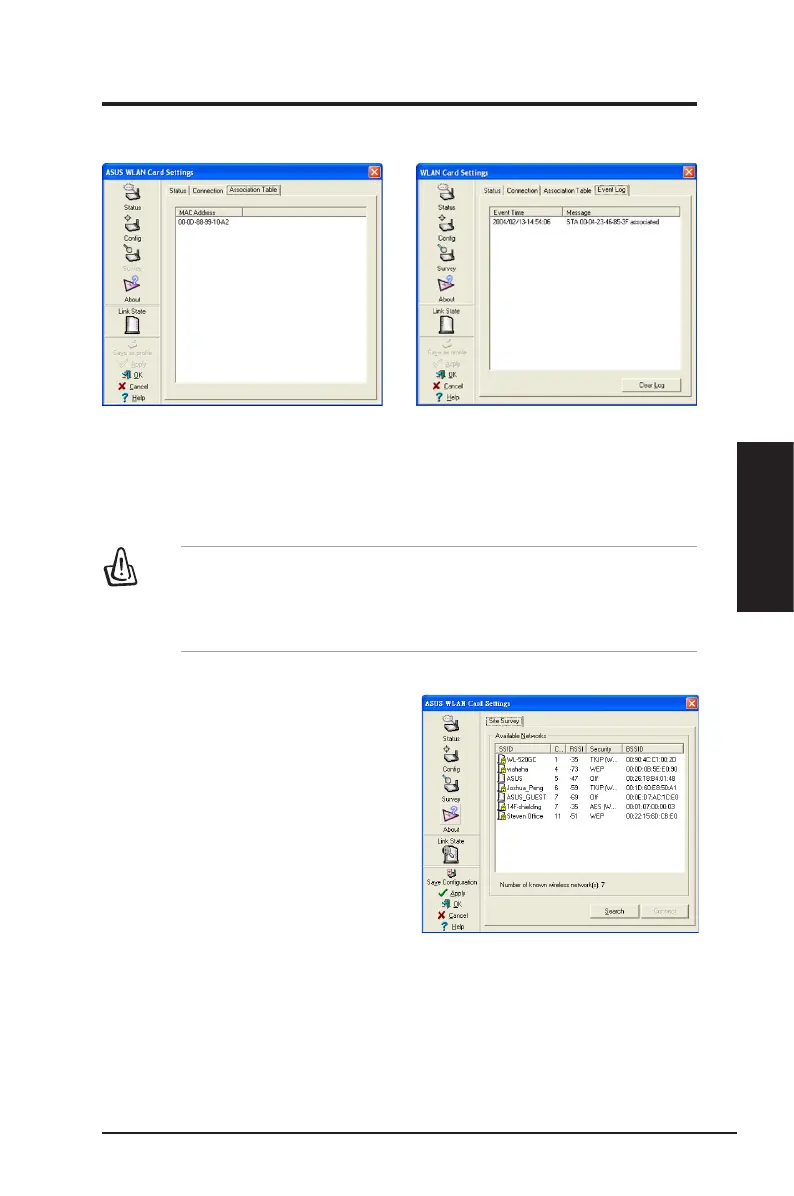
Use the Site Survey tab to view statistics
on the wireless networks available to the
Network adapter and their parameters.
•
SSID
: The SSID of the available
networks.
•
Channel
: The channel used by each
network.
ASUS Network adapter 41
Chapter 3 - Software Reference
Chapter 3
Software Reference
Soft AP Mode will also provide two extra
tabs on the Status pages - Association
Table and Event Log. The Association
Table shows clients that are currently
connected to the Soft AP.
Th e E ve nt Lo g tra ck s m es sa ges
associated with the Soft AP.
Soft AP (Windows XP/Vista) Cont.
IMPORTANT
: If the end points of a chain are connected to each other
a loop is created. Normally it is advised to avoid loops involving bridges
as it can lead to performance breakdowns, and broadcast and multicast
storms.


 To Next Page