TCP/IP settings-Device tab
Select the network adapter you want to use for this conguration.
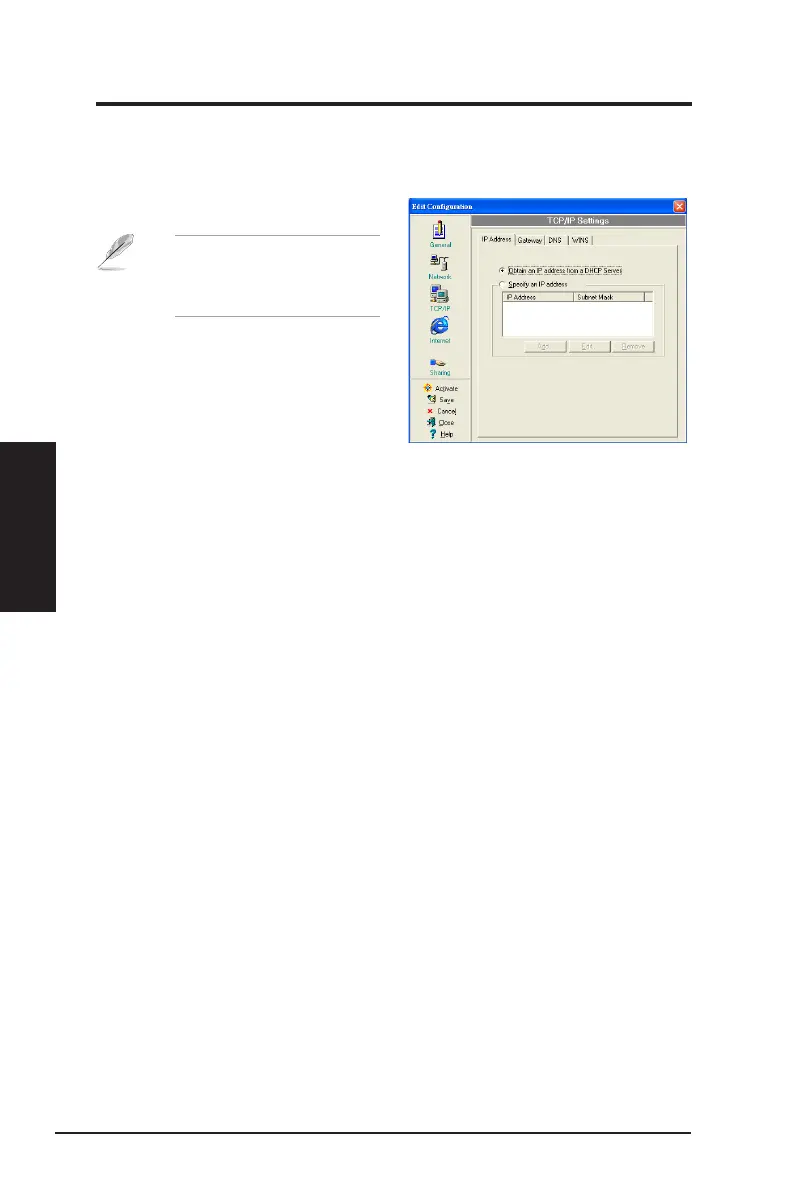
TCP/IP settings-IP Address tab
Obtain an IP address from a DHCP server
:
The Dynamic Host Configuration
Protocol (DHCP) server assigns IP addresses automatically within a specified
range of devices.
Specify an IP address
: Ask your network administrator for the IP address and
subnet mask you should use. Key in the IP Address and Subnet Mask manually.
TCP/IP settings-Gateway tab
Specify the gateways. You may specify more than one gateway. Set up the primary
gateway rst.
Add
:
Click this button to add a new TCP/IP gateway address. The added gateway
appears in the
Default gateways
list. Repeat the process to add another gateway.
The value in each gateway eld must be between 0 and 255. You can have up to
eight IP addresses for gateways.
Edit
: Click this button to edit a selected gateway address.
Remove
: Click this button to delete a selected gateway address.
TCP/IP settings-DNS tab
The DNS tab allows you to configure the DNS settings of the selected
conguration. This tab also allows you to add a DNS server and arrange them in
order of their use. You may also assign a DNS sufx for a specied DNS server.
NOTE
: This item appears
only when you are editing a
wired LAN conguration.
50 ASUS Network adapter
Chapter 3 - Software Reference
Chapter 3
Software Reference


 To Next Page