Get your ASUS Phone ready!
Parts and features
Take a hold of your device and have it running in a jiffy.
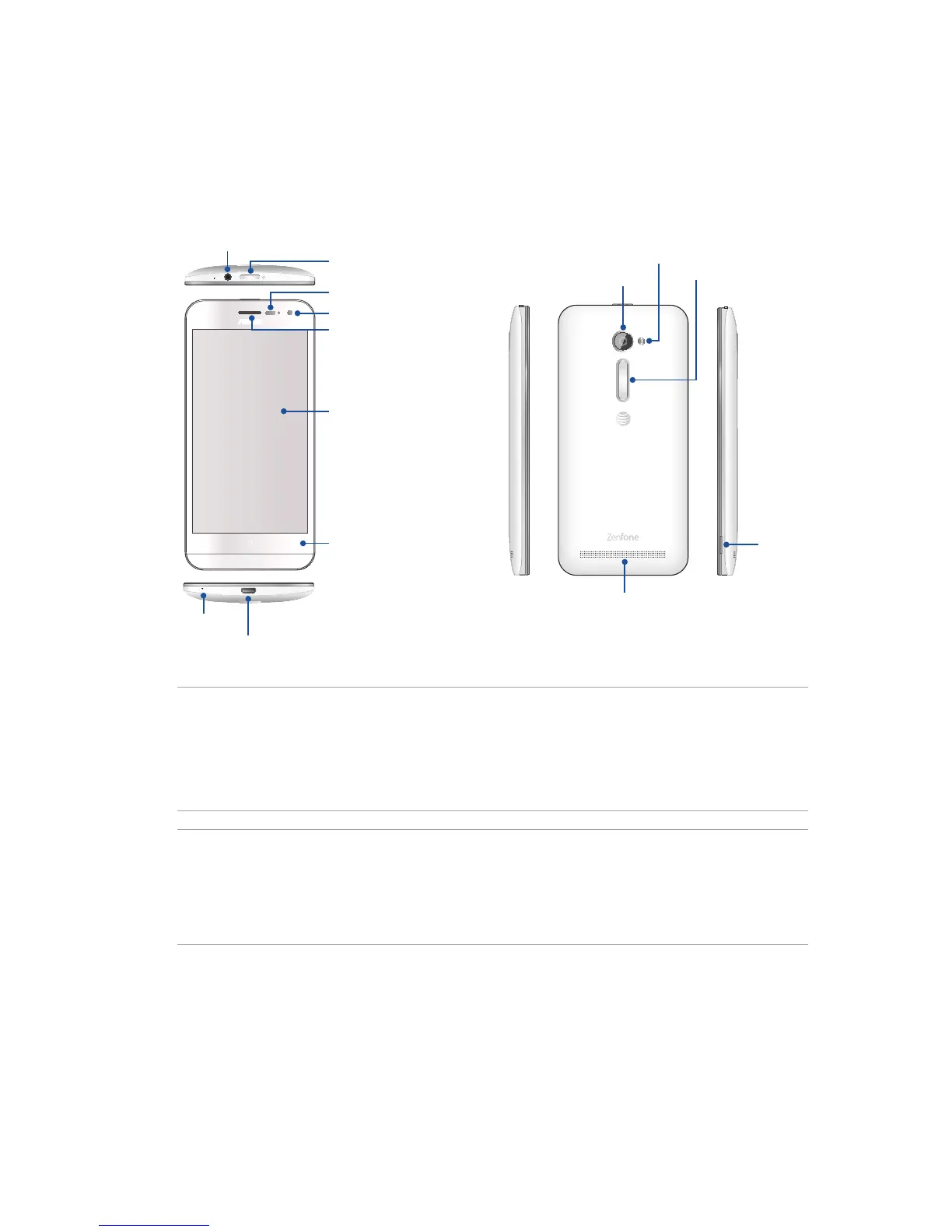
Groove
Microphone
Micro-USB port
Flash
Rear camera
Volume key
Speaker
NOTES:
• RemovetherearcovertodisplaythemicroSIMandmicroSDcardslots.
• ThemicroSIMcardslotsupportsWCDMA,DC-HSPA+,GSM/EDGE,FDD-LTE,GPRS,andHSPA+
network bands.
• ThemicroSDcardslotsupportsmicroSDandmicroSDHCcardformats.
IMPORTANT!
• Wedonotrecommendusingascreenprotectorasitcaninterferewiththeproximitysensor.Ifyou
want to use a screen protector, ensure that it does not block the proximity sensor.
• Keepthedevice,particularlythetouchscreen,dryallthetime.Waterorotherliquidscancausethe
touch screen to malfunction.
Front camera
Receiver
Touchscreen
display
Touch keys
Audio jack
Power key
Sensor














 To Next Page