13
Chapter 1: Basics
Charging your ASUS Phone
Your ASUS Phone comes partially charged but you must charge it fully before using it for the rst
time. Read the following important notices and cautions before charging your device.
IMPORTANT!
• UseonlythebundledACpoweradapterandMicroUSBcabletochargeyourASUSPhone.Usinga
dierent AC power adapter and cable may damage your device.
• PeelotheprotectivelmontheACpoweradapterandmicroUSBcablebeforeusingitwithyour
device.
• EnsuretoplugtheACpoweradaptertoacompatiblepoweroutlet.YoucanplugtheACpower
adapter to any compatible 100~240 V outlet.
• TheinputvoltagerangebetweenthewalloutletandthisadapterisAC100V-240V.Theoutput
voltage of the USB cable is +9V
2A, 18W / +5V 2A, 10W.
• WhenusingyourASUSPhonewhileplugged-intoapoweroutlet,thepoweroutletmustbenear
your device and easily accessible.
• Toconserveelectricity,unplugtheACpoweradapterfromthepoweroutletwhennotinuse.
• DonotplaceheavyobjectsontopofyourASUSPhone.
CAUTION!
• Whilecharging,yourASUSPhonecanbecomewarm.Thisisnormal,however,ifyourdevice
becomes unusually hot, disconnect the Micro USB cable from your device and send the device,
including the AC power adapter and cable to an ASUS-qualied service personnel.
• TopreventanydamagetoyourASUSPhone,ACadapter,ormicroUSBcable,ensurethatthemicro
USB cable, AC adapter, and your device are connected properly before charging.
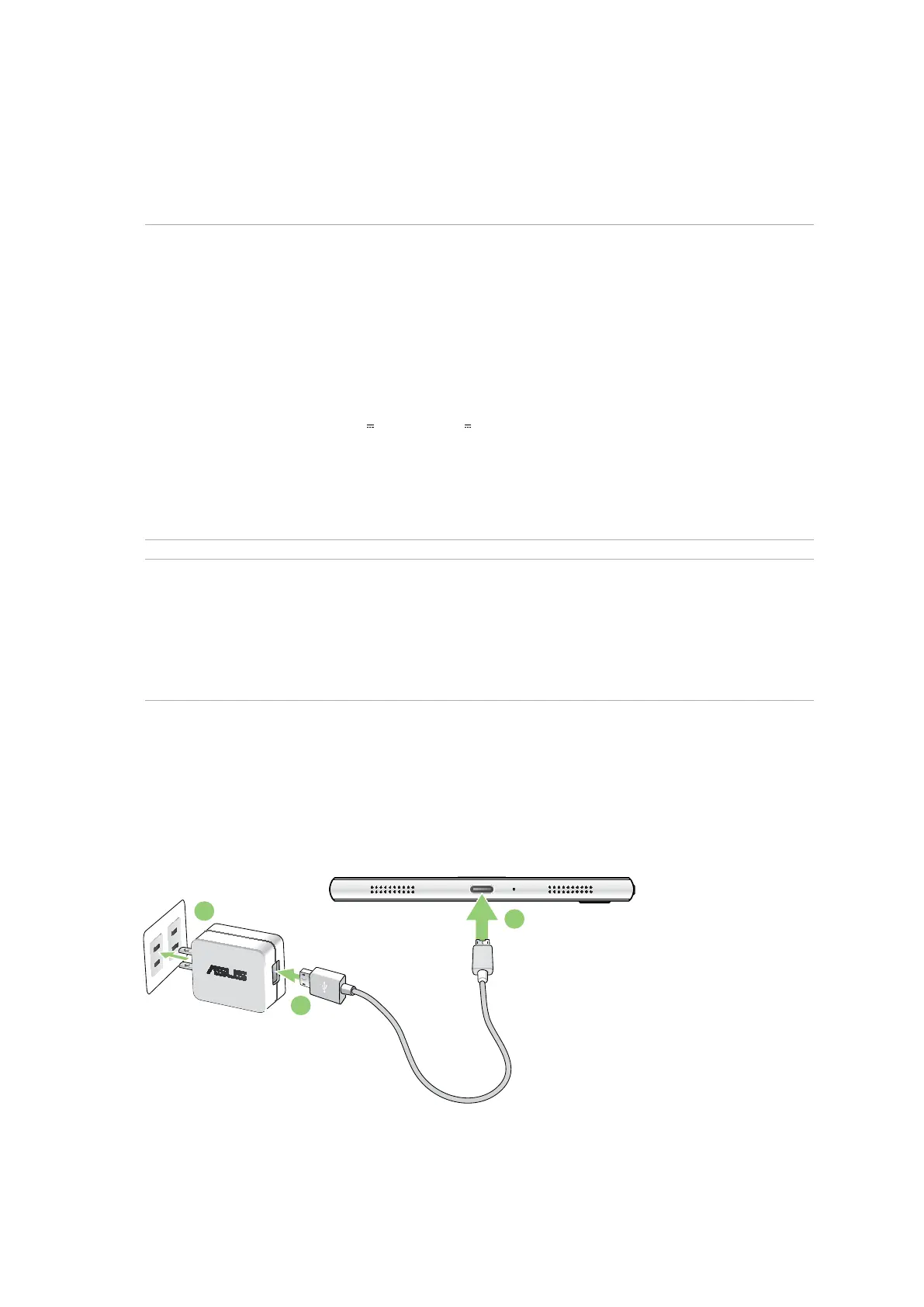
To charge your ASUS Phone:
1. Connect the micro USB cable to the power adapter.
2. Connect the micro USB cable to your ASUS Phone.
3. Plug the AC power adapter to a grounded power outlet.
3
1
2






 To Next Page