9
5.
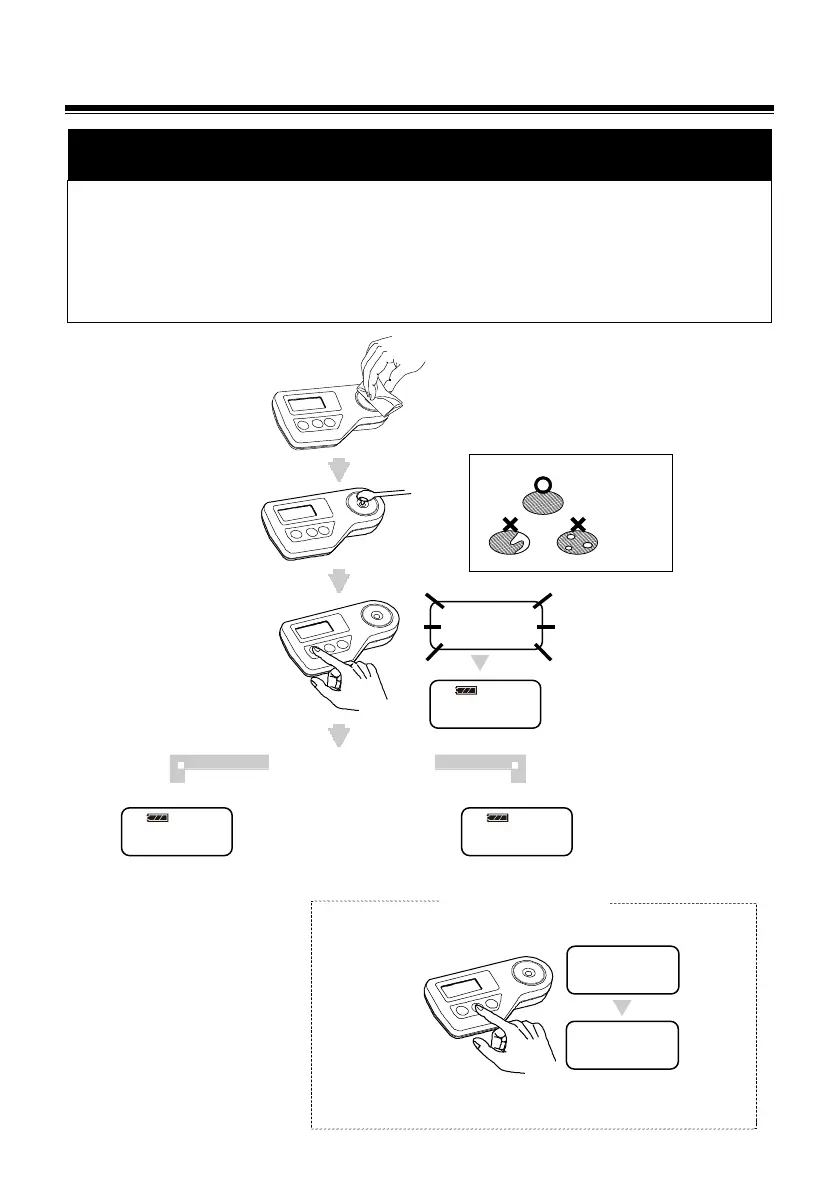
Zero setting
(In case of PR-32
α
, PR-101
α
, PR-201
α
)
CAUTION
◇ The refractometer needs the "zero setting" (calibration) before it is used for the first
time in a day. Moreover, if the ambient temperature changes during the daily work with
the refractometer, it needs the zero setting again.
◇ The zero setting is also needed whenever the battery is replaced.
◇ Do not use any metallic implement for dropping water on the prism because the metal
tool possibly damages the prism surface.
3.5℃
3.5℃
Flashes 3 times
Measurement
value is d
Zero-set correctly.
Completely cover prism surface
Clean the prism
surface thoroughly.
Apply tap water.
Press the
START/OFF Button.
Measurement:not 0.0%
Measurement:0.0%
Press the
ZERO Setting
Button.
Zero setting is complete.
3 times
000 is
displayed.
Perform zero-setting
Confirm zero-setting
20.4℃
20.4℃
20.4℃
3.5℃


 To Next Page