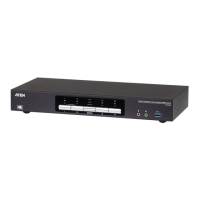
CS1912 / CS1914 User Manual
2
Features
2/4-port DisplayPort KVMP Switch with USB 3.1 Gen 1 hub and 2.1
surround sound audio
One USB console controls 2/4 computers and 2 USB peripherals
Computer selection via front panel pushbuttons, hotkeys and mouse*
Independent switching of KVM, USB and Audio focus
Superior video quality – up to 3840 x 2160 @ 30 Hz resolutions
2-port USB 3.1 Gen 1 hub with SuperSpeed 5 Gbps transfer rates
DisplayPort 1.1 compliant, HDCP compliant
Supports HD audio through DisplayPort**
Full bass response for high-quality 2.1 channel surround sound systems
Power On Detection – if a computer is powered off the CS1912 / CS1914
automatically switches to the next powered-on computer
Dual-Mode DisplayPort technology (DP++) supports passive HDMI and
DVI adapters***
Hot pluggable – add or remove computers without powering down the
switch
Mouse emulation/bypass feature supports most mouse drivers and
multifunction mice
Multi-platform support – Windows 2000, Windows XP, Windows Vista,
Windows 7/8 and higher, Mac, and Linux
Multilingual keyboard mapping supports English, Japanese, French and
German keyboards
Mac keyboard support and emulation****
Auto Scan Mode for monitoring all computers
Firmware upgradeable
Note: 1. Mouse port switching is only supported under mouse emulation
mode with a USB 3-button mouse wheel.
2. HD audio through DisplayPort cannot be switched independently.
3. Dual-Mode DisplayPort technology (DP++) does not require an
active adapter for most single display setups. Active DisplayPort
adapters are recommended if you are unsure of the video source's
DP++ compatibility.



 To Next Page
 Loading...