27
HEATING YOUR ROOM :
HOW TO USE COMFORT MODE
DESCRIPTION
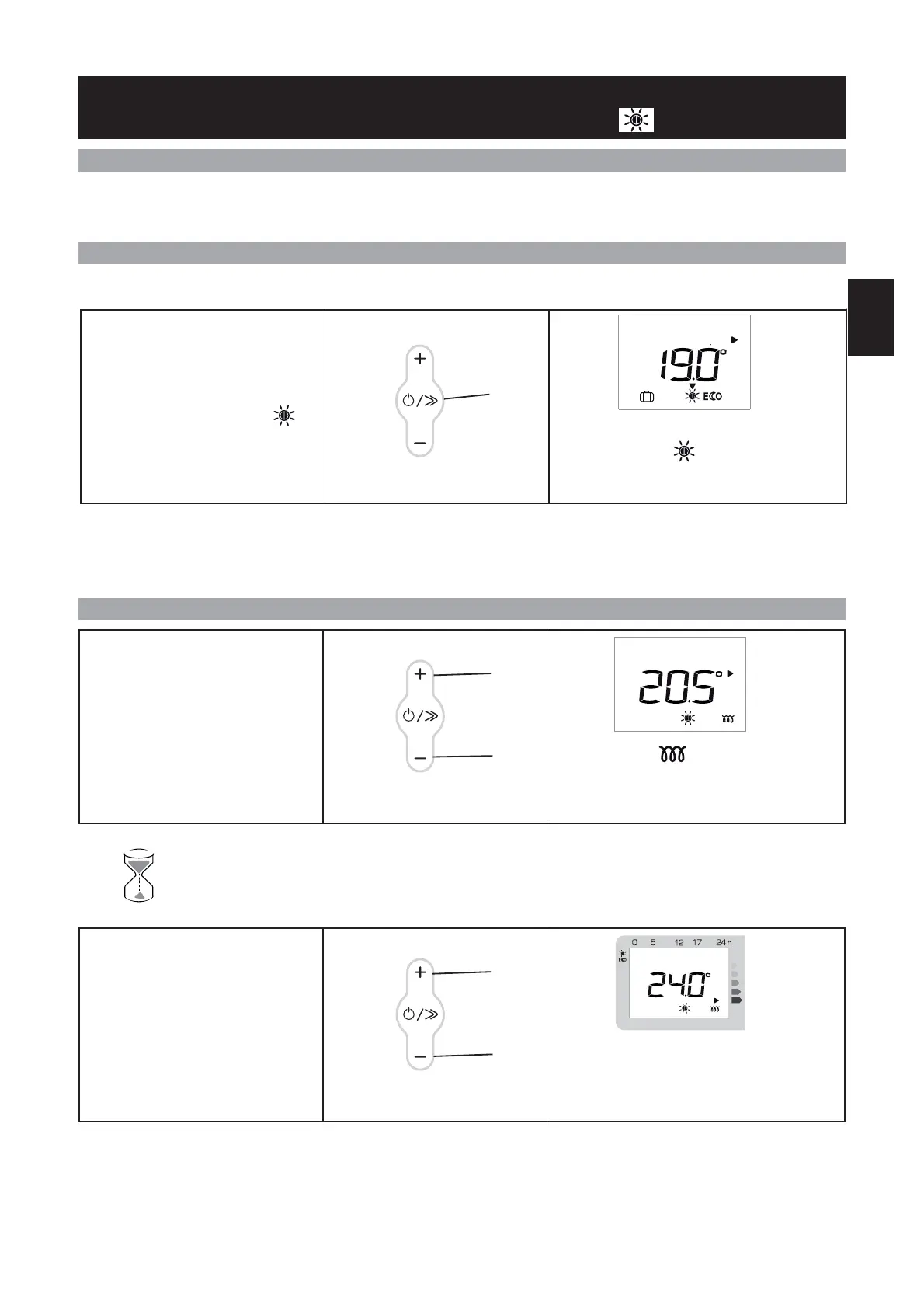
HOW TO ACTIVATE THIS MODE ?
HOW TO CHANGE THE TEMPERATURE ?
The advised Comfort temperature is 19°C.
The Comfort mode ranges from 12.5°C to 28°C.
This mode enables you to have the ambient temperature you desire in your room. The consumption indicator lights en-
able you to optimise your setting (see page 33).
If the screen is not lit up, press any button to activate the screen lighting.
Wait at least 6 hours for the room’s temperature to stabilise.
To activate the Comfort mode, press
the Scroll key (E) several times until
the arrow is on the Comfort
mode.
The mode selection arrow flashes for several se-
conds, then just the icon remains on the dis-
play : the setting is confirmed.
To change the temperature displayed,
press the + (D)or–(F) keys.
The heating icon appears on the screen if
the room temperature is lower than the one
displayed.
E
D
F
PROG
If you want to change the room tem-
perature, change it by pressing the +
(D)or–(F) keys.
As the temperature displayed on the screen
rises, the consumption indicator light des-
cends.
D
F
GB



 To Next Page