34
LOCKING THE CONTROLS
LOCKING THE CONTROL PANEL
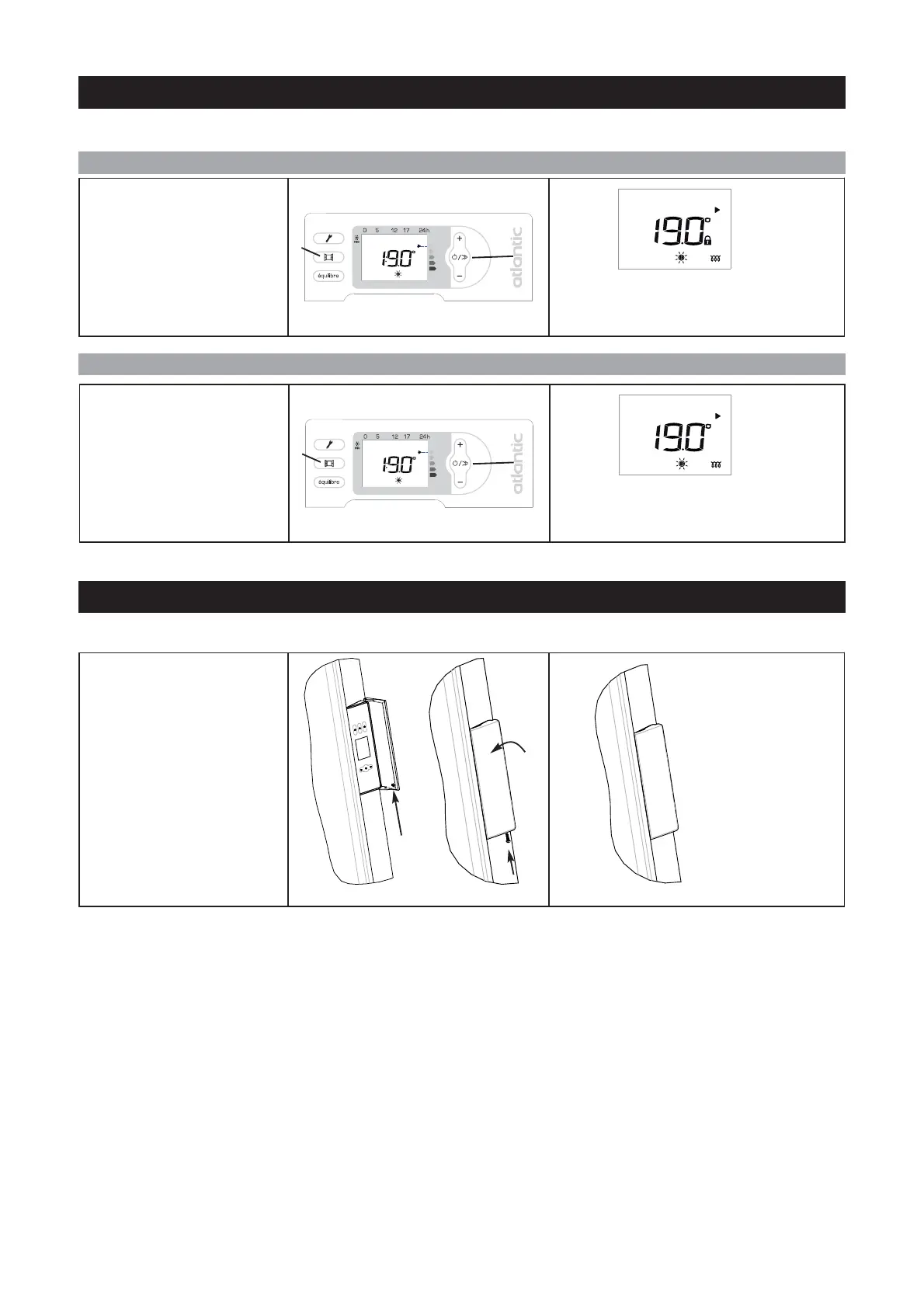
HOW TO LOCK THE CONTROLS ?
HOW TO UNLOCK THE CONTROLS ?
To avoid the control panel being used inopportunely, we advise you to lock it.
To lock the controls, press the
following keys simultaneously
for several seconds:
- Aeration (B) and
- Power on (E).
A lock appears on the screen: the settings can
no longer be changed.
E
B
To unlock the controls, press the
following keys simultaneously for
several seconds:
- Aeration (B) and
- Power on (E).
The lock disappears from the screen: the set-
tings can be changed.
E
B
Remove the screw located in-
side the control panel.
Close the control panel’s flap.
Block the flap using the screw.
The panel can no lon-
ger be opened, so the
controls cannot be ac-
cessed.
You can also lock the control panel using the screw provided.



 To Next Page