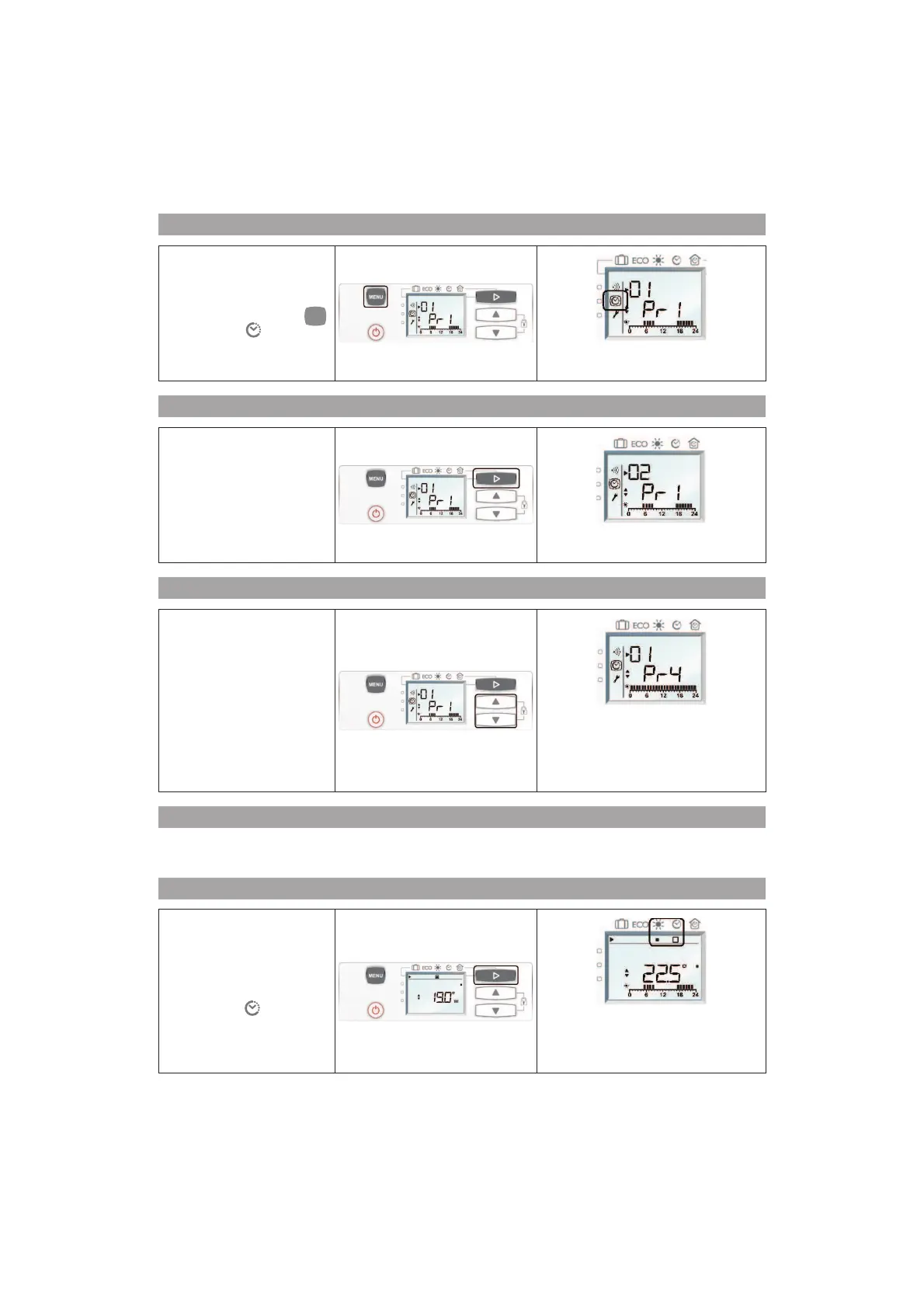
until the picto
For 01 (Monday), the default
programme is P1.
Retain the selected programme?
If you want to retain the
programme P1 on Monday:
press on E (C) to pass to the
next day.
02 (Tuesday) is displayed on the screen
with the P1 programme by default.
Change the selected programme?
If you want to modify the
Monday programme: press
on G or H (D) to pass to the
following programme. Select
the desired programme.
01 (Monday) is displayed on the screen
with the chosen programme.
The programme flashes and after 5s of
non-activity, the chosen programme is
automatically validated.
Set a daily programme for all the days in the week
You proceed in the same manner for all the days in the week, until Sunday, while retaining the selected
programme, or by modifying it.
How to activate the internal programming?
To activate the Internal
programming, press on E
(C) and select .
The internal programming picto and the
current setting in accordance with the
chosen programme is displayed on the
screen.



 To Next Page