10
Particle Sensor Display
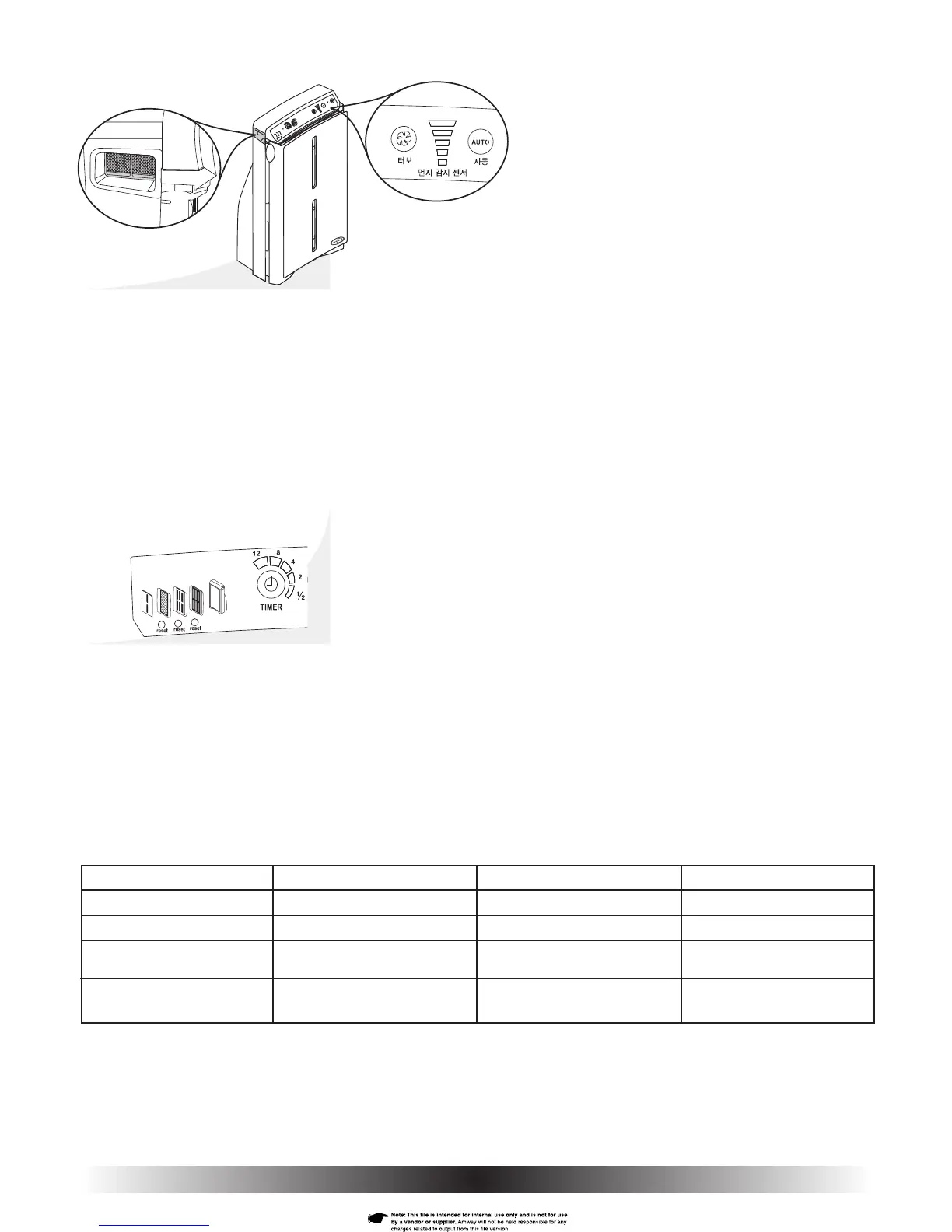
The particle sensor is active whenever the air purifi er is running. It provides
a display of how clean or dirty the air in the room environment is at any point
in time. The particle sensor fi lter is located inside the left handle on the side
of the purifi er (Fig. 14a).
When the air is very dirty, all fi ve bars are red; as the air is cleaned by the air
purifi er, the display changes to four red bars, then to three yellow, two yellow,
and fi nally – when the air is clean – one green (Fig. 14b).
Knowing how clean the air in the room is helps you make an appropriate
selection when setting the fan speed manually. Otherwise, you can select
AUTO mode by pressing the AUTO button, and let the particle sensor control
fan speed.
Filter Monitors
The ATMOSPHERE™ Air Purifi er automatically monitors the condition of
all three of its fi lters, and alerts you when they need replacing (or cleaning
in the case of the pre-fi lter). The monitors calculate fi lter life based on a
combination of operating hours, speed of operation, and levels of smoke,
dust, and pollen.
The status of each fi lter is indicated by the colour of the fi lter icon showing
on the control panel (Fig. 15). Icons A, B, and C represent the pre-, HEPA,
and odour fi lters respectively.
A summary of what each colour represents for each fi lter can be seen in
Understanding the Filter Monitor Icon Colours table.
A
B
C
Fig. 15
Fig. 14a
Fig. 14b
Fig. 14
Understanding the Filter Monitor Icon Colours
Colour Which Filters Status Duration
Green All 3 Filters Condition satisfactory Until colour changes
Amber HEPA & Odour Should be replaced soon About 2 weeks
Red Pre-fi lter Needs cleaning Until you clean the
pre-fi lter and reset
Red HEPA & Odour Replace immediately Until replace the HEPA or
odour fi lter and reset
NOTE: Whenever a fi lter monitor shows Amber or Red, the Air Purifi er beeps three times each time you press a control button as an
added reminder that a fi lter needs attention.
NOTE: The HEPA and odour fi lter two week duration between the amber and red coloured icons is a true two week period regardless
of operating conditions.


 To Next Page