14
Replacing the Odour Filter
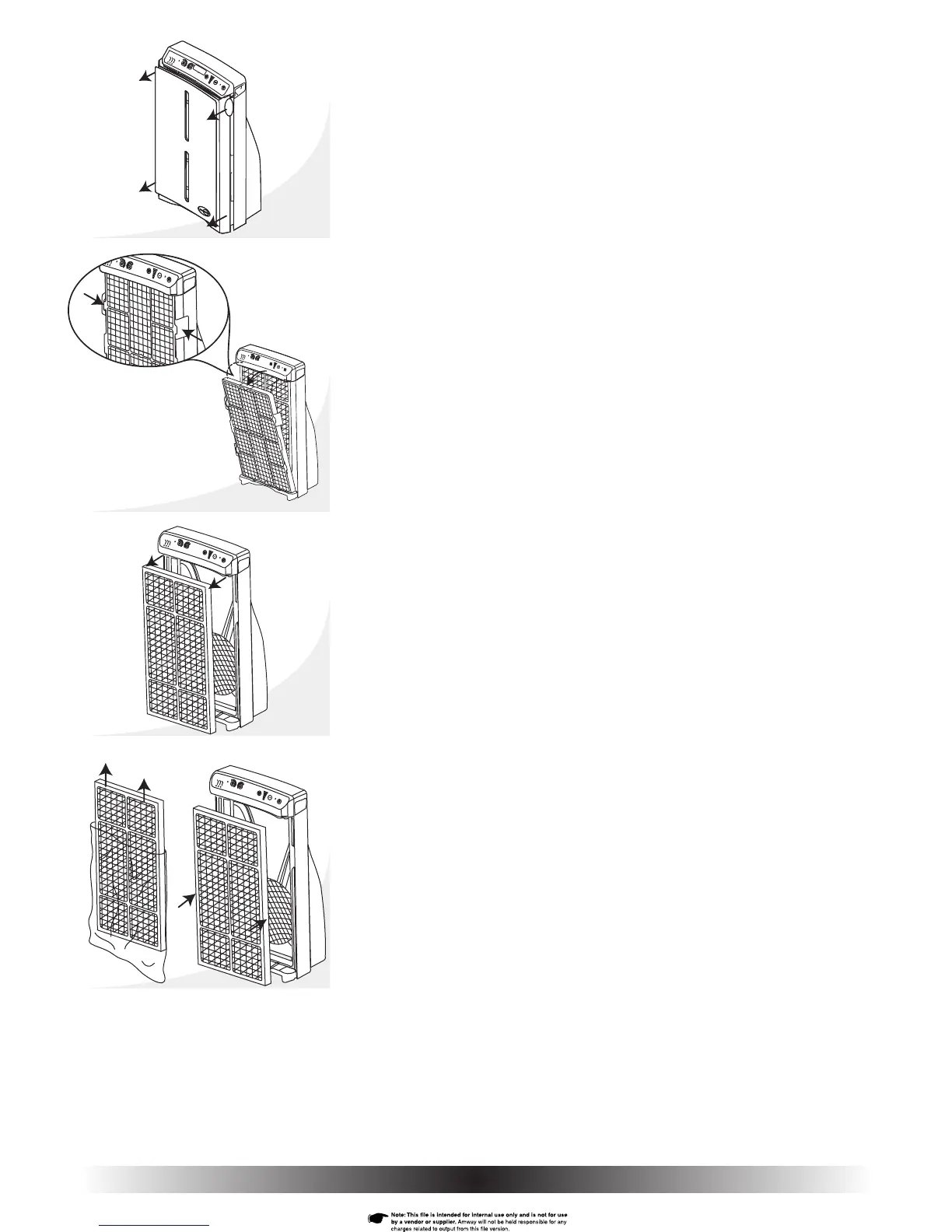
1. Turn power off and unplug the air purifi er.
2. Remove the front cover from the air purifi er using the fi nger tabs located
on each side of the air purifi er – near the top (Fig. 24). Steady the air
purifi er by fi rst placing your thumbs on the outside edges of the control
panel. Remove the front cover by gently pulling on the tabs with your
fi ngers. Then, pull off the bottom of the cover.
3. The pre-fi lter is attached to the outside of the HEPA fi lter. Remove the
combined pre- and HEPA fi lters by squeezing both tabs on either side of
the HEPA frame (near the top) until they unlatch (Fig. 25a).
4. Swing the fi lters out and down away from the housing. Set the combined
fi lters aside (Fig. 25).
5. Pull the tabs on the old odour fi lter to remove and discard (Fig. 26).
NOTE: Make sure you don’t let any carbon particles stain your clothing, furniture,
or carpet.
6. Remove the new odour fi lter from its plastic bag (Fig. 27) and carefully
place it all the way to the back inside the air purifi er (Fig. 28).
NOTE: When disposing of the bag, handle gently to be sure any carbon dust remains inside.
Fig. 24
Fig. 27
Fig. 26
Fig. 25
Fig. 25a
Fig. 28


 To Next Page