6
PRINTER SETTING
Follow below instruction before to print :
1.
Take the 3D printer out of the package and place it on a stable surface
which near by the AC outlet.
2.
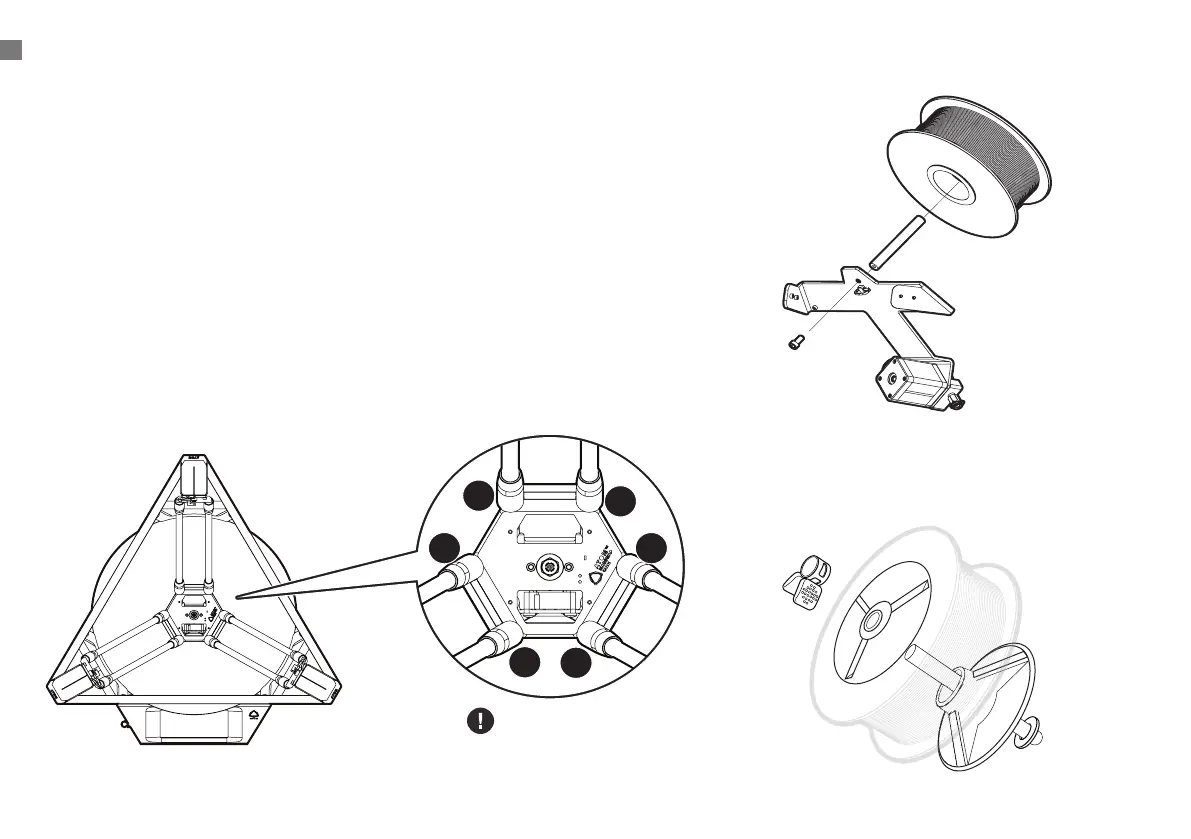
Take out the magnetic rod and the mobile platform. In order to ensure
the magnetism of the magnetic rod, please avoid separating the two.
Note: The magnet of each magnetic rod is marked with N-level; those
not marked are S-level.
※ If the mobile platform and the magnetic rod are connected together, please
reconnect the two corresponding to the magnet (as shown in the picture)
3.
Install the rod
4.
Install Washer > Spool Axie > Filament Roll > Spool Axie
> Retainer Clip
A
T
O
M
3
D
P
R
I
N
T
E
R
S
w
w
w
.
a
t
o
m
3
d
p
.
c
o
m
1
2
3
4
5
N
S
N
S
N
S
The fan faces the front


 To Next Page