14
[ + 0.02mm] Raise the nozzle position
[-0.02mm] Lower the nozzle position
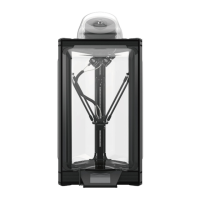
F. If the rst layer
of printing does
not stick to the
platform (the print
head is too high)
or the plastic is
not discharged
normally (the
print head is
too low), press
the right [arrow
button] to make
advanced settings
for the Z-axis
compensation
value.
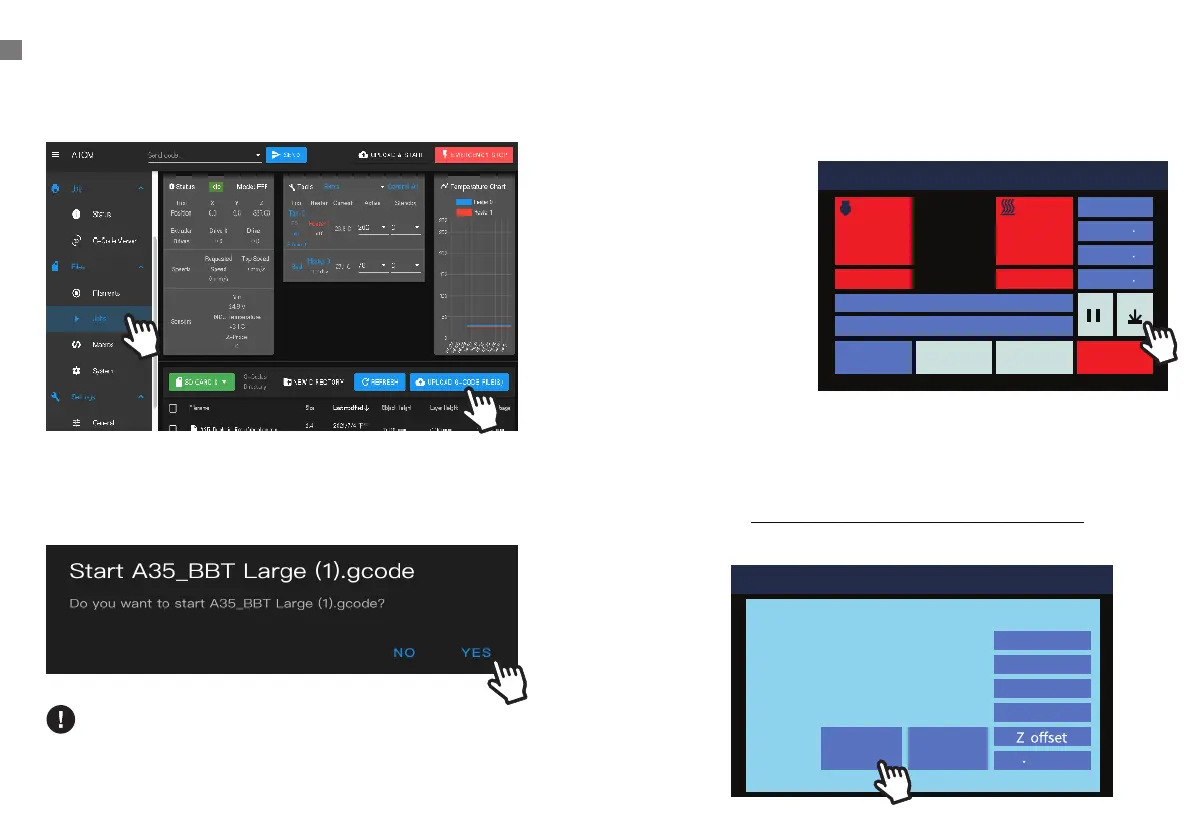
UPLOAD FILES/START PRINTING
D. Click left menu [ Jobs
]
> [ UPLOAD G-CODE FILE(S) ]
E. After uploading les, click the le you'd like to print and
press
[ YES ]
, it will start printing.
If the broswer is not working
Click the upper right EMERGENCY STOP to totally stop
the printer, then re-click the file you'd like to print.
011 Printing
Position
X 0 0
Y 0 0
Z 337 3
Percent: 30%
Time Left« 1h 10m
STOPControlPrint Setup
Nozzle 1 Hot Bed
200
70
200 69.9
1
011 Printing
Baby Stepping
V
Position
X 31.9
Y 81.7
Z 0.3
0 000mm
+0.02mm-0.02mm
1
2


 To Next Page