8
Auto-Leveling
Before your rst print, and anytime you remove the build plate,
you’ll want to run an auto-level to ensure that your parts adhere
well to the glass. Follow the procedure below to run an auto-
level
1. Make sure the nozzle temperature is in room temperature
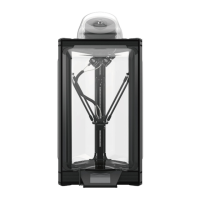
2. After connecting the automatic calibration sensor to the
green line of the mobile platform cable set, properly cover
the nozzle with the white sponge ring.
Please gently put the sensor
on the nozzle. If the nozzle
touches the plastic lm, it
will cause calibration errors.
Do not touch
the running fan
to avoid injury!
Connect the platform
calibration module cable
and the green connector
which above the nozzle
※Regardless of positive
and negative polarity
Automatic sensor
correction
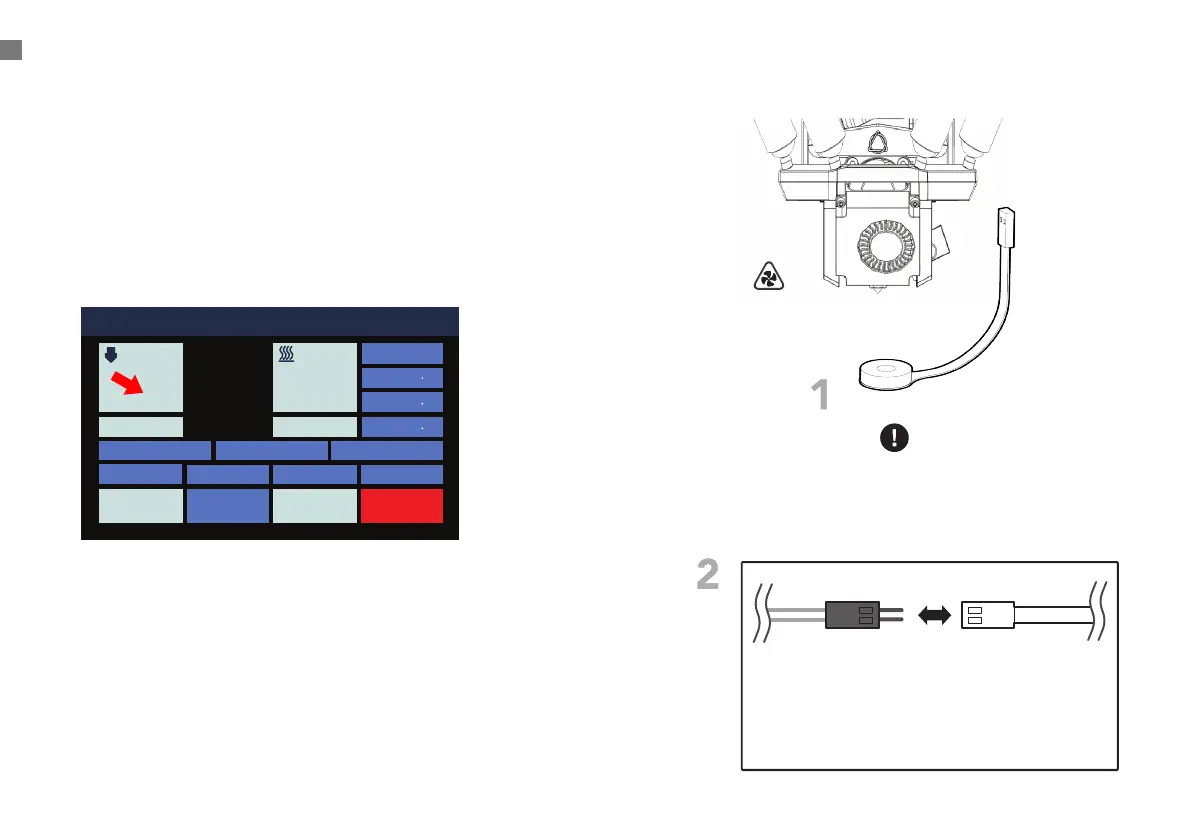
PREPARING TO PRINT
011 Idle
Position
X 0 0
Y 0 0
Z 337 3
Bed Calibration Extrusion
Macro
Fan 0%
HOMEConsoleMove
STOPControlPrint Setup
Nozzle 1 Hot Bed
200
70
23.3 24.2
1
Note: Please gently put the sensor on the nozzle. If the
nozzle touches the plastic lm, it will cause calibration
errors.


 To Next Page