10
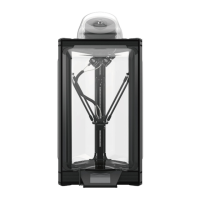
6. Touch the LCD screen to preheat the nozzle to the
working temperature of the material, for example,
PLA is 200° C.
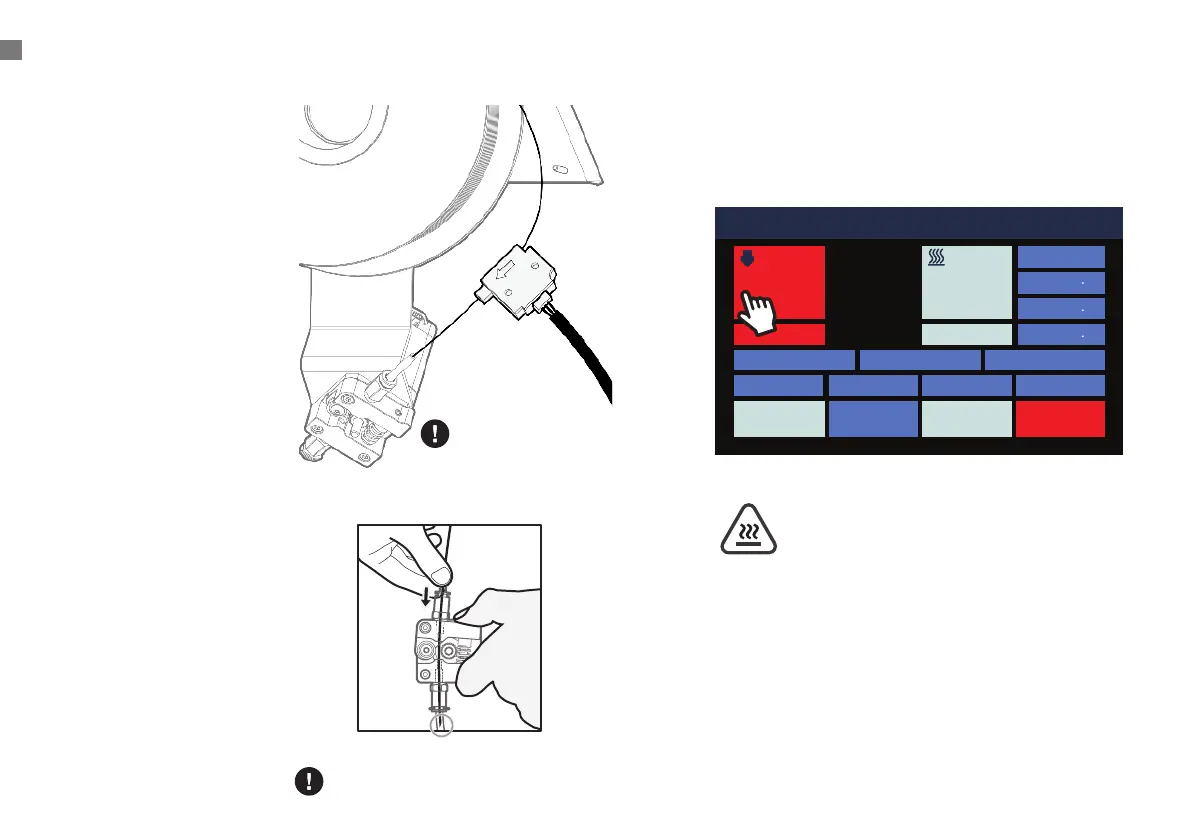
1. Place the filament spool
on the holder so that
the working end of the
filament hangs down to
the right.
2. Cut the end of the
filament at an angle as
illustrated.
3. Gently straighten a
segment about 5 cm
(2”) from the end with
your ngertips to make it
easier to feed the lament
through the sensor and
the extruder.
4. Remove the filament
sensor from its holder
and feed the end of the
filament through the
sensor in the direction as
indicated by the arrow,
then into the tube on the
right side of the extruder.
5. Pinch the extruder idler
lever and push the
filament past the gear
and into the bowden tube
just past the pneumatic
connector.
Pass the coil to the beginning of the
circle shown in the gure
Place the Sensor Module
back when it is not in use.
Do not touch the heated nozzle
and the heated build plate to
avoid burn scald !
LOADING FILAMENT
011 Idle
Position
X 0 0
Y 0 0
Z 337 3
Bed Calibration Extrusion
Macro
Fan 0%
HOMEConsoleMove
STOPControlPrint Setup
Nozzle 1 Hot Bed
200
70
23.3 24.2
1
Loading Filament


 To Next Page