➢1. Atomstack currently supports LaserGRBL and LightBurn
software.
➢Windows OS only supports LaserGRBL, software Here is the
download link:
http://lasergrbl.com/download/
Mac OS supports the both of LaserGRBL and Lightburn, Here is
the download link:
➢
https://lightburnsoftware.com/pages/trial-version-try-before-
you-buy
➢2. If the engraving machine and the computer fail to connect, you need
to update the driver. (For more information, please refer to the
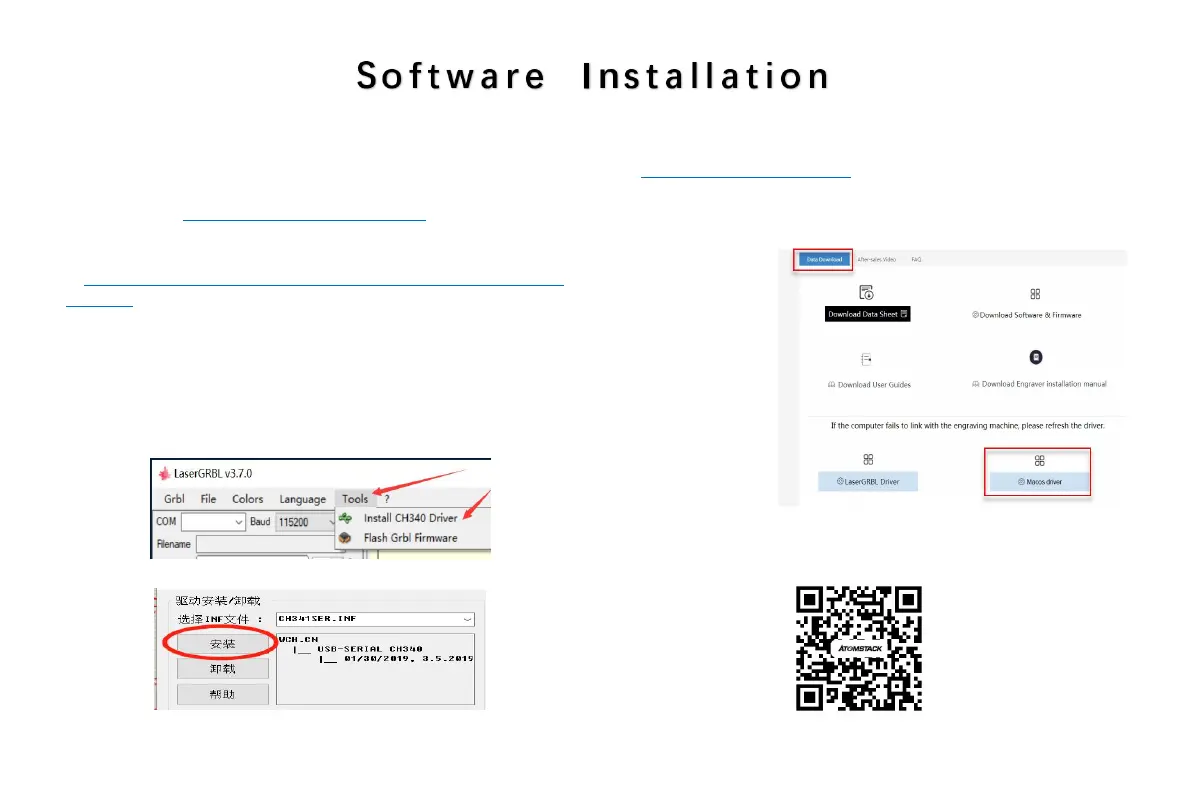
instruction manual), In LaserGRBL, click "Tools" > in turn.Linstall CH340
Driver "Update and install the Driver, restart the computer after the
update, and then connect, as shown in the picture below.
FIG. 1-1
FIG. 1-2
To update the driver of Macos, log in to the website
http://atomstack3d.com/a5
and click to download the Macos
driver, as shown below.
Scan for multi-language instruction
manual:
Scanner APP:
QR Code Reader
/Barcode Scanner
or any APP with scanner


 To Next Page