136 Homelin k®
Programming the Homelink ®
transmitter
Applies to vehicles: with Homelink® universal remote
control
The transmitter is programmed in two phas-
es. For rolling code transmitters, a third
phase is also necessary.
11111
-
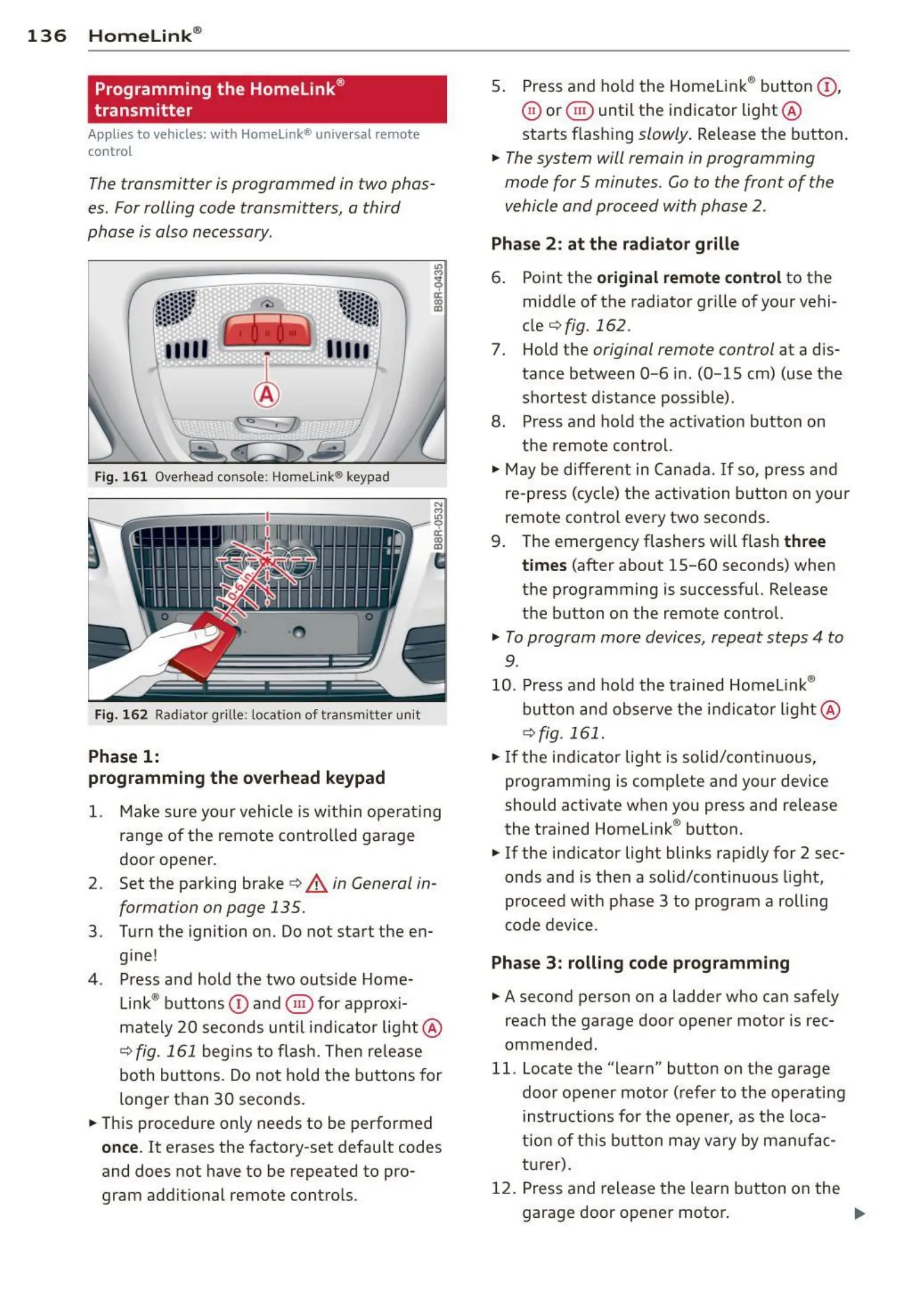
Fig. 161 Overhead console ; Homelin k® keypad
Fig . 16 2 Radiator grille: locat ion of tra nsmitter unit
Phase 1:
programming th e overhead keypad
N
§
ci:
"'
0)
1. Make sure your vehicle is with in operat ing
range of the remote contro lled garage
door opener.
2. Set the parking brake
c:> A in General in-
formation on page 135.
3 . Turn the ignition on. Do not start the en-
gine !
4 . Press and hold the two outs ide Home-
Link® buttons
(D and @ for approx i-
mately 20 seconds until indicator light @
c:>fig. 161 begins to flash. Then re lease
both buttons . Do not hold the buttons for
longer than 30 seconds.
• This procedure only needs to be performed
once. It erases the factory-set defau lt codes
and does not have to be repeated to pro-
gram addit ional remote contro ls.
5. Press and hold the Homelink ® button
(D,
@ or @) until the indicator light @
starts flash ing
slowly . Release the button.
• The system will remain in programming
mode for 5 minutes.
Go to the front of the
vehicle and proceed with phase 2 .
Phase 2: at the radiator grill e
6. Point the original remote control to the
middle of the radiator grille of your vehi-
cle
c:> fig. 162 .
7. Hold the original remote control at a dis-
tance between
0-6 in. (0-15 cm) (use the
sho rtest distance possible) .
8. Press and hold the act ivation button on
the remote control.
• May be differe nt in Canada. If so, press and
re-press (cycle) the activation button on your
remote contro l every two seconds.
9 . The emergency flashers will flash
three
times
(after about 15-60 seconds) when
the programming is successful. Release
the button on the remote control.
• To program more devices, repeat steps 4 to
9.
10.
Press and hold the t rained Homel ink®
button and observe the indicator light @
c:>fig. 161.
• If the indicator light is solid/contin uous,
programming is comp lete and your device
should activate when you press and release
the trained Homelink ® button.
• If the indicator light blinks rapidly for 2 sec-
onds and is then a solid/continuous light,
proceed with phase 3 to program a rolling
code device.
Phase 3 : rolling code programming
• A second person on a ladder who can safely
reach the garage door opener motor is rec-
ommended .
11. Locate the "learn" button on the garage
doo r opener motor (refer to the operating
inst ruct ions for the opener, as the loca-
t ion of t his button may vary by manu fac-
t urer) .
12. Press and release the learn button on the
garage door opener motor .



 To Next Page