.. Note: once the button is pressed, there are
30 seconds in which to initiate the next
step.
13. On the Homelink ® keypad inside the vehi-
cle, firmly press and hold the Homelink ®
button previously programmed in phases
1 and 2 for two seconds and release. Re-
peat this sequence
twice .
.,. Some vehicles may req uire the press/hold/
rele ase sequence up to t hree times to com-
plete the t raini ng process .
.. Homelink ® should now activate your rolling
code equipped device.
If t he S minute ti me limit is exceeded, the
emergency flashers will flash one time t o in-
dicate that the process has been terminated .
In this case, repeat steps 4 through 9.
If t he emergency flashe rs do not f las h three
times (after about 15 - 60 seconds), program-
ming was not successful. In this case, repeat
steps 4 through 9 .
Remote control units for ga rage door openers
in Canada are set to stop transmitting radio
frequency signals after two seconds. This time
may not be sufficient for the Homelink ® sys-
tem to learn the radio frequency s ignal. Per-
form all other steps as described above .
Operating the Homelink ® transmitter
Applies to vehicles: with Home Link® universal remote
control
The Homelink ® transmitter works in the
same manner as the original handheld re-
mote control that came with the system.
1::~
···=·=·::,'
~:::::::j
.:; ....
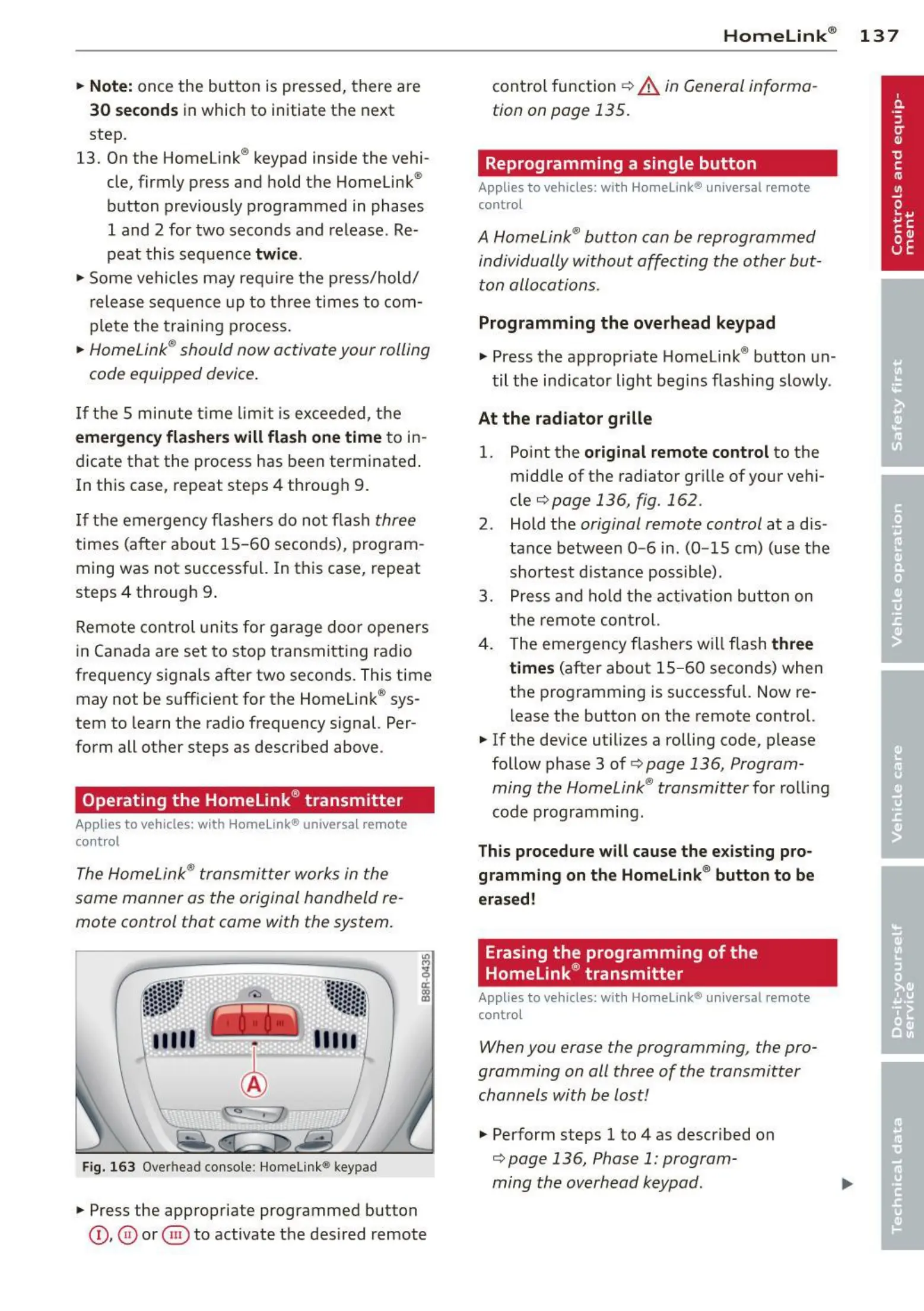
Fig. 163 Overh ead console : Home l ink® keypad
.. Press the appropriate programmed but t on
©, @ or @ to activate the des ired remote
Homelink ® 13 7
cont rol function <=>.&. in General informa-
tion on page 135.
Reprogramming a single button
Applies to vehicles: with Homelink® universa l remote
control
A Homelink ® button can be reprogrammed
individually without affecting the other but-
ton allocations.
Programming the overhead keypad
.. Press the appropriate Homelink ® button un-
til the ind icator light begins flashing slowly.
At the radiator grille
1. Point the original remot e control to the
middle of the radiator grille of your vehi-
cle
c::;,page 136, fig. 162 .
2. Hold the original remote control at a dis-
tance between
0- 6 in. (0- 15 cm) (use the
shortest distance possible).
3. Press and hold the act ivation button on
the remote control.
4. The emergency flashers will flash
three
time s
(after about 15 - 60 seconds) when
the programming is successful. Now re-
lease the button on the remote control.
.. If the dev ice utilizes a rolling code, please
follow phase 3 of
c::;, page 136, Program-
ming the Homelink ® transmitter
for rolling
code programming .
This procedure will cause the existing pro-
gramming on the Homelink ® button to be
erased!
Erasing the programming of the
Homelink ® transmitter
Applies to vehicles: with Homelink® universa l remote
control
When you erase the programming , the pro-
gramming on all three of the transmitter
channels with be lost!
.. Perform steps 1 to 4 as described on
c::;,page 136, Phase 1: program-
ming the overhead keypad .



 To Next Page