EasyManua.ls Logo

Audioxtra axis AX1860NAV - User Manual

Audioxtra axis AX1860NAV
16 pages
Print Icon
To Next Page IconTo Next Page
Loading...
1
INSTRUCTION MANUAL
AX1860NAV
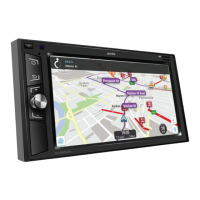
12/24V 6.2” ANDROID MULTIMEDIA RECEIVER
GENERAL
- 6.2” Capacitive Touch LCD
- Android 8.1.0 OS
- Cortex A7 Quad Core T3 1.2Ghz
- 1GB DDR3 RAM
- 32GB Flash
- Steering Wheel Control (Programmable)
- 11-28V DC Voltage Range
- -20° to +60°C Operating Temp
- 170W x 97Hmm Nose
- 178W x 103H x 98Dmm Overall
AUDIO
- 4 x 45W Max Power (24V)
- 7 x EQ Presets
- 1 x Custom 12 Band EQ with Q Value Adjust
- Subwoofer Control: 80/120/160Hz Level Adust
- Loud/Mute
- 2 x RCA Pre-out
- 1 x Sub RCA Pre-out
SPECIFICATIONS
2YEAR WARRANTY
NAVIGATION
- Includes: WAZE Navigation App, GOOGLE maps App
- Optional: iGo Primo Mapping, HEMA Explorer App
MULTIMEDIA
- Built-in WiFi
- Included Apps: Spotify, Chrome, Waze, Google Maps, YouTube
- Mirror Link: Android Display & 2-Way Control via USB
Apple & Android Display only via WiFi
- 32GB Internal Storage
- Supports External Hard Disk up to 1TB
- 3 x USB (2 x Rear, 1 Front)
- 1 x Micro SD Map Slot (Front)
- 1 x AUX Input (Front)
- 1 x A/V Input (Rear)
- 2 x Camera Input (Selectable)
- 1 x Video Output
- Audio Formats: MP3, WMA, AAC, WAV, OGG, FLAC, AC3
- Video Formats: 1080p, DivX, RMVB, MP4
- Image Formats: JPEG, BMP, GIF, PNG
BLUETOOTH
- A2DP Audio Streaming
- Phonebook & Search
- External Mic
INCLUDED
- GPS Antenna
- ISO Wiring Harness
- Installation L Brackets
- 2 Year Warranty
TUNER
- Elite RDS AM/FM
- FM 87.5-108MHz; AM522-1710KHz
- 30 Presets (18 FM/12 AM)

Questions and Answers

  • U
    ufisherAug 12, 2025
    Why does my Audioxtra axis AX1860NAV lose settings after turning off?
    • Q
      quinnkennethAug 12, 2025
      If the Audioxtra Car Receiver loses all settings after turning off the ignition, it might be because the vehicle's battery or fuse was replaced; in this case, reset and save your preferred settings. Alternatively, the accessories and constant power wires could be swapped; ensure these are correctly connected.
  • D
    Daniel ClineAug 20, 2025
    How to improve poor reception on Audioxtra axis AX1860NAV?
    • P
      Paul HawkinsAug 20, 2025
      If your Audioxtra Car Receiver has poor reception, ensure the antenna is well grounded (earthed). If your vehicle uses an amplified antenna system, locate the antenna power wire in the factory loom and connect it to 12V accessories.
  • Z
    Zachary PorterAug 27, 2025
    What to do if Audioxtra Car Receiver fails to turn on?
    • M
      Mr. Austin Watkins MDAug 27, 2025
      If your Audioxtra Car Receiver fails to turn on, the fuse might be burnt out. Replace it with a fuse of the same value. Alternatively, there may be an abnormality within the MPU. Try disconnecting the power from the unit to reset it.
  • O
    obraunSep 4, 2025
    What to do if there is no image on Audioxtra axis AX1860NAV?
    • S
      Shelia JonesSep 4, 2025
      If there is no image on your Audioxtra Car Receiver, there may be an abnormality with the MPU. Disconnect the power from the unit to reset it.

Audioxtra axis AX1860NAV Specifications

General IconGeneral
TouchscreenYes
NavigationYes
BluetoothYes
USB InputYes
SD Card InputYes
Steering Wheel Control CompatibilityYes
AUX InputYes
GPS NavigationYes
Rear View Camera InputYes
Screen Size6.2 inches
Display TypeLCD
Resolution800 x 480
RadioFM/AM