7
【Common function interface】
Registering
y
o
u
r
B
l
u
e
t
o
o
t
h
d
e
v
i
c
e
1. Activate
Bluetooth on
your phone.
2.
Touch "search".
3. Touch the Bluetooth Device name of your phone.
4.
2. Touch
to see the existing registered Bluetooth device list.
Type the pin code (default code is 0000 or 1234) on your phone.
3.
D
e
l
e
t
e
a
r
e
g
i
s
t
e
r
e
d
d
e
v
i
c
e
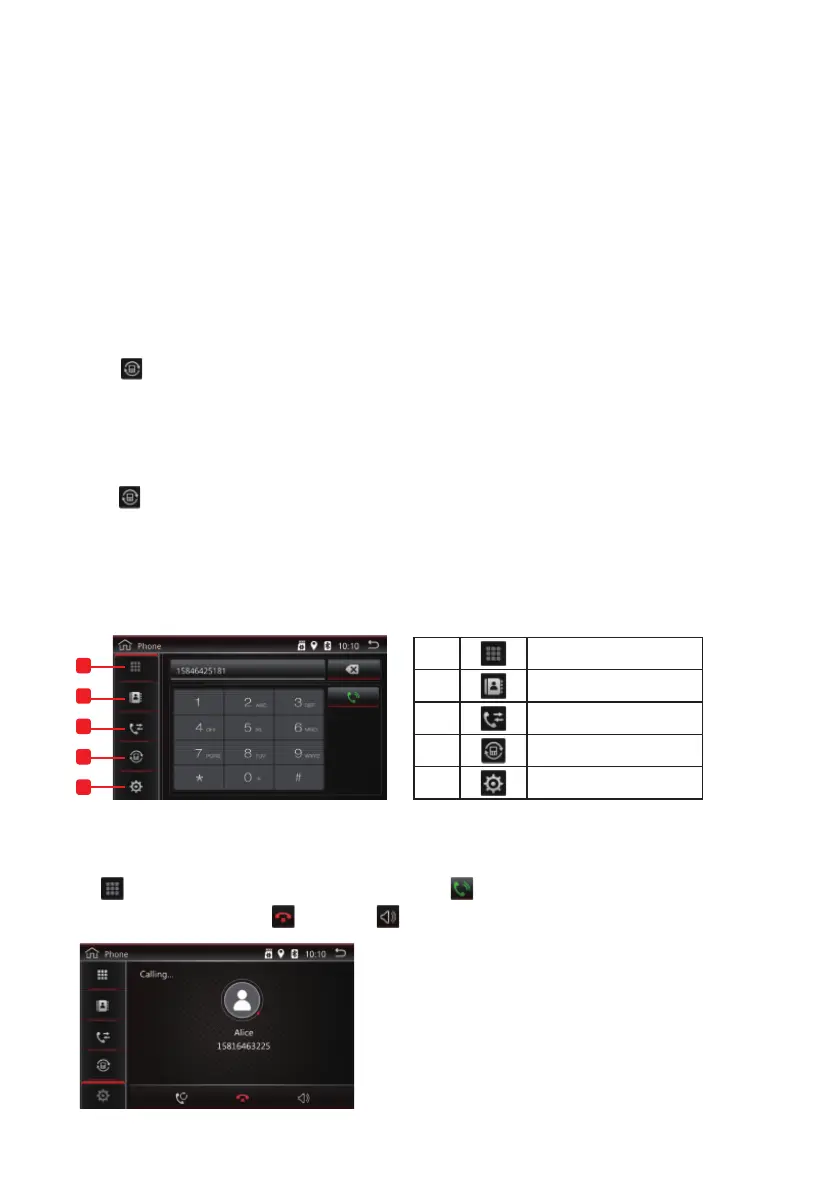
Hands-Free Call
1. Touch to see the registered Bluetooth device list.
2. Cross the box of the device name you wish to delete.
3. Touch the cross. You will be asked "do you want to unpair the Device??".
4. Touch OK. The device will be deleted.
1 Dial Panel
Phone book
Phone call record
Device list
Settings
2
3
4
5
1
2
3
4
5
Making a Phone call
Touch
for keypad, type the phone number, and touch to make phone call.
End the phone call by touching
, and touch
to switch to speaker.
Note: The Music and Video player works when the USB or the SD card is
connected and there are music or video files in the USB or SD card.
Function Function
Back to the folder
The previous song
Pause
The next song
Cycle mode
CD Player
EQ
Music Player
Video Player
Note:: For android mobile, USB debugging must be turned on for MirrorLink function.
MirrorLink is not supported on all Android phones - please check with manufacturer.
Find the Developer options of the mobile Turn on USB Debugging
BT connected
Turn on BT on the mobile
Touch the easy connect
Connect to the BT on the unit
Select the connecting method
Connected
Android USB connect
Note: The Reverse cable (pink color) of the power cable must be connected to the car's
parking or reversing wire, then parking or reversing, the parking screen will
1
Cable1
Red connect with positive wire(B+) of the car back light,
black connect with the negtive wire(-) of the car back light.
Video in/reverse camera
( Connected to the car dvd unit )
Positive wire
3
5
Camera
2
To negative power
6
To positive power
7
4
Reverse Cable
Note: The Reverse Cable is only with the
special car dvd for vw, the universal
car dvd no need this reverse cable.
Back
C
o
n
n
e
c
t
i
n
g
you
r
B
l
u
e
t
o
o
t
h
d
e
v
i
c
e
1. Activate Bluetooth on your phone.
.
Select the box of the Bluetooth device name to conne
ct.
4. Type the pin code (default code is 0000 or 1234) on your phone.
Bluetooth Phone
Tap the Phone icon on the Home Page to enter the phone interface.


 To Next Page