For more information visit www.auto-trail.co.uk 14
The system has a number of key components that you will
need to be familiar with before attempting to use it:
• Residual Current Device (RCD) and Miniature Circuit
Breakers (MCB): The RCD is provided to protect the
user from a potentially lethal electric shock. It will turn o
(trip) if a fault occurs on the system. To ensure the RCD
is working correctly, the test button should be operated
each time the vehicle is connected to the mains supply.
The MCBs operate in a similar way to traditional fuses
and are provided to protect the wiring from an overload
or short circuit. If an overload occurs, the MCB will switch
o the supply. If this occurs, the cause of the fault should
be investigated before switching the MCB back on.
• 12V DC Fuses: These fuses are provided to protect the
various 12V circuits from an overload or short circuit.
If a fuse does blow, the cause of the fault should be
investigated before a replacement. When replacing a
fuse, always replace with a fuse of the correct value, never
replace with a higher value as this could damage the
wiring harness.
• Charger Switch: The charger switch turns on the internal
battery charger that will charge the batteries and provide
12V power to the interior of the vehicle. The switch will
illuminate when the unit is plugged into the mains supply
and the switch is pushed to the ‘IN’ position.
• Heater Switch: The heater switch turns on the 230V
supply to the water and heating system. The switch will
illuminate when the unit is plugged into the mains supply
and the switch is pushed to the ‘IN’ position.
• Shutdown Button: The shutdown button should be used
when the vehicle is in storage or not being used for a long
period of time. This allows the leisure electronics to be
turned o when not required to save battery power.
• Operation while driving: The EC176 system is designed to
shutdown parts of the system whilst the vehicle engine is
running. This is to meet Electro Magnetic Compatibility
(EMC) regulations and to ensure the safe operation of
the system. Please ensure the system shutdown switch
on the PSU is in the 'ON' (button in) position before
driving. This will ensure the electronic system is active and
will therefore be able to control the charging process,
supply the refrigerator and monitor other system circuits
Please note: Apart from the changing of fuses and the testing
and resetting of the RCD and MCBs, no maintenance is
required on the PSU unit. If a problem develops with your
unit, please contact your supplying dealer or a qualified
electrician.
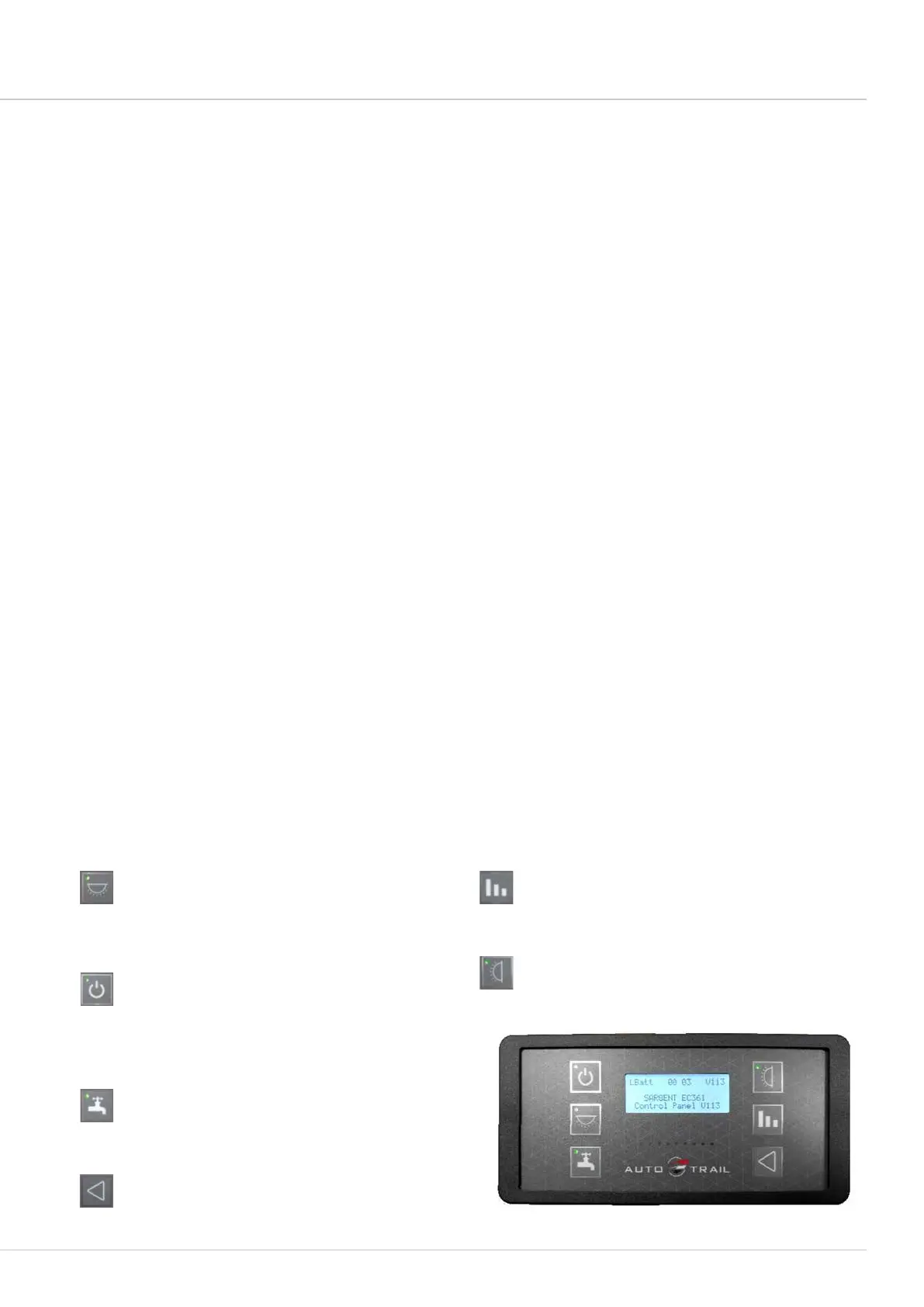
EC361/363 digital control panel with LCD display
Your control panel will have an appearance as below, but depending on your vehicle specifications, the control
panel features will vary. Not all features are present in all vehicles.
Power On/O Button: Press the power button to
turn the leisure power on. Press the button again to
turn the power o. The adjacent LED will illuminate
when the power is on, and also the voltage of the
selected battery will be displayed on the screen. When
the vehicle engine is running this LED will flash to
indicate the leisure battery is being charged.
Pump Button: With the power on, press the pump
button to turn the water pump on. Press the button
again to turn the pump o. The adjacent LED will
illuminate when the pump is on, and also the level of
the water tank will be displayed on the screen.
Select Button: Use this button to select options /
items or to change settings.
Levels/Scroll Button: Use this button to scroll through
the various levels screens / menu items or to cancel
alarms / warnings. Note: The screen illumination /
backlight will turn o after a period of time. Press the
levels button to reactivate the illumination.
Awning Light Button: With the power on, press the
awning light button to turn the awning light on or o.
The adjacent LED will illuminate when the light is on.
Light Button: With the power on, press the light
button to turn a selection of internal lights on. Press
the button again to turn these lights o. The adjacent
LED will illuminate when the lights are on. The lights
will be turned on and o automatically each time the
power button is operated.
EC176 power control system




 To Next Page