TRUMA HEATING
21 TOGETHER WE’RE GOING PLACES
w
x
y
z
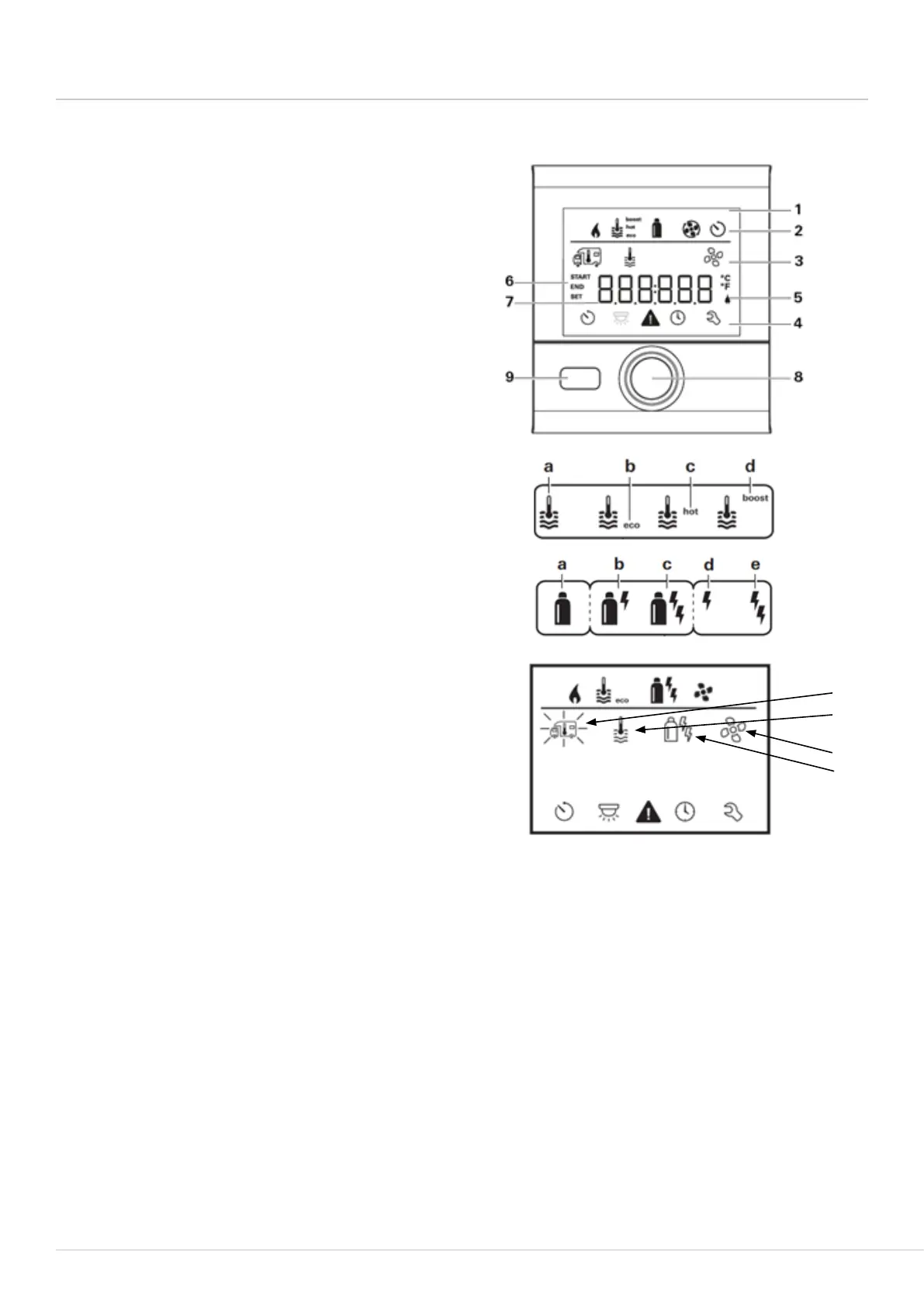
Water heating operation
Press and hold rotary control (8) for three seconds
and the system will turn on. The display will alternate
between the time and the temperature displays. Press
the rotary control (8) to adjust the settings. The
display will then show the symbols screen (3).
Rotate the control (8) until the thermometer symbol
(x) flashes, then press rotary control (8) to select this
setting and allow water temperature adjustment.
To adjust the water temperature turn the rotary
control (8) to select either ‘eco’ (b) which delivers hot
water at 40°C, ‘hot’ (c) which delivers water at 60°C,
or ‘boost’ (d) which will rapidly heat the water for a
maximum of 40 minutes.
Electric operation
Turn the rotary control until (8) the energy symbol
(y) is flashing. Press rotary control to allow the energy
selection to be adjusted between ‘EL1’ (1kw) or ‘EL2’
(2kw) on the display. Press the rotary control (8) to
confirm.
Gas operation
Turn the rotary control (8) until the energy symbol (y)
is showing on the display. Press the rotary control to
select this option and allow adjustment of the energy
selection.
Turn the rotary control (8) until ‘GAS’ is showing
on the display. Press the rotary control to make the
selection.
Space heater operation
Press and hold rotary control (8) for 3 seconds,
the system will turn “on”. The display will alternate
between the time and the temperature displays.
Press the rotary control (8) to adjust the settings, the
display will then show the ‘symbols’ screen (3).
Rotate the control (8) until the thermometer
symbol (w) flashes, then press rotary control (8) to
select this setting and rotate the control to set the
room temperature. Press to confirm the selected
temperature.
CP Plus control panel
1. Display
2. Status line
3. Menu line (above)
4. Menu line (below)
5. Mains voltage 230V display
6. Display timer
7. Settings
8. Control button
9. Back button



 To Next Page